GMeur
Associate III
July 24, 2019
Solved

Images aren't rendered properly on screen

  • July 24, 2019
  • 7 replies
  • 3519 views

Hi,

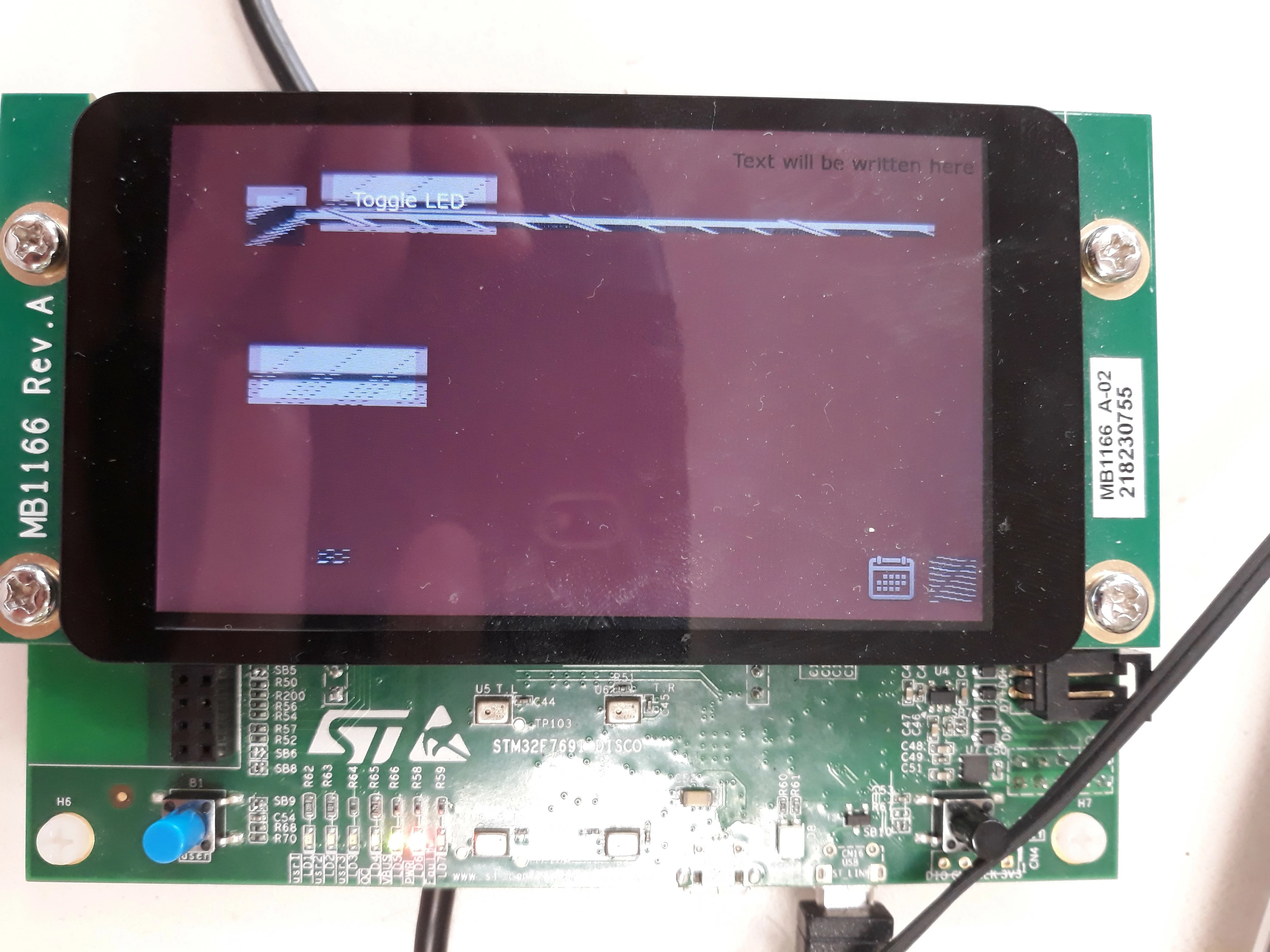
Here is how my widgets are currently rendered on my ST32F769I-discovery board. I know the problem is related to the external flash because the only image saved in the internal flash is displayed properly but I don't know exactly where the problem stems from and which parameters I've got to modify to make everything looks right.

0690X000009Z2NJQA0.jpg

Thanks for your help.

This topic has been closed for replies.
Best answer by Graeme

Hi, I had a similar problem on the STM746 Discovery board. What I remember is that the was that the images in external flash needed to be re-programmed every time they you change them (Usinf the st-flash tool and setting up its driver to access the external flash. Driver was built into the tool you just had to select the correct one). Development environments generally only know about the processor and its internal flash. External flashes mostly have to be programmed separately

Can't remember the exact details but there was a tutorial on ToughGFX website.

I remember my work flow was something like this:

Create project with initial screen layout etc as you have done

Generate the binary

Use st-flash tool to program the binary

Then start debugging (if the touch GFX part stays constant then reprogramming external flash was not necessary )

If GUI changes then external flash need s to be reporogrammed.

Hope This helps

7 replies

Graeme
GraemeBest answer
Associate
July 25, 2019

Hi, I had a similar problem on the STM746 Discovery board. What I remember is that the was that the images in external flash needed to be re-programmed every time they you change them (Usinf the st-flash tool and setting up its driver to access the external flash. Driver was built into the tool you just had to select the correct one). Development environments generally only know about the processor and its internal flash. External flashes mostly have to be programmed separately

Can't remember the exact details but there was a tutorial on ToughGFX website.

I remember my work flow was something like this:

Create project with initial screen layout etc as you have done

Generate the binary

Use st-flash tool to program the binary

Then start debugging (if the touch GFX part stays constant then reprogramming external flash was not necessary )

If GUI changes then external flash need s to be reporogrammed.

Hope This helps

Michael B
Associate III
July 25, 2019

This also can happen when working with different screen orientations. There are a number of changes you must make in order for everything to work right on the designer, simulator and target device and if you miss a step the image assets will look like this. Based on your picture though it doesn't appear to be orientation related.

GMeur
GMeurAuthor
Associate III
July 26, 2019

Hi,

Thanks for your reply. No, here I'm sure it's not orientation related but as you mentioned it in this topic, would you mind explaining briefly the parameters I must change if I want to use this screen in a vertical configuration instead of a horizontal one? Thanks.

Graeme
Associate
July 26, 2019

Here is the procedure that I mention in my previous post regarding Internal and external flash

https://touchgfx.zendesk.com/hc/en-us/articles/205264831-How-do-I-program-STM32-based-boards-using-ST-Link-utility-

As mentioned above, this worked for me.

GMeur
GMeurAuthor
Associate III
August 1, 2019

Apologies for my tardy answer but the issue is related to IAR workbench that can't flash the external memory. Doing as presented by Graeme works just fine.

Martin KJELDSEN
Principal III
August 26, 2019

Just to give you some history on this:

In the before time we tried to have flashloaders for all supported compilers: IAR, Keil, gcc (ST-Link). If we couldn't find them, we'd sometimes write them ourselves.

Now that TouchGFX is owned by ST none, or at least very few, of our projects have flashloaders built in. ST-Link or STCubeProgrammer are the tools to use, but it can be an easy thing to forget to reprogram image assets, etc.

/Martin

DSucl.1
Visitor II
September 7, 2022

Hi @GMeur​ ,

I'm having the same issue, i have an idea about what is going on but still not able to sort this out... how did you rid out of this issue?

I muchly appreciate your reply.

Regards