


Yunus ARI
Senior
October 21, 2019
Solved

Image add problem for version 4.12.3

  • October 21, 2019
  • 16 replies
  • 6425 views

Hi,

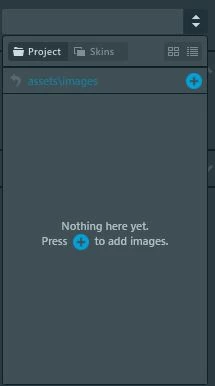
I am try adding image on my application with new TouchGFX Designer version. I added image in assets file in project. I can see added image to "Images" tab. But I can't see anything in project tab of widgets image selection.

How can i solve this problem?
0690X00000Aqd3XQAR.jpg

This topic has been closed for replies.
Best answer by Martin KJELDSEN

Just updating this thread as well -

The issue is fixed in 4.13.0 which is out this december. It was an issue with internal toUpper/toLower methods not respecting locale settings, and in some cases, like for Turkish, the generated code would contain incorrect symbols.

/Martin

16 replies

scottSD
Senior III
October 21, 2019

It appears image adding functionality has changed. It took me a bit to figure it out as well. At the top of the Designer is an "Images" tab (I believe this tab is new in 4.12.3):0690X00000AqebzQAB.png

In this area you are able to drag and drop an image or you can click the "(+)" which opens a dialog to explore and add an image.

After the image is added, it will show up in the Image Properties dialog "assets\images" window (in the uploaded picture in your post).

Yunus ARI
Yunus ARIAuthor
Senior
October 22, 2019

Actually I am tried to say that. I can see my images in there. I can add image this section. But all my added images can't see in the Image Properties dialog "assets\images" window.

There is also another situation like that; I can see images when I want to change old added widget image. But when I add a new widget I can't see any picture in widgets properties.

Yunus ARI
Yunus ARIAuthor
Senior
October 23, 2019

@Martin KJELDSEN​  can you help me about that? I still can't fix that. I tested this on a new empty project. New project did not do that.

I upgraded my application to v4.12.3 from v4.10.0 with use CubeMX. Than this problem appeared. Am I do something wrong?

What am I supposed to do?

Martin KJELDSEN
Principal III
October 23, 2019

Please send me your original project that i can try to update to see this issue?

/Martin

Yunus ARI
Yunus ARIAuthor
Senior
October 24, 2019

Hi @Martin KJELDSEN​ ,

I'm adding the code which I'm having trouble with right now. I don't have right now original project. If you want it I search and try found it.

You can access project files here.

Yunus ARI
Yunus ARIAuthor
Senior
October 31, 2019

Hi @Martin KJELDSEN​ 

Did you find time to look at the project?

Yunus ARI
Yunus ARIAuthor
Senior
October 31, 2019

There is a new thing. I did try start over. I created a new cubemx project which selected 32F746GDISCOVERY with all default peripheral. Than I have configured this project like my old project properties. This new project too gives the same error I mentioned.

You can see here screenshots of the new project;

0690X00000ArUNVQA3.jpg

0690X00000ArUNaQAN.jpg

I did this test on latest CubeMX and TouchGFX version.

Martin KJELDSEN
Principal III
October 31, 2019

Hi @Yunus Arı​,

I haven't forgotten you, i've just been unusually busy these past few weeks leaving no room for much else. Getting back into the loop here i'll start catching up on everything starting sometime tomorrow (still have guests at the office for extensive TouchGFX training)

/Martin

Yunus ARI
Yunus ARIAuthor
Senior
November 1, 2019

Hi @Martin KJELDSEN​ 

Thank you for interest. I waiting for news from you.
