

florinn2520
Associate
April 21, 2022
Question

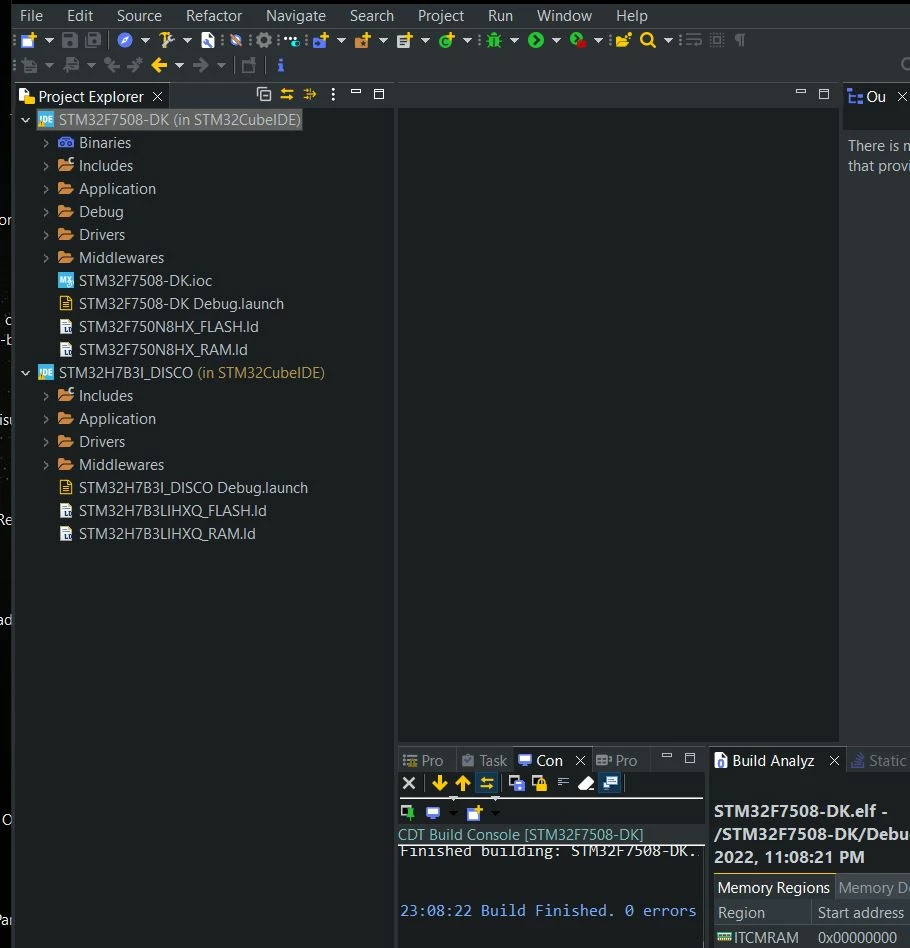
I use TouchGFX 4.19.1 Designer and STM32CubeIDE 1.9.0. The project imported in STM32CubeIDE doesn't contain the ioc file for STM32F7B3I Disco. However, for STM32F7508-DK the file is present. It's a bug?

  • April 21, 2022
  • 3 replies
  • 2312 views

0693W00000LyfMvQAJ.jpg

This topic has been closed for replies.

3 replies

Osman SOYKURT
Technical Moderator
April 25, 2022

Hello florinn2520,

Indeed there's a bug here, you're right. I'll get back to you when we'll have a fix for that.

Thanks for your contribution :)

/Osman

Osman SOYKURTST Software Developer | TouchGFX
Osman SOYKURT
Technical Moderator
May 6, 2022

Hello florinn2520,

We patched this issue. I invite you to try again, it should be working :)

Remember to delete the old STM32H7B3I-DK folder in "%AppData%\Roaming\TouchGFX-4.19.1\Downloads" so that TouchGFX Designer will take in count the patch.

Let me know if that works fine on your side.

/Osman

Osman SOYKURTST Software Developer | TouchGFX
florinn2520
Associate
May 7, 2022

It works, thank you. But every TouchGFX project is generated with the default name "STM32H7B3I-DK". If I want to generate another project and import in STM32CubeIde, a warning to replace the old project appears. Any idea to have more than a project in workspace?

florinn2520
Associate
May 7, 2022

It works, thank you. But every TouchGFX project is generated with the default name "STM32H7B3I-DK". If I want to generate another project and import in STM32CubeIde, a warning to replace the old project appears. Any idea to have more than a project in workspace?

Osman SOYKURT
Technical Moderator
May 9, 2022

Hello,

This is a known issue, it's on our table. Meantime, I invite you to create a new workspace for your project, or remove your old project from your workspace.

/Osman

Osman SOYKURTST Software Developer | TouchGFX