

Associate II
July 18, 2023
Solved

How to use the arrows from the keyboard inside TouchGFX DEMO option?

  • July 18, 2023
  • 2 replies
  • 2436 views

Hello, I would like to know if there is a way to select the arrows keys to interact within the DEMO in TouchGFX?

I can only see letters and some Symbols, but not the arrow keys.
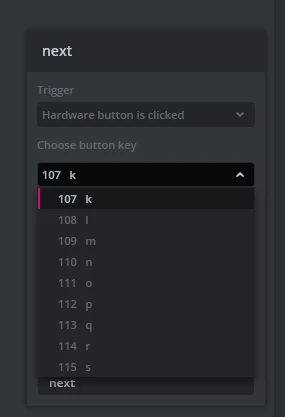
fpadoan_0-1689670401016.png

Thanks in advance for your help.

This topic has been closed for replies.
Best answer by Yoann KLEIN

Hello @f.padoan,


Did you try with the arrows from the numeric pad (8 = up, 4 = left, 6 = right, 2 = bottom) ?

Your trigger should be mapped with 50, 52, 54 and 56 button keys.

2 replies

Yoann KLEIN
Yoann KLEINBest answer
ST Employee
July 20, 2023

Hello @f.padoan,


Did you try with the arrows from the numeric pad (8 = up, 4 = left, 6 = right, 2 = bottom) ?

Your trigger should be mapped with 50, 52, 54 and 56 button keys.

Yoann KLEINST Software Developer | TouchGFX
f.padoanAuthor
Associate II
July 20, 2023

Hello Yoann, thanks for the fast reply. Yes this is how I currently use the DEMO mode. I was just wondering if there was a way of using it with the keyboard arrows. Thanks again.
