

June 7, 2019
Solved

How to use hardware button interaction?

  • June 7, 2019
  • 7 replies
  • 3624 views

Hi,

I am making a project where I need to use hardware buttons,

I found some examples with queue and Model:: tick and it works well,

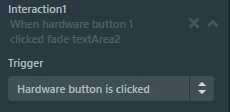
but also I found harware button interaction in TouchGFX Designer
0690X000008iLICQA2.png

I want to know how to use it, because it seems like it could be useful for me.

When I generated the code i found only this function:

//Handles when a key is pressed
void Screen2ViewBase::handleKeyEvent(uint8_t key)
{
 if(1 == key)
 {
 //Interaction1
 //When hardware button 1 clicked fade textArea2
 //Fade textArea2 to alpha:0 with LinearIn easing in 2000 ms (120 Ticks)
 textArea2.clearFadeAnimationEndedAction();
 textArea2.startFadeAnimation(0, 120, EasingEquations::linearEaseIn);
 }
}

So, how could I connect my hardware button to the function?

Thanks

Anton

This topic has been closed for replies.
Best answer by Martin KJELDSEN

Hi @qqAnton​,

I understand your confusion. The designer indicates that this is somehow related to hardware which it isn't from a simulator perspective (Notice how the values are ASCII values - which means you can use your keyboard in the simulator to react to things. e.g. 48 for 0, 49 for 1). What you can do to hook this designer feature to your board is to use a ButtonController that reports simular values.

I will show you how to do this when i have a moment and i'll also show you how to react to a button press without the designer/ButtonController where you might have a separate OS Task to handle peripherals like buttons.

/Martin

7 replies

Martin KJELDSEN
Martin KJELDSENBest answer
Principal III
June 7, 2019

Hi @qqAnton​,

I understand your confusion. The designer indicates that this is somehow related to hardware which it isn't from a simulator perspective (Notice how the values are ASCII values - which means you can use your keyboard in the simulator to react to things. e.g. 48 for 0, 49 for 1). What you can do to hook this designer feature to your board is to use a ButtonController that reports simular values.

I will show you how to do this when i have a moment and i'll also show you how to react to a button press without the designer/ButtonController where you might have a separate OS Task to handle peripherals like buttons.

/Martin

June 7, 2019

Thank you for the answer, waiting your tutorials)

I have a little problem and dont wanna create a special topic for it, could you answer here.

I changed screen name from Screen2 to MainScreen,

0690X000008iM41QAE.png

but every time i click "Generate Code" in TouchGFX Designer, it generates old screen's folder and cpp file.

0690X000008iM67QAE.png

Project works fine If i delete the folder, but what should i do resolve the problem?

I guess it is my bad, but i still can not find what did i forget to change.

Thanks

Anton

Update:

Deleted Screen2.hpp and problem was resolved

MHugn.1
Visitor II
May 3, 2020

Hello @qqAnton​ and @Martin KJELDSEN​,

I have the same problem than you @qqAnton​. Is it possible to see your tutorial about the hardware button ?

Thanks a lot !

Mathieu

Martin KJELDSEN
Principal III
May 3, 2020
MHugn.1
Visitor II
May 4, 2020

Thanks a lot @Martin KJELDSEN​ ! =)

I understand the global idea of your tutorial but I have some questions :

1) I understand that you created a "H7B3ButtonController" class from a "ButtonController" class. I understand the "init" and "sample" functions but where did you write the following code ? :

*****

...

H7B3ButtonController bc;

void touchgfx_init()

{

...

hal.initialize();

hal.setButtonController(&bc);

}

*****

2) What is the object "hal" ? Is it generated by TouchGFX Designer or I have to create this object ?

3) At the end you wrote in your tutorial : "To use a value sampled by the ButtonController in interactions from the TouchGFX designer a name/value-mapping must be created in the .touchgfx project file". I understand what you want to do but I can't find a file with ".touchgfx". The only ".touchgfx" I found is the one I can open in TouchGFXDesigner but I can't write in it, no? Where can I find it ?

I'm a beginner in TouchGFX (only 2 weeks of work), your answer will help me a lot :grinning_face:.

Mathieu