CSche.4
Associate II
May 20, 2023
Question

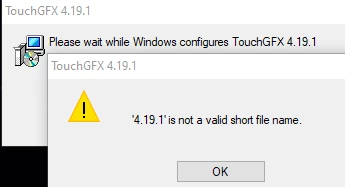
how to uninstall 4.19.1 and 4.20.0? getting error '4.19.1 is not a valid short file name.'

  • May 20, 2023
  • 4 replies
  • 3368 views


_legacyfs_online_stmicro_images_0693W00000bkUSeQAM.png

This topic has been closed for replies.

4 replies

Yoann KLEIN
ST Employee
May 22, 2023

Hello @CSche.4​,

That can be easily done by opening the "Apps & features" settings pane of Windows.

You can simply write "Add or remove programs" in the Windows search bar.


_legacyfs_online_stmicro_images_0693W00000bkZDZQA2.pngThen search "TouchGFX" in the programs list, select the version you wanna delete, click "Uninstall", and follow the instructions on the screen.


_legacyfs_online_stmicro_images_0693W00000bkZEXQA2.pngLet me know if you have issues doing that.

/Yoann

Yoann KLEINST Software Developer | TouchGFX
CSche.4
CSche.4Author
Associate II
May 22, 2023

Yes, all of this I have tried. it still gets the same error when trying to remove either the 4.19 or 4.20.


_legacyfs_online_stmicro_images_0693W00000bkZouQAE.png 

Yoann KLEIN
ST Employee
May 22, 2023

What does the path of your TouchGFX installation look like ?

/Yoann

Yoann KLEINST Software Developer | TouchGFX
CSche.4
CSche.4Author
Associate II
May 22, 2023

current installation is:

F:\TouchGFX\4.21.3\env\MinGW\msys\1.0\msys.bat


_legacyfs_online_stmicro_images_0693W00000bkaiiQAA.png
_legacyfs_online_stmicro_images_0693W00000bkaisQAA.pngit seems a residue of directories are left behind with each uninstall.

But 4.19, 4.20 will not disappear at all .