ikassma
Associate III
April 12, 2019
Question

how to scroll container scroll bar limit set?

  • April 12, 2019
  • 10 replies
  • 4514 views

I am creating my menu using ListLayout Example of TouchGFX example code.

I want to set the Limit of the Scrollbar. But when I reviewed the current example and Class, I could not find that part.

How can I set Limit ?????

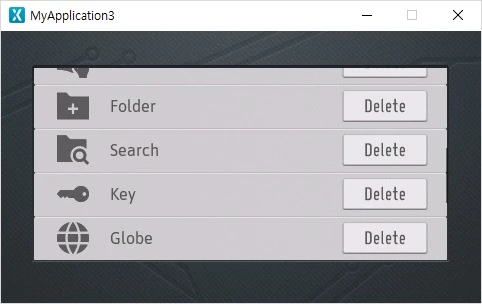
The end of the current list is similar to the one below, but I want to make the end of the list like the second one.

1st.0690X000008AQxAQAW.jpg
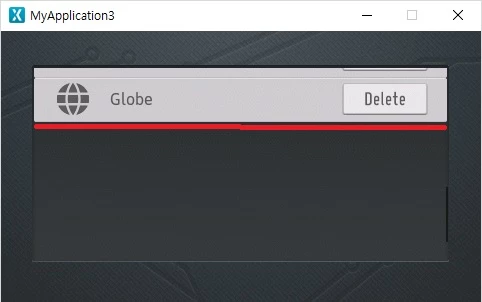
2nd.

0690X000008AQxOQAW.jpg

This topic has been closed for replies.

10 replies

apll
Associate II
May 3, 2019

@ikassma​ do you resolve this problem?

ikassma
ikassmaAuthor
Associate III
May 5, 2019

no,i don't

ihsanoglu
Senior
May 6, 2019

same problem here :)

ihsanoglu
Senior
May 6, 2019

Its like the scrolling limit value is somehow set to the upper side of the container instead of the lower side

Martin KJELDSEN
Principal III
May 7, 2019

The height of the "list" member in the ListView example controls this behavior. Try, in your concrete view constructor, adding the following line:

list.setPosition(0, 0, 250, 50 /*Previously 250*/);

ihsanoglu
Senior
May 7, 2019

The list member of the object is in protected scope ... and cant be accessed form the view construcor ...

ihsanoglu
Senior
July 24, 2019

Here is the answer for the question.

Simply use

setWindowSize()

From ScrollList Class.

If you have a list instance called myScrollList. And you want it to always display 5 items. You do this:

myScrollList.setWindowSize(5);

The default value is 1. So it will keep scrolling until there is 1 item displayed (Like the screenshot you shared). Set it to 5 and it won't scroll if less than 5 items are going to be visible.

RMoha.2
Associate III
July 14, 2020

setWindowSize() is a member in the ScrollList Class, not in the ListLayoutthough.

Is there a way to have the same effect of setWindowSize() in ListLayout?