


scottSD
Senior III
January 22, 2021
Solved

How to remove stubborn text SingleUseIds?

  • January 22, 2021
  • 3 replies
  • 2305 views

Typically text Single Use Ids are removed when the element is removed. I have also found that they are removed when I change the text area to use a Resource ID.

However, I have a few that refuse to disappear.

I am attempting to go to a text resource with wildcards only in my application. When I select the wildcard, I am not placing a default value to prevent these Single Use Ids.

They are showing up in the following files as well as Touchgfx project file and texts.xlsx but NO WHERE ELSE in my project (including any base screen files):
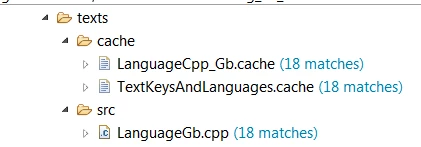
0693W000007CNTcQAO.png 

Any ideas?

This topic has been closed for replies.
Best answer by scottSD

@Romain DIELEMAN​ 

Thank you for the reply. I am using Stm32CubeIDE.

I did find a way to get them removed out of the project. Here is what I did (for anyone else that runs into this):

  • In the TouchGFX Designer, go to the Texts > Single Use tab.
  • This shows where Single Use IDs are located. I had none being used, but some were still listed from previous usages.
  • Select any unused ones. There is not a way to delete them in this menu, so click "Convert to Resource".
  • Next, go to Texts > Resources. Select the new ResourceIDs (converted from Single Use Ids) and then click "Delete Selected Resource".
  • Generate and compile and they are gone!.

You're welcome!

3 replies

Romain DIELEMAN
ST Employee
January 25, 2021

Hi,

What toolchain are you using ? If STM32CubeIDE, could you add it as a topic tag in order for this post to have more visibility ? Could you share a screenshot with more of the path ? I believe you could fix this issue by cleaning the project and manually deleting the no longer used files.

/Romain

scottSD
scottSDAuthorBest answer
Senior III
January 26, 2021

@Romain DIELEMAN​ 

Thank you for the reply. I am using Stm32CubeIDE.

I did find a way to get them removed out of the project. Here is what I did (for anyone else that runs into this):

  • In the TouchGFX Designer, go to the Texts > Single Use tab.
  • This shows where Single Use IDs are located. I had none being used, but some were still listed from previous usages.
  • Select any unused ones. There is not a way to delete them in this menu, so click "Convert to Resource".
  • Next, go to Texts > Resources. Select the new ResourceIDs (converted from Single Use Ids) and then click "Delete Selected Resource".
  • Generate and compile and they are gone!.

You're welcome!

Romain DIELEMAN
ST Employee
January 27, 2021

Perfect. Thank you very much for describing the steps to follow.

/Romain