

Zui
Senior
April 18, 2019
Solved

How to insert a newline in a text area via coding

  • April 18, 2019
  • 6 replies
  • 3668 views

i have this problem, in my app i have a text area which say:

current option:

Option A

using touchGFX i set an interaction when a button is pressed to chage that text area, and i need it to become:

current option:

Option B

when i put those tho line in the text field in the Interaction options on touchGFX like showed
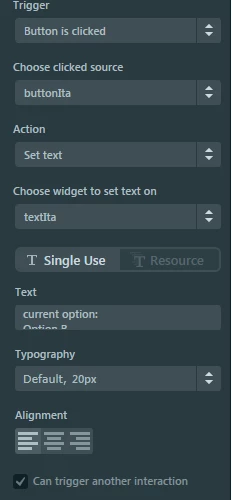
0690X000008AiRxQAK.png

what TouchGFX generates on ScreenViewBase.cpp is this:
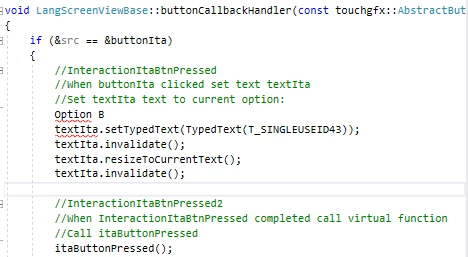
0690X000008AiS7QAK.png

and OFC won't compile.

i tryed some escape sequence, but no luck so far...

can someone enlight me.

Thanks in advance

Stefano

This topic has been closed for replies.
Best answer by Martin KJELDSEN

Hi @Zui​,

Have you considered texts with wildcards? Using wildcard unicode buffers you can replace the text of a textarea runtime.

Step 3 of this tutorial explains how to do that using the designer:

https://touchgfx.zendesk.com/hc/en-us/articles/205587571-Step-3-Adding-Text

6 replies

After Forever
Senior III
April 18, 2019

What escape sequences did you try? If not \n or \r\n then try them too.

Zui
ZuiAuthor
Senior
April 18, 2019

tryed \n, \n\r ,\\n, \0x0A, and whith / instead of \

After Forever
Senior III
April 18, 2019

So what exactly happens with \n for example? I'd think that the generated comment breaking with syntax error should be fixed.

Zui
ZuiAuthor
Senior
April 18, 2019

well, with \n there are no errors, but che textArea shown is

current option:\n option B

instead of

current option:

option B

Zui
ZuiAuthor
Senior
April 18, 2019

i fix temporaly with a work-around by creating a resource with the phrases i need, in this case works fine because i need few different fixed phrases, but problem persists if i need to change text with something user type, or still something not hard coded

Martin KJELDSEN
Martin KJELDSENBest answer
Principal III
May 3, 2019

Hi @Zui​,

Have you considered texts with wildcards? Using wildcard unicode buffers you can replace the text of a textarea runtime.

Step 3 of this tutorial explains how to do that using the designer:

https://touchgfx.zendesk.com/hc/en-us/articles/205587571-Step-3-Adding-Text

AMege
Associate II
July 15, 2019

That tutorial article is nice and all, but it doesn't show how to add newlines to a text area from code.

Does snprintf support printing newlines to a wild card buffer? I think not (I've tried)