Associate II
Feb 8, 2024 7:16 AM UTC
Solved

How to edit Dynamic Graph in TouchGFX to print time in X-Axis ?

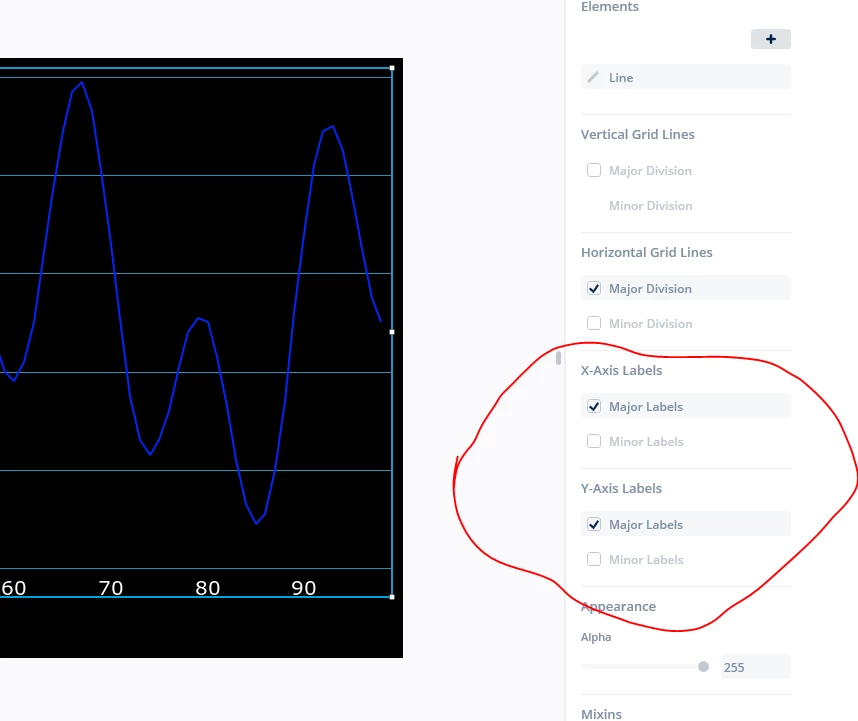
Hello everyone, I hope you are all having a great day. I would like to know how to work with the labels for the dynamic graph widget :

purushotham2608_0-1707376315812.png


I want to know how to make the X axis labels display a real time value instead of numbers and I want it to be accurate to the real time, for example : Instead of 10,20  etc I want it to show 01:10 AM, 01:20 AM. etc. can someone help me with this please? Thank You Best Regards.


This topic has been closed for replies.
JTP1Best answer
Graduate II
Feb 8, 2024 5:44 PM UTC

Hi

I think you cannot get time to the X labels directly from TGFX Designer:slightly_frowning_face:

You need to litte bit manipulate the GraphLabels.cpp (and maybe be GraphLabels.hpp, depends on what you want).

Browse first to \Middlewares\ST\touchgfx\framework\source\touchgfx\widgets\graph\ folder and copy GraphLabels.cpp to your project \TouchGFX\gui\src\common\ folder for example.Edit that copy in \common\ folder.

Here is simple example which prints hh:mm AM/PM format time when number of decimals is set to value 4 in TGFX designer for X Labels.

GraphLabels.cpp:


void GraphLabelsBase::formatLabel(Unicode::UnicodeChar* buffer, int16_t bufferSize, int label, int decimals, Unicode::UnicodeChar decimalPoint, int scale) const
{
 int length = 0;
 int scaledLabel;

 if (label < 0 && length < bufferSize - 1)
 {
 buffer[length++] = '-';
 label = -label;
 }

 if (decimals == 0)
 {
 	scaledLabel=(label + scale / 2) / scale;
 	Unicode::snprintf(buffer + length, bufferSize - length, "%d", (label + scale / 2) / scale);
 }
	/* HERE Simply Extension to print X label time */
 else if (decimals == 4) // custom print time hh:mm AM when set 4 decimal in the TGFX designer
 {
 	scaledLabel=label;
		
		// cut down the overflow (24 hours * 60 minutes)
		scaledLabel%=(24*60);

		if(scaledLabel<(12*60))
			Unicode::snprintf(buffer + length, bufferSize - length, "%02d:%02d AM", scaledLabel/60,scaledLabel%60);
		else
			Unicode::snprintf(buffer + length, bufferSize - length, "%02d:%02d PM", scaledLabel/60,scaledLabel%60);
 }
 else if (decimals > 0)
 {
 Unicode::snprintf(buffer + length, bufferSize - length, "%d", label / scale);
 length = Unicode::strlen(buffer);
 if (length < bufferSize - 1)
 {
 buffer[length++] = decimalPoint;
 int remainder = label % scale;
 for (int i = 0; i < decimals && length < bufferSize - 1; i++)
 {
 remainder *= 10;
 if (i == decimals - 1 || length == bufferSize - 1)
 {
 remainder += scale / 2; // Rounding on the last (visible) digit
 }
 const int digit = (remainder / scale);
 buffer[length++] = (Unicode::UnicodeChar)('0' + digit);
 remainder %= scale;
 }
 buffer[length] = (Unicode::UnicodeChar)0;
 }
 }
}


Note that if you do like this, one point must represent value of one minute in your data to get time domain correct !

Then, your data will naturally start from time 00:00
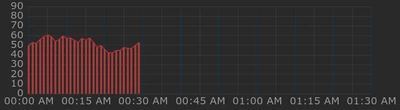
JTP1_3-1707412285094.png

Which is not allways the case. One way might be to add offset for starting time. So browse to \Middlewares\ST\touchgfx\framework\include\touchgfx\widgets\graph\- folder and open GraphLabels.hpp.

Add variable labelOffset and funtion 'setXStartOffset' to the X labels class.

GraphLabels.hpp:


class GraphLabelsX : public GraphLabelsBase
{
public:

	/** EXTENSION:
	 * Variable for X -label offset , when using extended time- type X labels
	 *
	 */
	int labelOffset=0;
	
	/** EXTENSION:
	 * Function for set X -label offset 
	 *	
	 * offset The X label offset of first the label value 
	 */
 virtual void setXStartOffset(int offset)
 {
 	labelOffset=offset;
 }

 virtual void invalidateGraphPointAt(int16_t index);


 Then open GraphLabels.cpp and locate GraphLabelsX::drawString- funtion. Add summing of labelOffset to the call of formatLabel. (Note that same format routine is called for X and Y labels, so this offset must be take into account here in the call).

GraphLabels.cpp:


void GraphLabelsX::drawString(const Rect& invalidatedArea, const Font* fontToDraw, const AbstractDataGraph* graph, const int valueScaled, const int labelScaled, const uint8_t a) const
{
 const int16_t labelX = valueToScreenXQ5(graph, valueScaled).round() - graph->getGraphAreaPaddingLeft();
 if (labelX < 0 || labelX >= graph->getGraphAreaWidth())
 {
 return;
 }

 Unicode::UnicodeChar wildcard[20];
	/*** Extension HERE - labelOffset summed with label- value: */
 formatLabel(wildcard, 20, labelOffset+getIndexToXAxis(graph, valueScaled, labelScaled), labelDecimals, labelDecimalPoint, graph->getScaleX());
 // Adjust to make label centered
 int16_t labelWidth;
 const Unicode::UnicodeChar* text = labelTypedText.getText();


 Then you can set in your view.cpp something like


dynamicGraph1MajorXAxisLabel.setXStartOffset((11*60)+45); //11:45 AM


And then time starts from 11:45 AM
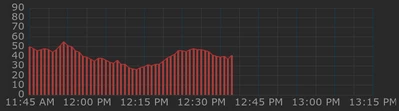
JTP1_2-1707412217725.png

Here are the most important settings of graph in this example:
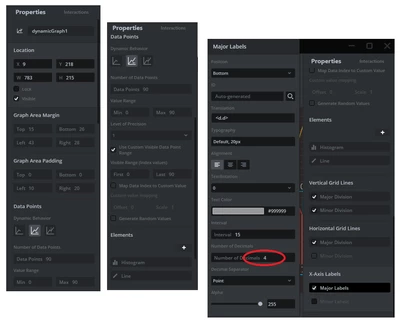
JTP1_4-1707412695956.png

Number of decimals is set to 4 to activate extended time formatting for X labels. Since the Y label uses the same formatLabel function, there is must something that activates Time format for x labels but not for y (in most cases not needed to have time also in Y label).

This is just simple example how to extend DynamicGraph.

Hope this helps somebody.

Br JTP

2 replies

JTP1Best answer
Graduate II
Feb 8, 2024 5:44 PM UTC

Hi

I think you cannot get time to the X labels directly from TGFX Designer:slightly_frowning_face:

You need to litte bit manipulate the GraphLabels.cpp (and maybe be GraphLabels.hpp, depends on what you want).

Browse first to \Middlewares\ST\touchgfx\framework\source\touchgfx\widgets\graph\ folder and copy GraphLabels.cpp to your project \TouchGFX\gui\src\common\ folder for example.Edit that copy in \common\ folder.

Here is simple example which prints hh:mm AM/PM format time when number of decimals is set to value 4 in TGFX designer for X Labels.

GraphLabels.cpp:


void GraphLabelsBase::formatLabel(Unicode::UnicodeChar* buffer, int16_t bufferSize, int label, int decimals, Unicode::UnicodeChar decimalPoint, int scale) const
{
 int length = 0;
 int scaledLabel;

 if (label < 0 && length < bufferSize - 1)
 {
 buffer[length++] = '-';
 label = -label;
 }

 if (decimals == 0)
 {
 	scaledLabel=(label + scale / 2) / scale;
 	Unicode::snprintf(buffer + length, bufferSize - length, "%d", (label + scale / 2) / scale);
 }
	/* HERE Simply Extension to print X label time */
 else if (decimals == 4) // custom print time hh:mm AM when set 4 decimal in the TGFX designer
 {
 	scaledLabel=label;
		
		// cut down the overflow (24 hours * 60 minutes)
		scaledLabel%=(24*60);

		if(scaledLabel<(12*60))
			Unicode::snprintf(buffer + length, bufferSize - length, "%02d:%02d AM", scaledLabel/60,scaledLabel%60);
		else
			Unicode::snprintf(buffer + length, bufferSize - length, "%02d:%02d PM", scaledLabel/60,scaledLabel%60);
 }
 else if (decimals > 0)
 {
 Unicode::snprintf(buffer + length, bufferSize - length, "%d", label / scale);
 length = Unicode::strlen(buffer);
 if (length < bufferSize - 1)
 {
 buffer[length++] = decimalPoint;
 int remainder = label % scale;
 for (int i = 0; i < decimals && length < bufferSize - 1; i++)
 {
 remainder *= 10;
 if (i == decimals - 1 || length == bufferSize - 1)
 {
 remainder += scale / 2; // Rounding on the last (visible) digit
 }
 const int digit = (remainder / scale);
 buffer[length++] = (Unicode::UnicodeChar)('0' + digit);
 remainder %= scale;
 }
 buffer[length] = (Unicode::UnicodeChar)0;
 }
 }
}


Note that if you do like this, one point must represent value of one minute in your data to get time domain correct !

Then, your data will naturally start from time 00:00

JTP1_3-1707412285094.png

Which is not allways the case. One way might be to add offset for starting time. So browse to \Middlewares\ST\touchgfx\framework\include\touchgfx\widgets\graph\- folder and open GraphLabels.hpp.

Add variable labelOffset and funtion 'setXStartOffset' to the X labels class.

GraphLabels.hpp:


class GraphLabelsX : public GraphLabelsBase
{
public:

	/** EXTENSION:
	 * Variable for X -label offset , when using extended time- type X labels
	 *
	 */
	int labelOffset=0;
	
	/** EXTENSION:
	 * Function for set X -label offset 
	 *	
	 * offset The X label offset of first the label value 
	 */
 virtual void setXStartOffset(int offset)
 {
 	labelOffset=offset;
 }

 virtual void invalidateGraphPointAt(int16_t index);


 Then open GraphLabels.cpp and locate GraphLabelsX::drawString- funtion. Add summing of labelOffset to the call of formatLabel. (Note that same format routine is called for X and Y labels, so this offset must be take into account here in the call).

GraphLabels.cpp:


void GraphLabelsX::drawString(const Rect& invalidatedArea, const Font* fontToDraw, const AbstractDataGraph* graph, const int valueScaled, const int labelScaled, const uint8_t a) const
{
 const int16_t labelX = valueToScreenXQ5(graph, valueScaled).round() - graph->getGraphAreaPaddingLeft();
 if (labelX < 0 || labelX >= graph->getGraphAreaWidth())
 {
 return;
 }

 Unicode::UnicodeChar wildcard[20];
	/*** Extension HERE - labelOffset summed with label- value: */
 formatLabel(wildcard, 20, labelOffset+getIndexToXAxis(graph, valueScaled, labelScaled), labelDecimals, labelDecimalPoint, graph->getScaleX());
 // Adjust to make label centered
 int16_t labelWidth;
 const Unicode::UnicodeChar* text = labelTypedText.getText();


 Then you can set in your view.cpp something like


dynamicGraph1MajorXAxisLabel.setXStartOffset((11*60)+45); //11:45 AM


And then time starts from 11:45 AM

JTP1_2-1707412217725.png

Here are the most important settings of graph in this example:

JTP1_4-1707412695956.png

Number of decimals is set to 4 to activate extended time formatting for X labels. Since the Y label uses the same formatLabel function, there is must something that activates Time format for x labels but not for y (in most cases not needed to have time also in Y label).

This is just simple example how to extend DynamicGraph.

Hope this helps somebody.

Br JTP

ST Employee
Feb 29, 2024 7:27 AM UTC

Hello all,


Just don't forget to add wildcard characters to your topography with JTP1's solution :

Regards,

Louis BOUDOST Software Engineer | TouchGFX