

JBond.1
Senior
February 27, 2020
Question

How to control LCD display brightness?

  • February 27, 2020
  • 2 replies
  • 2377 views

Hi,

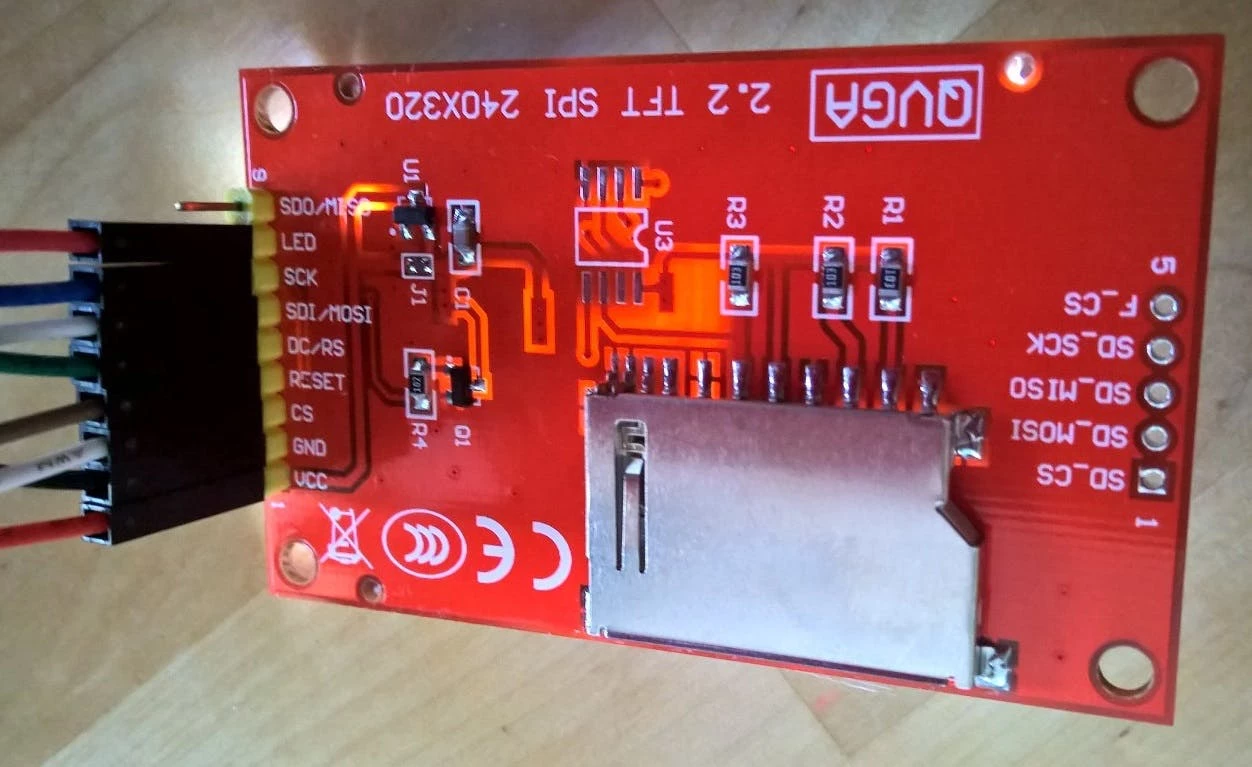
I am searching how to control such displays brightness?

I assume I need to pass less than 3.3V to LED pin? How do I pass less volts?
0690X00000DXU6bQAH.jpg

This topic has been closed for replies.

2 replies

Tesla DeLorean
Guru
February 27, 2020

Perhaps the vendor has a manual or examples?

You could try using a PWM signal

Tips, Buy me a coffee, or three.. PayPal Venmo (See Profile) Up vote any posts that you find helpful, it shows what's working..
alister
Senior III
February 27, 2020

Googled 'qvga 2.2 tft spi "240x320"'. Lots of hits. Very popular. Looks cute.

From its schematic you'd see the controller does the PWM.

Controller is ILI9341 or ILI9340.

From the datasheet's table of contents:

8.2.38. Write Display Brightness (51h).......................................................................................... 141
8.2.39. Read Display Brightness (52h).......................................................................................... 142
8.2.40. Write CTRL Display (53h).................................................................................................. 143
8.2.41. Read CTRL Display (54h) ................................................................................................. 145
8.2.42. Write Content Adaptive Brightness Control (55h).............................................................. 147
8.2.43. Read Content Adaptive Brightness Control (56h) ............................................................. 148
8.2.44. Write CABC Minimum Brightness (5Eh)............................................................................ 149
8.2.45. Read CABC Minimum Brightness (5Fh)............................................................................ 150

You'd send the commands via the SPI.

Comprehensive post about it at https://www.instructables.com/id/Cheap-TFT-22-inch-Display-on-Arduino-ILI9340C-or-I/.
