Senior
March 1, 2023
Solved

How to configure lcd-image-converter for a STM32 controller for converting an image

  • March 1, 2023
  • 1 reply
  • 3758 views

I'm using the development board STM32L4P5G-DK. My development board uses display type RGB222(6bits) <--device configuration tool(its the only option). My LCD display makes use of 24bit RGB data(RGB888 input format). Controller uses the following outputs: R7,R6,G7,G6,B7,B6. I have connected it to R7,R6,G7,G6,B7,B6 of the display, the rest of RGB data signal of the display is connected to ground. In device configuration tool of STM32Cube IDE i use the pîxel format RGB888(layer 1). I only use one layer.

About lcd-image-converter:

1)Wich image format(png,bmp,jpeg,etc) is recommended to use for converting an image to C for STM32?

2)Wich "main scan direction" to use(top to bottom, bottom to top, left to right,etc)?

3) In the application note 4161 they recommend to use Image -->block size: 32 bit: is this correct?

4)Wich preset option to use, "R8G8B8" or an other?

5)In Image-->Common -->application note 4161 shows to use "split to rows". Is this correct?

Could someone help me.

This topic has been closed for replies.
Best answer by KDJEM.1

Hello @FLuba.1​  and welcome to Community :) ,

The LCD image converter tool supports different image format such as bmp, gif, jpeg, png ...

You can use any image input format or any main scan direction.

It is important to use an image size aligned with the LTDC Layer1 configuration.

For fast read and conversion, it is recommend to use block size 32 bit.

Depending on your needs, you can choose the preset option.

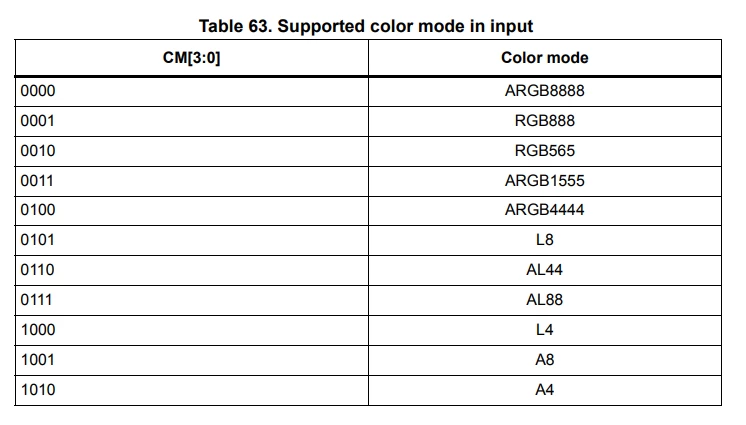
If, in your application, the LTDC synchronization with DMA2D and CPU, you must choose preset that is supported by DMA2D as shown in the below table.

0693W00000bh7ZRQAY.pngWhen your question is answered, please close this topic by choosing Select as Best. This will help other users find that answer faster.

Thank you

Kaouthar

1 reply

KDJEM.1
KDJEM.1Best answer
ST Technical Moderator
March 29, 2023

Hello @FLuba.1​  and welcome to Community :) ,

The LCD image converter tool supports different image format such as bmp, gif, jpeg, png ...

You can use any image input format or any main scan direction.

It is important to use an image size aligned with the LTDC Layer1 configuration.

For fast read and conversion, it is recommend to use block size 32 bit.

Depending on your needs, you can choose the preset option.

If, in your application, the LTDC synchronization with DMA2D and CPU, you must choose preset that is supported by DMA2D as shown in the below table.

0693W00000bh7ZRQAY.pngWhen your question is answered, please close this topic by choosing Select as Best. This will help other users find that answer faster.

Thank you

Kaouthar

To give better visibility on the answered topics, please click on "Best answer" on the reply which solved your issue or answered your question.