


PKunK.1
Associate III
April 1, 2021
Solved

How to change the resolution in TouchGFX?

  • April 1, 2021
  • 6 replies
  • 3664 views

When I created the TouchGFX project, I set it up to 800 *480.

However, the LCD has been changed, so we have to change the things we have worked on so far to 854*480.

I am trying to change the resolution in TouchGFX, but the setting part is not allowed to be modified.

We need to change 800*480 to 854*480. If anyone knows how to do it, please ask
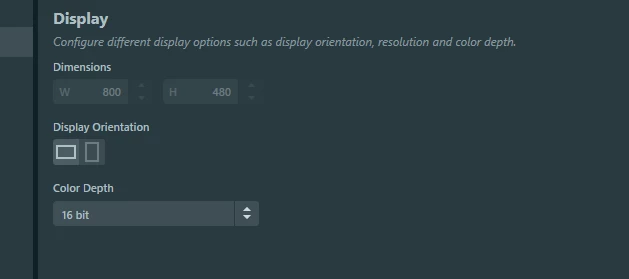
0693W000008yT31QAE.png

This topic has been closed for replies.
Best answer by MM..1

When you create project over MX you can change new resolution in MX and generate code. After this open ApplicationTemplate.touchgfx.part not touchgfx file.

OR ApplicationTemplate.touchgfx.part touchgfxfile is text file edit it simply before open ...

{
 "Application": {
 "Name": "XXXXXXX",
 "TouchGfxPath": "../Middlewares/ST/touchgfx",
 "AvailableColorDepths": [ 24 ],
 "AvailableLCDs":
 {
 "24": "LCD24bpp"
 },
 "AvailableResolutions" : [
 {
 "Width": 480,
 "Height": 1280
 }
 ],
 "PostGenerateTargetCommand" : "touchgfx update_project --project-file=../XXXXXXXX.ioc --platform=m4"
 },
 "Version": "4.16.0"
}

after edit this file open it and TouchGFX project is redesigned...

6 replies

Alexandre RENOUX
Visitor II
April 1, 2021

Hello PKunK.1,

This is normal because it is dependent on your hardware. Therefore, if you want to change the resolution of your project, you need to do it in CubeMX.

/Alexandre

MM..1
MM..1Best answer
Super User
April 1, 2021

When you create project over MX you can change new resolution in MX and generate code. After this open ApplicationTemplate.touchgfx.part not touchgfx file.

OR ApplicationTemplate.touchgfx.part touchgfxfile is text file edit it simply before open ...

{
 "Application": {
 "Name": "XXXXXXX",
 "TouchGfxPath": "../Middlewares/ST/touchgfx",
 "AvailableColorDepths": [ 24 ],
 "AvailableLCDs":
 {
 "24": "LCD24bpp"
 },
 "AvailableResolutions" : [
 {
 "Width": 480,
 "Height": 1280
 }
 ],
 "PostGenerateTargetCommand" : "touchgfx update_project --project-file=../XXXXXXXX.ioc --platform=m4"
 },
 "Version": "4.16.0"
}

after edit this file open it and TouchGFX project is redesigned...

MKris.5
Visitor II
March 2, 2022

Hi @PKunK.1 (Customer)​ ,

Can you please share me the ILI9806E code for initializing the ILI9806E module.

I can't change the LCD orientation . Currently set it as 480p width and 800p height. i wanna change it to 800 width and 480 height.

Thanks,

meimurgan

JBLEI
Visitor II
June 13, 2022

Hi @PKunK.1​ 

I am also working on the ili9806, I have some communication problems, is it possible to send me the initialization steps. Thank you very much in advance

Jeremy

pk84
Associate III
October 26, 2022

Hello, I have the same problem but I don't have CubeMx, and I also cannot find this " ApplicationTemplate.touchgfx.part" file.

How to proceed then?

Romain DIELEMAN
ST Employee
November 2, 2022

Hello,

Are you working with a custom project or did you use a TouchGFX Board Setup for one of the ST boards available in TouchGFX Designer ? If you used any TBS you should have a .touchgfx.part file in the TouchGFX/ folder of your project.

Otherwise, as written above, you can open the .touchgfx file in Notepad or any other code editor and modify the resolution there by changing the value of the width or height.

If you are working with the simulator you should be able to modify the resolution in the Config -> Display tab in TouchGFX Designer.

Could you share your project so that we can have a look in case you are still not able to do your changes ?

/Romain
