


Solved
How to avoid creating too many similar widgets
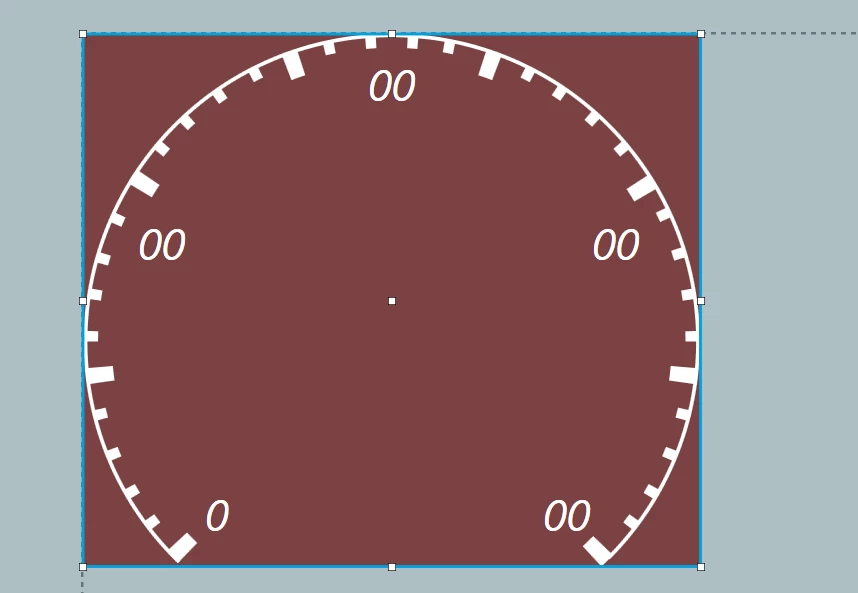
I am makeing a gauge background out of many circle widgets. I dont want to use static immage background because the position of segments can change depending on the maximum rpm.
I have create this in TouchGFX designer and for each circle widget Designer created also a painter. Therefor there are many painter that have the same color configuration. Is it possible to eliminate some widgets and/or painters to reduce the memory consumption.
part of generated code CustomGaugeBackgroundBase.cpp
 segmentBig1.setPosition(0, 0, 494, 426);
 segmentBig1.setCenter(247, 246);
 segmentBig1.setRadius(235);
 segmentBig1.setLineWidth(22);
 segmentBig1.setArc(-136, -133);
 segmentBig1.setCapPrecision(180);
 segmentBig1Painter.setColor(touchgfx::Color::getColorFrom24BitRGB(255, 255, 255));
 segmentBig1.setPainter(segmentBig1Painter);

 segmentBig8.setPosition(0, 0, 494, 426);
 segmentBig8.setCenter(247, 246);
 segmentBig8.setRadius(235);
 segmentBig8.setLineWidth(22);
 segmentBig8.setArc(134, 137);
 segmentBig8.setCapPrecision(180);
 segmentBig8Painter.setColor(touchgfx::Color::getColorFrom24BitRGB(255, 255, 255));
 segmentBig8.setPainter(segmentBig8Painter);

 segmentBig2.setPosition(0, 0, 494, 426);
 segmentBig2.setCenter(247, 246);
 segmentBig2.setRadius(235);
 segmentBig2.setLineWidth(22);
 segmentBig2.setArc(-98, -95);
 segmentBig2.setCapPrecision(180);
 segmentBig2Painter.setColor(touchgfx::Color::getColorFrom24BitRGB(255, 255, 255));
 segmentBig2.setPainter(segmentBig2Painter);

 segmentBig3.setPosition(0, 0, 494, 426);
 segmentBig3.setCenter(247, 246);
 segmentBig3.setRadius(235);
 segmentBig3.setLineWidth(22);
 segmentBig3.setArc(-59, -56);
 segmentBig3.setCapPrecision(180);
 segmentBig3Painter.setColor(touchgfx::Color::getColorFrom24BitRGB(255, 255, 255));
 segmentBig3.setPainter(segmentBig3Painter);

 segmentBig4.setPosition(0, 0, 494, 426);
 segmentBig4.setCenter(247, 246);
 segmentBig4.setRadius(235);
 segmentBig4.setLineWidth(22);
 segmentBig4.setArc(-21, -18);
 segmentBig4.setCapPrecision(180);
 segmentBig4Painter.setColor(touchgfx::Color::getColorFrom24BitRGB(255, 255, 255));
 segmentBig4.setPainter(segmentBig4Painter);

 segmentBig5.setPosition(0, 0, 494, 426);
 segmentBig5.setCenter(247, 246);
 segmentBig5.setRadius(235);
 segmentBig5.setLineWidth(22);
 segmentBig5.setArc(18, 21);
 segmentBig5.setCapPrecision(180);
 segmentBig5Painter.setColor(touchgfx::Color::getColorFrom24BitRGB(255, 255, 255));
 segmentBig5.setPainter(segmentBig5Painter);

 segmentBig6.setPosition(0, 0, 494, 426);
 segmentBig6.setCenter(247, 246);
 segmentBig6.setRadius(235);
 segmentBig6.setLineWidth(22);
 segmentBig6.setArc(57, 60);
 segmentBig6.setCapPrecision(180);
 segmentBig6Painter.setColor(touchgfx::Color::getColorFrom24BitRGB(255, 255, 255));
 segmentBig6.setPainter(segmentBig6Painter);

 segmentBig7.setPosition(0, 0, 494, 426);
 segmentBig7.setCenter(247, 246);
 segmentBig7.setRadius(235);
 segmentBig7.setLineWidth(22);
 segmentBig7.setArc(95, 98);
 segmentBig7.setCapPrecision(180);
 segmentBig7Painter.setColor(touchgfx::Color::getColorFrom24BitRGB(255, 255, 255));
 segmentBig7.setPainter(segmentBig7Painter);

 circleOut.setPosition(0, 0, 494, 426);
 circleOut.setCenter(247, 246);
 circleOut.setRadius(245);
 circleOut.setLineWidth(3);
 circleOut.setArc(-136, 135);
 circleOut.setCapPrecision(180);
 circleOutPainter.setColor(touchgfx::Color::getColorFrom24BitRGB(255, 255, 255));
 circleOut.setPainter(circleOutPainter);

 segmentSmall1_1.setPosition(0, 0, 494, 426);
 segmentSmall1_1.setCenter(247, 246);
 segmentSmall1_1.setRadius(240);
 segmentSmall1_1.setLineWidth(10);
 segmentSmall1_1.setArc(-128, -126);
 segmentSmall1_1.setCapPrecision(180);
 segmentSmall1_1Painter.setColor(touchgfx::Color::getColorFrom24BitRGB(255, 255, 255));
 segmentSmall1_1.setPainter(segmentSmall1_1Painter);

 segmentSmall1_2.setPosition(0, 0, 494, 426);
 segmentSmall1_2.setCenter(247, 246);
 segmentSmall1_2.setRadius(240);
 segmentSmall1_2.setLineWidth(10);
 segmentSmall1_2.setArc(-121, -119);
 segmentSmall1_2.setCapPrecision(180);
 segmentSmall1_2Painter.setColor(touchgfx::Color::getColorFrom24BitRGB(255, 255, 255));
 segmentSmall1_2.setPainter(segmentSmall1_2Painter);

 segmentSmall1_3.setPosition(0, 0, 494, 426);
 segmentSmall1_3.setCenter(247, 246);
 segmentSmall1_3.setRadius(240);
 segmentSmall1_3.setLineWidth(10);
 segmentSmall1_3.setArc(-111, -113);
 segmentSmall1_3.setCapPrecision(180);
 segmentSmall1_3Painter.setColor(touchgfx::Color::getColorFrom24BitRGB(255, 255, 255));
 segmentSmall1_3.setPainter(segmentSmall1_3Painter);

 segmentSmall1_4.setPosition(0, 0, 494, 426);
 segmentSmall1_4.setCenter(247, 246);
 segmentSmall1_4.setRadius(240);
 segmentSmall1_4.setLineWidth(10);
 segmentSmall1_4.setArc(-103, -105);
 segmentSmall1_4.setCapPrecision(180);
 segmentSmall1_4Painter.setColor(touchgfx::Color::getColorFrom24BitRGB(255, 255, 255));
 segmentSmall1_4.setPainter(segmentSmall1_4Painter);

 segmentSmall2_1.setPosition(0, 0, 494, 426);
 segmentSmall2_1.setCenter(247, 246);
 segmentSmall2_1.setRadius(240);
 segmentSmall2_1.setLineWidth(10);
 segmentSmall2_1.setArc(-90, -88);
 segmentSmall2_1.setCapPrecision(180);
 segmentSmall2_1Painter.setColor(touchgfx::Color::getColorFrom24BitRGB(255, 255, 255));
 segmentSmall2_1.setPainter(segmentSmall2_1Painter);

 segmentSmall2_2.setPosition(0, 0, 494, 426);
 segmentSmall2_2.setCenter(247, 246);
 segmentSmall2_2.setRadius(240);
 segmentSmall2_2.setLineWidth(10);
 segmentSmall2_2.setArc(-80, -82);
 segmentSmall2_2.setCapPrecision(180);
 segmentSmall2_2Painter.setColor(touchgfx::Color::getColorFrom24BitRGB(255, 255, 255));
 segmentSmall2_2.setPainter(segmentSmall2_2Painter);

 segmentSmall2_3.setPosition(0, 0, 494, 426);
 segmentSmall2_3.setCenter(247, 246);
 segmentSmall2_3.setRadius(240);
 segmentSmall2_3.setLineWidth(10);
 segmentSmall2_3.setArc(-73, -75);
 segmentSmall2_3.setCapPrecision(180);
 segmentSmall2_3Painter.setColor(touchgfx::Color::getColorFrom24BitRGB(255, 255, 255));
 segmentSmall2_3.setPainter(segmentSmall2_3Painter);

 segmentSmall2_4.setPosition(0, 0, 494, 426);
 segmentSmall2_4.setCenter(247, 246);
 segmentSmall2_4.setRadius(240);
 segmentSmall2_4.setLineWidth(10);
 segmentSmall2_4.setArc(-65, -67);
 segmentSmall2_4.setCapPrecision(180);
 segmentSmall2_4Painter.setColor(touchgfx::Color::getColorFrom24BitRGB(255, 255, 255));
 segmentSmall2_4.setPainter(segmentSmall2_4Painter);

 segmentSmall3_1.setPosition(0, 0, 494, 426);
 segmentSmall3_1.setCenter(247, 246);
 segmentSmall3_1.setRadius(240);
 segmentSmall3_1.setLineWidth(10);
 segmentSmall3_1.setArc(-49, -51);
 segmentSmall3_1.setCapPrecision(180);
 segmentSmall3_1Painter.setColor(touchgfx::Color::getColorFrom24BitRGB(255, 255, 255));
 segmentSmall3_1.setPainter(segmentSmall3_1Painter);