

Associate
November 20, 2023
Solved

How to align(center) two wildcard text areas that change dynamically in the same row?

  • November 20, 2023
  • 3 replies
  • 3269 views

Hello,

Here is an example of what I am trying to make in TouchGFX Designer.
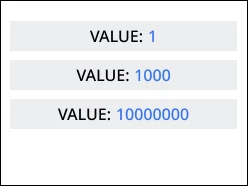
ex.png


So, since I need different text colors for text inputs, I am using 2 text area inputs here. Both inputs are wildcards and should change value dynamically. I am having trouble centering them on the screen, as I would like that no matter the length of each value the texts are centered in the container. (like in the attached image).

If I were to present this as one text area with 2 wildcard inputs I would just remove auto-size, expand text area to full width of the container and center it. But here I am using two textareas.

Is there a way to do this in Designer alone or do I need some code added later on to fix the positions?


    This topic has been closed for replies.
    Best answer by Mohammad MORADI ESFAHANIASL

    Hello @JJYodd ,

    Unfortunately, there is no direct way to do it in through the designer. However, you can do it in code by getting the width of your text areas, adding them and then substracting from the container's width. Then, by diving by 2, you get the position of your text areas. You get set the position by SetX()
    You can read more about the different functions regarding Drawable here:

    https://support.touchgfx.com/docs/api/classes/classtouchgfx_1_1_drawable

    I hope this help

    3 replies

    ST Employee
    November 28, 2023

    Hello @JJYodd ,

    Unfortunately, there is no direct way to do it in through the designer. However, you can do it in code by getting the width of your text areas, adding them and then substracting from the container's width. Then, by diving by 2, you get the position of your text areas. You get set the position by SetX()
    You can read more about the different functions regarding Drawable here:

    https://support.touchgfx.com/docs/api/classes/classtouchgfx_1_1_drawable

    I hope this help

    Mohammad MORADIST Software Developer | TouchGFX
    JJYoddAuthor
    Associate
    November 30, 2023

    Yes, that is good. Thank you!

    ST Employee
    December 5, 2023

    You are very welcome,

    Good luck 

    Mohammad MORADIST Software Developer | TouchGFX