

ferro
Lead
January 3, 2025
Solved

GfxDesigner add 'Delete generated code'

  • January 3, 2025
  • 6 replies
  • 2172 views

Hi Gfx Team,

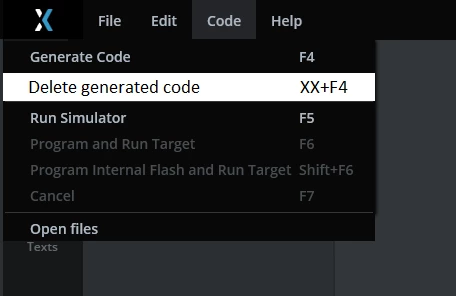
Could you consider adding an option to delete all auto-generated code

folder /generated

And all files generated during the build process?

folder /build
ferro_0-1735938528867.png


Thanks


    This topic has been closed for replies.
    Best answer by GaetanGodart

    Hello @ferro ,


    Can you explain a bit why that would be useful.

    How is it different than running the "clean" of your makefile? Is it the same and you just want to have a button to call it from the Deisgner?

    Couldn't you just extract the GUI folder, the asset folder and the .touchgfx file to get the smallest footprint for your project while being able to re-generate everything.


    Regards,

    6 replies

    GaetanGodart
    GaetanGodartBest answer
    ST Employee
    January 8, 2025

    Hello @ferro ,


    Can you explain a bit why that would be useful.

    How is it different than running the "clean" of your makefile? Is it the same and you just want to have a button to call it from the Deisgner?

    Couldn't you just extract the GUI folder, the asset folder and the .touchgfx file to get the smallest footprint for your project while being able to re-generate everything.


    Regards,

    Gaetan GodartSoftware engineer at ST (TouchGFX)
    ferro
    ferroAuthor
    Lead
    January 8, 2025

    Hi @GaetanGodart 

    "How is it different than running the "clean" of your makefile?"

    Hm, I've never used 'clean' . I can Build from GfxDesigner then also mirror that with Clean.


    "Couldn't you just extract the GUI folder, the asset folder and the .touchgfx file to get the smallest footprint for your project while being able to re-generate everything."

    Tha's what we are doing at the moment and suboptimal. A button would add a bit of 'sophistication'.

    I'll close this post. Thanks.

    GaetanGodart
    ST Employee
    January 8, 2025

    So using "Clean" solves your issue?


    Regards,

    Gaetan GodartSoftware engineer at ST (TouchGFX)

