Question
generating the 3 colored palette
I'm trying a palette that goes from white to red and red to green. Following this article https://support.touchgfx.com/docs/development/ui-development/scenarios/creating-dynamic-l8-images, I could make the columns colored. But I couldn't make it 3 colored.
BitmapId dynamicBitmap1 = Bitmap::dynamicBitmapCreate(200, 10, Bitmap::L8, Bitmap::CLUT_FORMAT_L8_RGB888);
	imageDynamic.setBitmap(Bitmap(dynamicBitmap1));

	if (dynamicBitmap1 == BITMAP_INVALID)
	{
		touchgfx_printf("Unable to create dynamic bitmap\n");
	}
	else
	{
		uint8_t* data = Bitmap::dynamicBitmapGetAddress(dynamicBitmap1);

		uint8_t* pixel = data;
		//make colored columns
		for (int y = 0; y < 10; y++)
		{
			for (int x = 0; x < 200; x++)
			{
				*pixel++ = x;
			}
		}

		uint32_t byteSize = 200 * 10;
		byteSize = ((byteSize + 3) & ~3);

		//Palette starts four bytes after the pixels
		uint8_t* pal = (data + byteSize + 3);

		//Make palette with 256 colors from white to red, red to green
		for (int i = 0; i < 256; i++)
		{
			//BGR
			pal[i * 3 + 0] = uint8_t(255);
			pal[i * 3 + 1] = uint8_t(255);
			pal[i * 3 + 2] = uint8_t(255 * (cosf(i*2.0f / 255)));
		}
	}
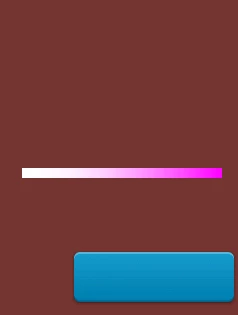
This is what I got