


Zui
Senior
October 17, 2019
Question

Font differences between touchGfx and simulator/code loaded on board

  • October 17, 2019
  • 7 replies
  • 2691 views

I can't understand why a give text with a given font looks different (also in size) from theTouchGfx GUI and the simulator, or the code loaded into board.

I don't need so i never change font in my app( is that even possible?) so i can't undestand why this is happening, for sure is not some of my code i forgot i've written...0690X00000AqUlaQAF.png
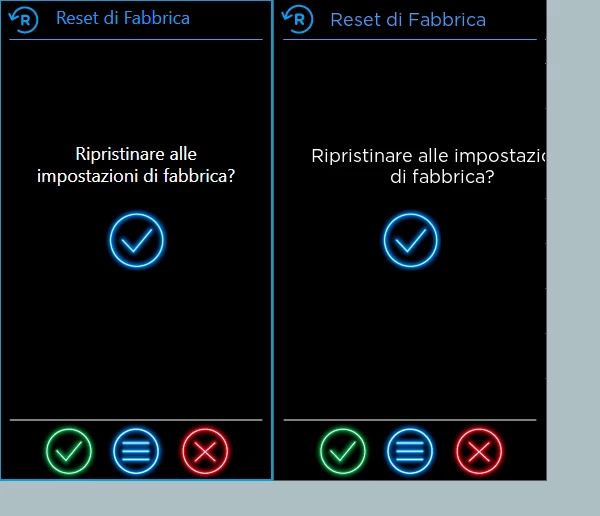
as you can see the in the left image (a touchGfx screenshot) the text have a different font and size than righ image (a simulator screenshots, but also code loaded into board looks the same as simulator)

This topic has been closed for replies.

7 replies

Martin KJELDSEN
Principal III
October 21, 2019

I don't really understand that either. That shouldn't be possible because the generated code is the same for any platform and touchgfx processes it the same. Which one is the correct one (as defined in text sheet)? Can you share the project? or at least the text sheet?

/Martin

Zui
ZuiAuthor
Senior
October 21, 2019

sure, i'll send you my application via pvt. Thanks

Zui
ZuiAuthor
Senior
November 6, 2019

stm32f746g disco

Martin KJELDSEN
Principal III
November 6, 2019

Thanks.

Emil Damkjaer PETERSEN
ST Employee
November 7, 2019

Hi, Emil from the TouchGFX team here.

I have tested your project and unfortunately are we not able to recreate the issue with line break, but inserting a line break in the text should help.

Regarding the placement of the text, it is sometimes placed different, since the GUI is not rendered in the same way as Touchgfx.

Normally i would remove the auto-size from the text area and adjust the position until the text is displayed in the desired way in the simulator.

/Emil