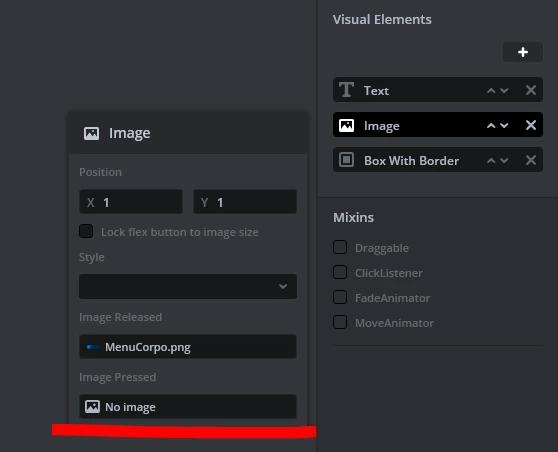
OK so I think I have found the issue (I hope it isn't just an error from ziping and unziping the project). In the settings of the image in the flex button you have not set the "pressed" image. Because of that the code was never properly generated for the image as you can see in MainMenuViewBase.cpp in the TouchGFX/generated/gui_generated/src/mainmenu_screen (fix the issue for one of the flex buttons and generate code, you will see that the code is different for the button fixed)
It is surprising that you (at least I) did not get an error message from this.
Can you display those images when using a Image widget instead of a flex button ? are they stored in internal or external flash ? Could you share one of them so that I can try to replicate it ?
Hum it does work on my side this is strange. Did you start your project from the available TouchGFX Board Setup for the STM32H735disco or did you start your project from scratch from STM32CubeMX or STM32CubeIDE ? Could you go to the "Config" settings (click on the "Config" tab on the left of TouchGFX Designer) ? There go to the "Framework Features" settings and make sure the relevant features are set. The Flex Button widget uses texture mappers unlike the Image widget, so maybe try to use a Texture Mapper widget (found in the same group as the Image widget) to see if my suspicion is correct.
Could you maybe share your project so that I can have a look ? Or share screenshots of the image configuration in the settings tab on the right in TouchGFX Designer.
By starting from scratch I meant from STM32CubeMX or STM32CubeIDe, if you started from Designer by selecting the STM32H735 disco then I have the same setup as you which makes the error even weirder since I cannot replicate it :grinning_face_with_sweat:.
Could you look on the other side of the board for the revision number ? Something like MB1520-H736I-B02 in my case.
Could you also navigate to the C/Program Files/STMicroelectronics/STM32Cube/STM32CubeProgrammer/bin/ExternalLoader folder and look for MX25LM1245G_STM32H735G-DK.stdlr ? I want to make sure you have the external loader available (even though you already are able to flash images.
I'm really sorry to disturb you but this error is really weird...
Yes, there's no problem with me to share the project with you, at the moment it only consists of the menu you can see and another page to control an LED modulating pwm.
Only, is there some way different than posting my code on this forum ? Please, let me know...
My board's revision number is MB1520-H735I-B02, I think that should be the same as yours
OK so I think I have found the issue (I hope it isn't just an error from ziping and unziping the project). In the settings of the image in the flex button you have not set the "pressed" image. Because of that the code was never properly generated for the image as you can see in MainMenuViewBase.cpp in the TouchGFX/generated/gui_generated/src/mainmenu_screen (fix the issue for one of the flex buttons and generate code, you will see that the code is different for the button fixed)
It is surprising that you (at least I) did not get an error message from this.
I'd have never tought to this because i usually work on c# and delphi and if you don't specify a pressed image the controls simply use the released for both.
Thank you so much for all your help, Romain !
BTW, did you try to run the project in the simulator (F6) ? is it working in your environment ?
I did try it. You need to modify the makefile under the TouchGFX/simulator/gcc folder to include the path to libraries outside of the TouchGFX folder. I gave it a quick go yesterday but did not manage to make it work. I am not super skilled in editing Makefiles sorry :grinning_face_with_sweat: