


External flash download error with stock STM32F469I-DISCO (DK32F469I$AU1)
I am experimenting with a newly purchased STM32F469I-DISCO AU.
I immediately had issues in downloading to the external flash. Is not a configuration issue, in fact the error is random: 5% of the times I manage to correctly flash it, most of the times I get errors like "Error: Unable to get core ID".
No issues with the internal memory, but as soon as I allocated anything that requires to write more than one block of flash, the downloading problem happens. I confirm the flash gets written, since when it fails at 50% or so, I see the loaded picture shown half on the LCD.
Attached an example of a project I managed only twice to correcly flash, and only from the TouchGFX suite, not from the CubeIDE. Also, in both TouchGFX and CubeIDE, the error is the same, just the percentage changes:
make -f ../gcc/Makefile -j10 flash
 Reading TouchGFX/application.config
 Reading TouchGFX/target.config
 Linking TouchGFX/build/bin/target.elf
 Producing additional output formats...
 target.hex - Combined internal+external hex
 intflash.elf - Internal flash, elf debug
 intflash.hex - Internal flash, hex
 -------------------------------------------------------------------
 STM32CubeProgrammer v2.11.0
 -------------------------------------------------------------------

 ST-LINK SN : 066DFF575285514867133515
 ST-LINK FW : V2J40M27
 Board : 32F469IDISCOVERY
 Voltage : 3.23V
 SWD freq : 4000 KHz
 Connect mode: Normal
 Reset mode : Software reset
 Device ID : 0x434
 Revision ID : Rev A
 Device name : STM32F469xx/F467xx
 Flash size : 2 MBytes
 Device type : MCU
 Device CPU : Cortex-M4
 BL Version : --


 Memory Programming ...
 Opening and parsing file: target.hex
 File : target.hex
 Size : 3.91 MB
 Address : 0x08000000


 Erasing memory corresponding to segment 0:
 Erasing internal memory sectors [0 5]
 Erasing memory corresponding to segment 1:
 Erasing external memory sectors [0 59]
 Download in Progress:
 ±±±±±±±±±±±±±±±±±±±±±±±±±±±±±±±±±±±±±±±±±±±±±±±±±± 0%
 ÛÛÛ 7%ÛÛÛ 13%ÛÛÛÛ 20%ÛÛÛÛ 28%Error: Unable to get core ID


 Error: failed to download Segment[1]
 Error: failed to download the File


 Error: Unable to reset MCU!
 Done
As a work around I followed this ST post - nothing really changed.
Another example can be seen in the screenshot here:
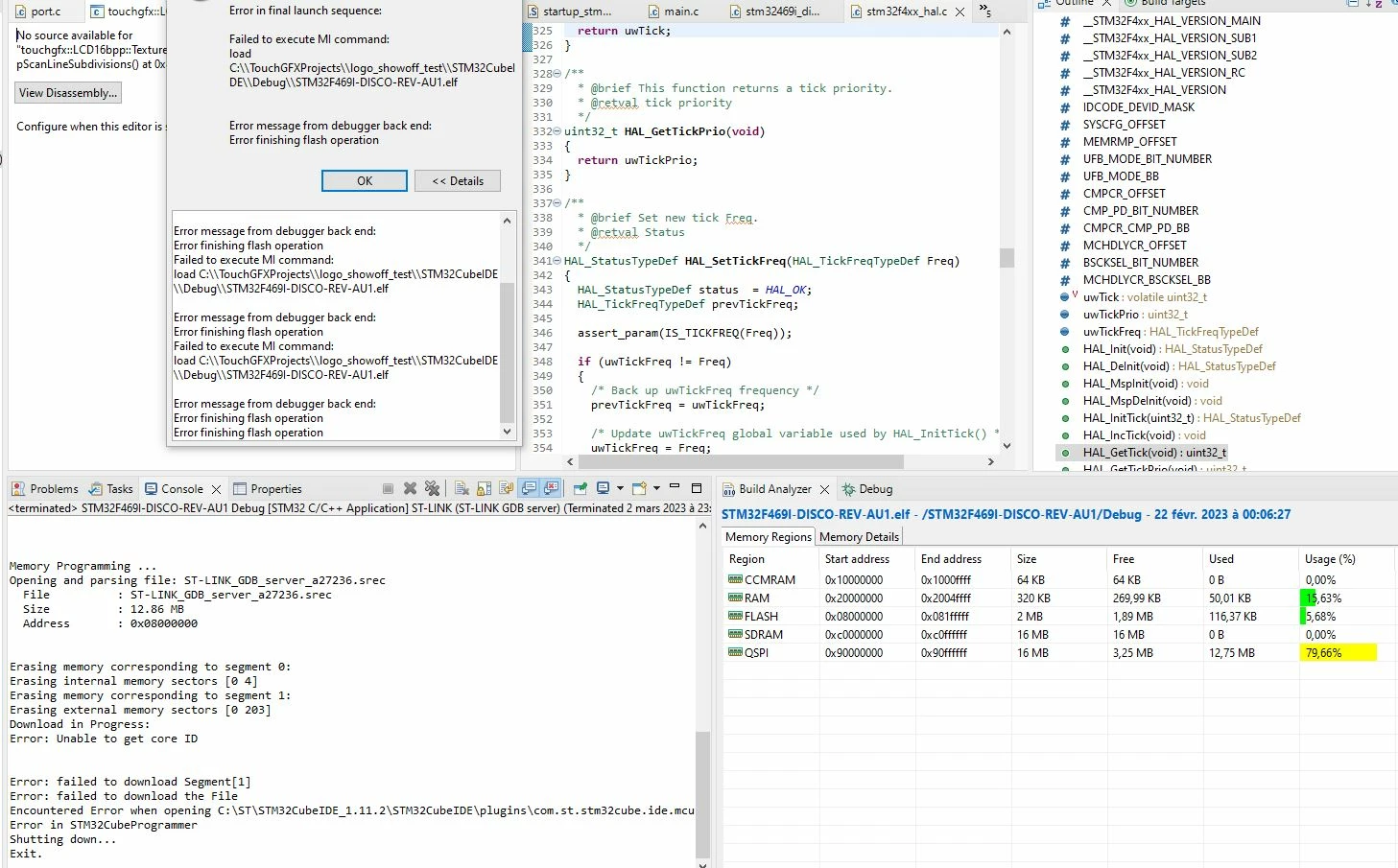
There is a previous post I did, showing a project which I can fully share, trying to link correctly in the external flash a simple array, with small data like 16B, no problem. If I expand this array from 16B to the real 1.33MB, it fails most of the times. My board is the variant DK32F469I$AU1 - I attached the project so you can try.
I used the latest ST-Link firmware (March 2nd 2023), and both the flash loaders "0x434" from the 2.6 Programmer (replaced in the internal programmer of CubeIDE 1.11.2), but also with the original flash loader.
Programmer data (from the dev board) and the typical error is reported below. Fun fact: the BL version does not appears all the time - comapre with the previous report in this post.
ST-LINK SN : 066DFF575285514867133515
ST-LINK FW : V2J40M27
Board : 32F469IDISCOVERY
Voltage : 3.24V
SWD freq : 4000 KHz
Connect mode: Under Reset
Reset mode : Hardware reset
Device ID : 0x434
Revision ID : Rev A
Device name : STM32F469xx/F467xx
Flash size : 2 MBytes
Device type : MCU
Device CPU : Cortex-M4
BL Version : 0x90


Memory Programming ...
Opening and parsing file: ST-LINK_GDB_server_a02036.srec
 File : ST-LINK_GDB_server_a02036.srec
 Size : 1.39 MB
 Address : 0x08000000


Erasing memory corresponding to segment 0:
Erasing internal memory sectors [0 4]
Erasing memory corresponding to segment 1:
Erasing external memory sectors [0 21]
Download in Progress:
Error: Unable to get core ID


Error: failed to download Segment[1]
Error: failed to download the File
Encountered Error when opening C:\ST\STM32CubeIDE_1.11.2\STM32CubeIDE\plugins\com.st.stm32cube.ide.mcu.externaltools.cubeprogrammer.win32_2.0.500.202209151145\tools\bin\STM32_Programmer_CLI.exe
Error in STM32CubeProgrammer
Shutting down...
Exit.
Thanks!