Tutorial how to detect swipe to change screen:
- Add a button to Screen 1 and configure interaction so it switches to Screen2 when pressed.
- Create a full screnn custom container and name it SwipeDetectContainer.
- Add custom container to your screen. Make sure it is positioned above images or texts, but bellow any other button. The reason is that button press won't be detected if positioned below SwipeDetect container which is fullscreen container.
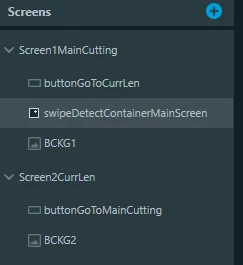
- Generate code in TouchGFX Designer and open in your IDE following files: Screen1MainCuttingView.cpp, Screen1MainCuttingView.hpp, SwipeDetectContainer.cpp and SwipeDetectContainer.hpp.
- Add following code:
Screen1MainCuttingView.cpp
#include <gui/screen1maincutting_screen/Screen1MainCuttingView.hpp>

Screen1MainCuttingView::Screen1MainCuttingView():
	swipeCallback(this, &Screen1MainCuttingView::swipeCallbackHandler)
{
	swipeDetectContainerMainScreen.setAction(swipeCallback);
}

void Screen1MainCuttingView::setupScreen()
{
 Screen1MainCuttingViewBase::setupScreen();
}

void Screen1MainCuttingView::tearDownScreen()
{
 Screen1MainCuttingViewBase::tearDownScreen();
}

void Screen1MainCuttingView::swipeCallbackHandler(int16_t velocity){
	if(velocity < 0){
		application().gotoScreen2CurrLenScreenSlideTransitionEast();
	}
}
Screen1MainCuttingView.hpp
#ifndef SCREEN1MAINCUTTINGVIEW_HPP
#define SCREEN1MAINCUTTINGVIEW_HPP

#include <gui_generated/screen1maincutting_screen/Screen1MainCuttingViewBase.hpp>
#include <gui/screen1maincutting_screen/Screen1MainCuttingPresenter.hpp>

class Screen1MainCuttingView : public Screen1MainCuttingViewBase
{
public:
 Screen1MainCuttingView();
 virtual ~Screen1MainCuttingView() {}
 virtual void setupScreen();
 virtual void tearDownScreen();
protected:

private:
 touchgfx::Callback<Screen1MainCuttingView, int16_t> swipeCallback;

 void swipeCallbackHandler(int16_t);
};

#endif // SCREEN1MAINCUTTINGVIEW_HPP
SwipeDetectContainer.cpp
#include <gui/containers/SwipeDetectContainer.hpp>

SwipeDetectContainer::SwipeDetectContainer():
	SwipeDetectContainerBase(), action()
{
	setTouchable(true);
	setVisible(true); //handleGestureEvent is reported by HAL only to drawables that are visible and touchable only
}

void SwipeDetectContainer::initialize()
{
 SwipeDetectContainerBase::initialize();
}

void SwipeDetectContainer::handleGestureEvent(const GestureEvent& event){
	if(event.getType() == touchgfx::GestureEvent::SWIPE_HORIZONTAL){
		if(action -> isValid()){
			action->execute(event.getVelocity()); // <-- getVelocity returns int16_t
		}
	}
}
SwipeDetectCointainer.hpp
#ifndef SWIPEDETECTCONTAINER_HPP
#define SWIPEDETECTCONTAINER_HPP

#include <gui_generated/containers/SwipeDetectContainerBase.hpp>
#include <touchgfx/Callback.hpp>

class SwipeDetectContainer : public SwipeDetectContainerBase
{
public:
 SwipeDetectContainer();
 virtual ~SwipeDetectContainer() {}

 virtual void initialize();

 virtual void setAction(GenericCallback<int16_t> &callback){
 action = &callback;
 }

 virtual void handleGestureEvent(const GestureEvent& event);
protected:
 GenericCallback<int16_t>* action;

};

#endif // SWIPEDETECTCONTAINER_HPP
These are the Base files generated by TouchGFX and are only needed to know how SwipeContainer object is named and to get function from button handler to initiate Screen change:
/*********************************************************************************/
/********** THIS FILE IS GENERATED BY TOUCHGFX DESIGNER, DO NOT MODIFY ***********/
/*********************************************************************************/
#ifndef SCREEN1MAINCUTTINGVIEWBASE_HPP
#define SCREEN1MAINCUTTINGVIEWBASE_HPP

#include <gui/common/FrontendApplication.hpp>
#include <mvp/View.hpp>
#include <gui/screen1maincutting_screen/Screen1MainCuttingPresenter.hpp>
#include <touchgfx/widgets/Box.hpp>
#include <touchgfx/widgets/Image.hpp>
#include <gui/containers/SwipeDetectContainer.hpp>
#include <touchgfx/widgets/Button.hpp>

class Screen1MainCuttingViewBase : public touchgfx::View<Screen1MainCuttingPresenter>
{
public:
 Screen1MainCuttingViewBase();
 virtual ~Screen1MainCuttingViewBase() {}
 virtual void setupScreen();

protected:
 FrontendApplication& application() {
 return *static_cast<FrontendApplication*>(touchgfx::Application::getInstance());
 }

 /*
 * Member Declarations
 */
 touchgfx::Box __background;
 touchgfx::Image BCKG1;
 SwipeDetectContainer swipeDetectContainerMainScreen;
 touchgfx::Button buttonGoToCurrLen;

private:

 /*
 * Callback Declarations
 */
 touchgfx::Callback<Screen1MainCuttingViewBase, const touchgfx::AbstractButton&> buttonCallback;

 /*
 * Callback Handler Declarations
 */
 void buttonCallbackHandler(const touchgfx::AbstractButton& src);

};

#endif // SCREEN1MAINCUTTINGVIEWBASE_HPP
/*********************************************************************************/
/********** THIS FILE IS GENERATED BY TOUCHGFX DESIGNER, DO NOT MODIFY ***********/
/*********************************************************************************/
#include <gui_generated/screen1maincutting_screen/Screen1MainCuttingViewBase.hpp>
#include <touchgfx/Color.hpp>
#include "BitmapDatabase.hpp"

Screen1MainCuttingViewBase::Screen1MainCuttingViewBase() :
 buttonCallback(this, &Screen1MainCuttingViewBase::buttonCallbackHandler)
{

 __background.setPosition(0, 0, 480, 272);
 __background.setColor(touchgfx::Color::getColorFrom24BitRGB(0, 0, 0));

 BCKG1.setXY(0, 0);
 BCKG1.setBitmap(touchgfx::Bitmap(BITMAP_BACKGROUND_ELECTRONIC_ID));

 swipeDetectContainerMainScreen.setXY(0, 0);

 buttonGoToCurrLen.setXY(443, 120);
 buttonGoToCurrLen.setBitmaps(touchgfx::Bitmap(BITMAP_RIGHT_ARROW_ID), touchgfx::Bitmap(BITMAP_RIGHT_ARROW_PRESSED_ID));
 buttonGoToCurrLen.setAction(buttonCallback);

 add(__background);
 add(BCKG1);
 add(swipeDetectContainerMainScreen);
 add(buttonGoToCurrLen);
}

void Screen1MainCuttingViewBase::setupScreen()
{
 swipeDetectContainerMainScreen.initialize();
}

void Screen1MainCuttingViewBase::buttonCallbackHandler(const touchgfx::AbstractButton& src)
{
 if (&src == &buttonGoToCurrLen)
 {
 //InteractionGoToCurrLen
 //When buttonGoToCurrLen clicked change screen to Screen2CurrLen
 //Go to Screen2CurrLen with screen transition towards East
 application().gotoScreen2CurrLenScreenSlideTransitionEast();
 }
}