


kajoje123
Associate II
September 17, 2019
Solved

Enabling TouchGfx in CubeMx (built in CubeIDE) disables Timer2 - STM32F746-DISCO configuration - is this a bug?
  • September 17, 2019
  • 4 replies
  • 1676 views

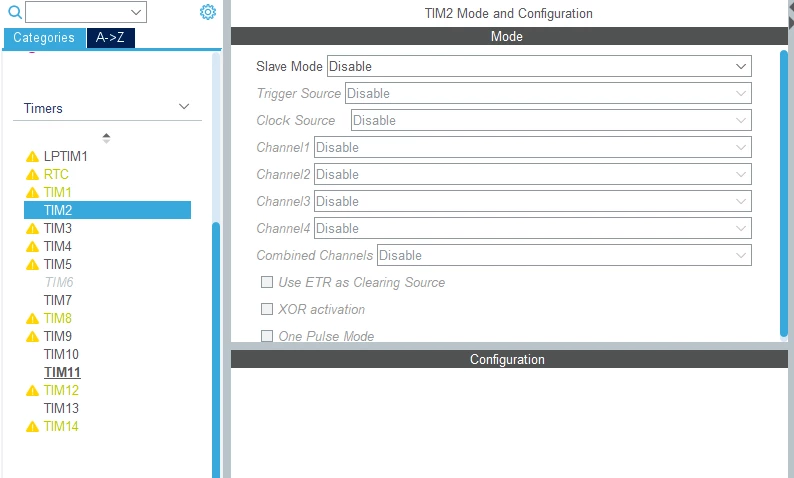
0690X00000ARJX0QAP.pngWhen I enable TouchGfx in Middleware->Graphics the Timer2 is being disabled (in ParameterSettings->TimerInstrumentation I select Timer14). Is there a connection between those two or it is a kind of bug I can fix manually in code?

This topic has been closed for replies.
Best answer by Khouloud ZEMMELI

​HI @kajoje123​ ,

Thanks for ypur feedback, this bug has been already fixed and it will be available for  the next release -5.4.0-

Best Regards,

Khouloud

4 replies

Khouloud ZEMMELI
ST Employee
September 18, 2019

​Hello @kajoje123​ ,

Which CubeMX version did you use ?  Did you mean that you created  MX project from CubeIDE ?

could you please share your ioc file ?

Thanks,

Khouloud

kajoje123
kajoje123Author
Associate II
September 18, 2019

Yes, I meant the MX project form CubeIDE

STM32CubeIDE - Version: 1.0.2 Build: 3566_20190716-0927 (UTC)

STM32CubeMX - Version: 5.3.0.201907110903

I created new STM32 Project - all the peripherals were initialized as default (STM32F746NG DISCO). Timer2 is being disabled when I enable the TouchGfx

Khouloud ZEMMELI
Khouloud ZEMMELIBest answer
ST Employee
September 19, 2019

​HI @kajoje123​ ,

Thanks for ypur feedback, this bug has been already fixed and it will be available for  the next release -5.4.0-

Best Regards,

Khouloud

kajoje123
kajoje123Author
Associate II
September 19, 2019

Thank you too :)