SLuo.2
Associate III
April 22, 2022
Solved

ellipsis character doesn't work

  • April 22, 2022
  • 2 replies
  • 1792 views

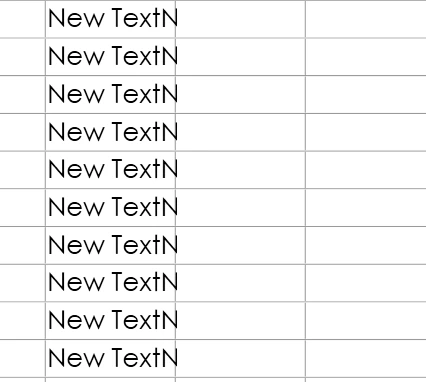
When I put a long text in a small text area, the ellipsis doesn't appear, and the text is directly truncated,version is 4.19.10693W00000LygoqQAB.png0693W00000LygolQAB.png
This topic has been closed for replies.
Best answer by Yoann KLEIN

Hello @SLuo.2​ ,

The implementation of ellipsis characters in TouchGFX could be quite tricky to understand.

Let us check if you included everything to make it work :

  • In Screen1View.cpp, did you call the setWideTextAction() function ? It will enable you to automatically wrap long text lines. You can find example of that in the documentation.
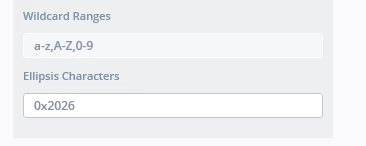
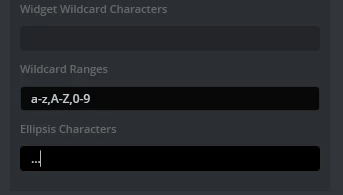
  • In your TouchGFXDesigner screenshot, I noticed that you wanted to print three-dots "..." character. Unfortunately, only one character is allowed for ellipsis. But, if you really want to display those three dots. you can write "0x2026" in this field, which is the hex code for those symbols.0693W00000Lyj8nQAB.png

Let me know if that helped you,

/Yoann

2 replies

Yoann KLEIN
Yoann KLEINBest answer
ST Employee
April 22, 2022

Hello @SLuo.2​ ,

The implementation of ellipsis characters in TouchGFX could be quite tricky to understand.

Let us check if you included everything to make it work :

  • In Screen1View.cpp, did you call the setWideTextAction() function ? It will enable you to automatically wrap long text lines. You can find example of that in the documentation.
  • In your TouchGFXDesigner screenshot, I noticed that you wanted to print three-dots "..." character. Unfortunately, only one character is allowed for ellipsis. But, if you really want to display those three dots. you can write "0x2026" in this field, which is the hex code for those symbols.0693W00000Lyj8nQAB.png

Let me know if that helped you,

/Yoann

Yoann KLEINST Software Developer | TouchGFX
SLuo.2
SLuo.2Author
Associate III
April 22, 2022

oh,Thanks!

Is because I ignored the setWideTextAction() function.