


MNema.1
Associate II
January 10, 2023
Solved

Dynamic graph Y min and max labels.

  • January 10, 2023
  • 4 replies
  • 1758 views

Hi!

I have a dynamic graph that I want to autoscale depending on max and min of the curve. So each time I get a new value I redraw the graph with the new Y range. I also want my graph to have two Y Axis labels: min and max. How do I achieve that? For example, if I set range to (12, 57) I want to see only those two labels: 12 and 57. So far I can only make it show 57 (if I set Label interval to 57), but not 12.

This topic has been closed for replies.
Best answer by Yoann KLEIN

Hello again,

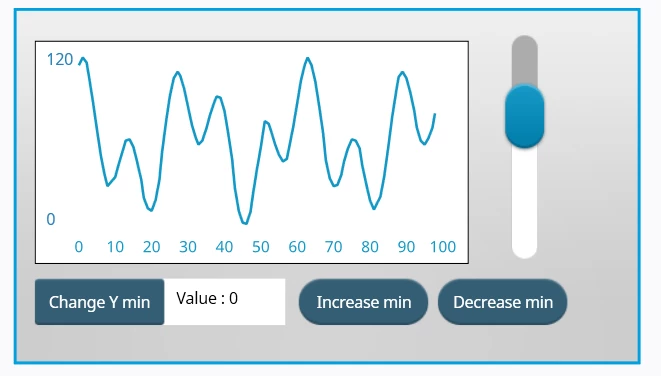
I modified this project to get closer to what you wanna do.

I think it cans provide you a nice first approach.

To explain quickly what I did :

0693W00000Y7wcmQAB.png 

  • Replaced the Y axis max and min labels by TextAreas with wildcards, to be able to display what I want in it and modify it dynamically.
  • Added a TextArea for the min value you wanna set (could also be done for the max) and 2 other buttons that allow you to increase and decrease the value on each click.
  • Added a button that enables you to update this value on the graph.

For the code, I invite you to take a look at Screen1View.cpp, everything is in there.

This was done quickly and could be improved a lot, but I invite you to test it and to play with it. What you want to achieve is definitely doable.

Let me know if you have other questions.

/Yoann

4 replies

Yoann KLEIN
ST Employee
January 10, 2023

Hello @MNema.1​ ,

You can take a look at the project located in your X-CUBE-TOUCHGFX installation path (should be something like "C:\Users\username\STM32Cube\Repository\Packs\STMicroelectronics\X-CUBE-TOUCHGFX\4.21.0\Projects\STM32F746G-DISCO\Applications\DynamicGraph").

I think that this project does exactly what you want.

/Yoann

Yoann KLEINST Software Developer | TouchGFX
MNema.1
MNema.1Author
Associate II
January 10, 2023

Thank you for the answer. unfortunately, I have 4.20.0. So I can't see that example. And the only example I can find is this one (for Simulator). Is it the same?

0693W00000Y7rbPQAR.pngThey adjust labels there but the problem is, I need to have only 2 labels: min and max. I need something like this:

0693W00000Y7rlFQAR.pngBut it feels impossible to do if my min is not 0.

Yoann KLEIN
Yoann KLEINBest answer
ST Employee
January 11, 2023

Hello again,

I modified this project to get closer to what you wanna do.

I think it cans provide you a nice first approach.

To explain quickly what I did :

0693W00000Y7wcmQAB.png 

  • Replaced the Y axis max and min labels by TextAreas with wildcards, to be able to display what I want in it and modify it dynamically.
  • Added a TextArea for the min value you wanna set (could also be done for the max) and 2 other buttons that allow you to increase and decrease the value on each click.
  • Added a button that enables you to update this value on the graph.

For the code, I invite you to take a look at Screen1View.cpp, everything is in there.

This was done quickly and could be improved a lot, but I invite you to test it and to play with it. What you want to achieve is definitely doable.

Let me know if you have other questions.

/Yoann

Yoann KLEINST Software Developer | TouchGFX
MNema.1
MNema.1Author
Associate II
January 11, 2023

Thank you, it helped!