


heyo
Associate III
November 15, 2022
Question

Drop-down

  • November 15, 2022
  • 2 replies
  • 2479 views

Hello,

I create drop-down used by slide menu but it isn't working how I want.

0693W00000WIOJkQAP.pngWhen I click this dropdown it expands and background image goes to last position, like this :0693W00000WIOKOQA5.pngI want that my background picture be in first position like that:
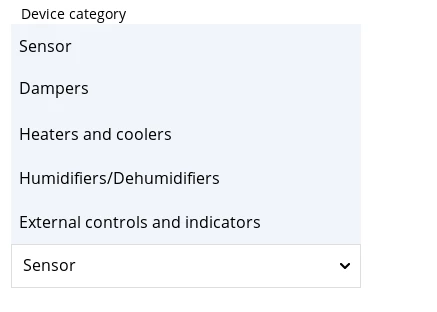
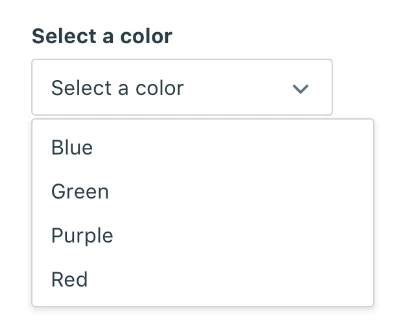
0693W00000WIOKnQAP.pngHow can I achieve it? Thanks.

This topic has been closed for replies.

2 replies

ktrofimo
Senior III
November 15, 2022

Good question. Will follow this thread...​

Yoann KLEIN
ST Employee
November 16, 2022

Hello @heyo​ ,

I'm not sure whether that is possible in TouchGFX or not, but maybe you can try to get inspiration from the SlideMenu Example we did in TouchGFXDesigner. There is maybe something in the code which might help you with your issue.

Let me know how it is going.

/Yoann

Yoann KLEINST Software Developer | TouchGFX
heyo
heyoAuthor
Associate III
November 17, 2022

I do not figure out how it can be done... Maybe u have ideas?

Romain DIELEMAN
ST Employee
December 7, 2022

Hi,

Late comment but maybe you could just have it divided into three things (based on the last picture):

  • text area
  • flex button (with text, box with a thin border, and the arrow icon)
  • list layout (have a look at the list layout example, no need to implement it in a scrollable container though. You make it visible or scroll it when you press the flex button. To do the scroll effect I would personally put the list layout in a container which you gradually change the size to make the elements visible and invisible. I can elaborate if you want if the solution suits you)

0693W00000WKPYLQA5.png 

/Romain