


lxw
Associate III
August 6, 2019
Solved

Designer Run Simulator error!
  • August 6, 2019
  • 10 replies
  • 4306 views

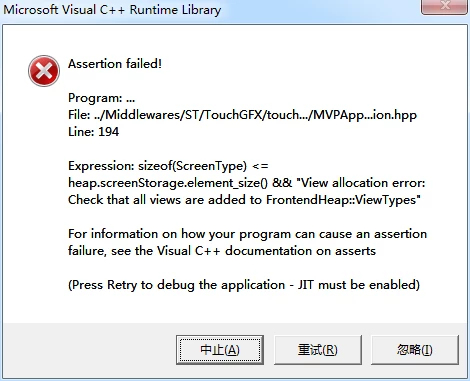
0690X000009878ZQAQ.pngI used cubemx to generate the project, using designer generate gui code. This project works well in VS, MDK and development boards.But use run simulator in designer to prompt the errors shown in the figure.Excuse me, where did this go wrong, how should revise.Thank you very much!

This topic has been closed for replies.
Best answer by Martin KJELDSEN

When you clean and re-generate code from within the designer it should correctly evaluate the size of the view and not give you this error. I'm not really sure why this happened. Sometimes when files are reverted to their older states. This is weird, especially since you have only one view.

In any case, the project works for me in 4.10.0 so i think you should just re-generate your code (The offending file is a generated one).

/Martin

10 replies

Martin KJELDSEN
Principal III
August 6, 2019

Hi,

This happens during transition to a different screen. TouchGFX asserts that there is enough space on the heap to allocate the new view/. Memory is allocated statically based on the largest view. Having created it through the designer it should definitely not be failing because code generation will ensure that the view size is evaluated properly.

Did you by chance use a version control system to revert one of these files? Can you send me the project?

/Martin

lxw
lxwAuthor
Associate III
August 7, 2019

I sent you a message with the project. Can you see it