


GBert.2
Senior
November 23, 2021
Question

Debug Touchgfx simulation using Visual Studio: How to add external code?

  • November 23, 2021
  • 2 replies
  • 1704 views

I'm using Visual Studio (TouchGFX/simulator/msvs/Application.sln) to debug my project's simulation.

I want to understand what is causing an exception.

The problem is that the exception is not in the codebase.

See the call stack here
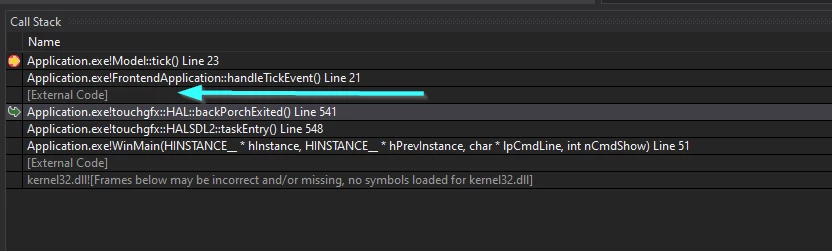
0693W00000GYc6xQAD.pngHow do I add those external files to the Visual Studio Solution?

Regards,

Gabriel

~~

EDIT:

After further investigation, It appears that the VS solution is not configured to see the Middlewares\ST\touchgfx directory. Could this be the problem?

This topic has been closed for replies.

2 replies

Michael K
Senior III
November 24, 2021

I think FrontendApplication::handleTickEvent() is called by the TouchGFX engine, which comes as a prebuilt library and links into user code. VS may not be able to see the exact stack trace for functions inside the library.

Embedded UI/UX Consulting: cadenza.design
GBert.2
GBert.2Author
Senior
November 24, 2021

Humm I think you're right Michael. this seems likely.

I'm not sure if somebody from ST would have a trick to debug the prebuilt library.

The more I see the code, the best I can debug.