


Question
Custom Widget with transparency issue
Hi,
following my previous post (Thanks alot!):
https://community.st.com/s/question/0D53W000014VujASAS/rectangle-frame-widget?t=1631603862714
I decided to try and create a custom widget.
I'm struggling with setting part of the widget to be transparent.
More precisely, it is transparent, but for some reason shows the previous screen in the transparent area.
This is my first screen:
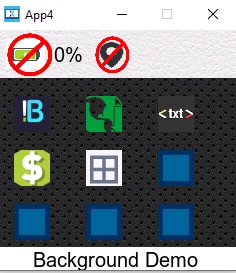 and this is my second screen:
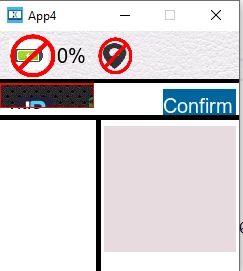
as can be seen, the my custom widget is the frame in the top left corner underneath the status bar.
void RectFrame::draw(const touchgfx::Rect& invalidatedArea) const
{
	touchgfx::Rect absolute = getAbsoluteRect();

	uint16_t* framebuffer = touchgfx::HAL::getInstance()->lockFrameBuffer();

	int left_edge = invalidatedArea.x;
	int up_edge = invalidatedArea.y;
	int bottom_edge = invalidatedArea.bottom();
	int right_edge = invalidatedArea.right();

	for (int y = invalidatedArea.y; y < bottom_edge; y++)
	{

		for (int x = invalidatedArea.x; x < right_edge; x++)
		{

			if((x >= left_edge && x <= left_edge + thickness) ||
				(x <= right_edge && x >= right_edge - thickness)||
				(y >= up_edge && y <= up_edge + thickness) ||
				(y <= bottom_edge && y >= bottom_edge - thickness)){


					framebuffer[absolute.x + x + (absolute.y + y) *
 touchgfx::HAL::DISPLAY_WIDTH] = 0xf800;

			}
		}


	}

	touchgfx::HAL::getInstance()->unlockFrameBuffer();
	//HAL::lcd().fillRect(absolute, (255, 0, 0, 255), 0);
}
I tried using the commented fillRect() (which is used by Box) line with different parameters but to no avail.
Thanks you