


Fishmaster257
Associate II
March 27, 2021
Solved

CubeIDE not flashing external memory

  • March 27, 2021
  • 3 replies
  • 2675 views

Hello,

I am working on a Project mainly from my desktop PC, yet because I recently installed my board in a garden shed, I have to use my Laptop from now on if I dont want to take the board home again. For this purpose I simply copied my projectfolder from /.../TouchGFXProjects, to the same location on my laptop.

If I try flashing my STM32F469I-DISCO board from my laptop, somehow CubeIDE decides to not flash my external memory (QSPI). The result is a black screen instead of what I designed with TGFX.

This is what I get from the console using my PC:

Erasing memory corresponding to segment 0:

Erasing internal memory sectors [0 5]

Erasing memory corrseponding to segment 1:

Erasing external memory sectors [0 119]

Download in Progress:

This is what CubeIDE outputs ont the console using my laptop:

Erasing memory corresponding to segment 0:

Erasing internal memory sectors [0 5]

Erasing memory corrseponding to segment 1:

Download in Progress:

So to my understanding it simply "refuses" to flash the QSPI... yet when taking a look at the build analyzer it looks like this on both laptop and PC:
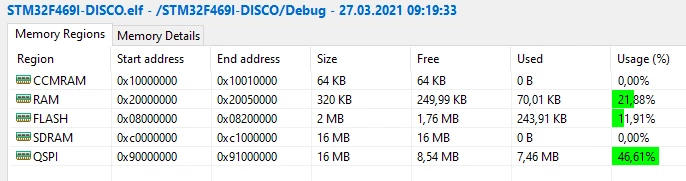
0693W000008y4kAQAQ.pngI basiically set my laptop up in the same way I set up my PC. I installed, Touchgfx, ST-LinkUtility,CubeProgramme, CubeMX and CubeIDE.

I guess, I am just missing a checkbox or something, yet I have already compared build and debugging settings and they both look the same on PC and laptop.

Lastly this rather crude method of simply copying the projectfolder worked for me before with an older proect also set up with TGFX. So I dont quite understand why it is not working this time.

Any help is much appreciated.

This topic has been closed for replies.
Best answer by Michael K

Can you confirm that your linker script looks similar to below?

/* Memories definition */
MEMORY
{
 CCMRAM (xrw) : ORIGIN = 0x10000000, LENGTH = 64K
 RAM (xrw) : ORIGIN = 0x20000000, LENGTH = 320K
 FLASH (rx) : ORIGIN = 0x8000000, LENGTH = 2048K
 SDRAM (rw) : ORIGIN = 0xC0000000, LENGTH = 16M
 QSPI (r) : ORIGIN = 0x90000000, LENGTH = 16M
}

If you download STM32CubeProgrammer standalone, are you able to browse memory location of QSPI after selecting the appropriate external loader? (You can find the external loader selected under Debug Configurations -> Debugger tab, Misc section)

3 replies

Michael K
Michael KBest answer
Senior III
March 29, 2021

Can you confirm that your linker script looks similar to below?

/* Memories definition */
MEMORY
{
 CCMRAM (xrw) : ORIGIN = 0x10000000, LENGTH = 64K
 RAM (xrw) : ORIGIN = 0x20000000, LENGTH = 320K
 FLASH (rx) : ORIGIN = 0x8000000, LENGTH = 2048K
 SDRAM (rw) : ORIGIN = 0xC0000000, LENGTH = 16M
 QSPI (r) : ORIGIN = 0x90000000, LENGTH = 16M
}

If you download STM32CubeProgrammer standalone, are you able to browse memory location of QSPI after selecting the appropriate external loader? (You can find the external loader selected under Debug Configurations -> Debugger tab, Misc section)

Embedded UI/UX Consulting: cadenza.design
Fishmaster257
Associate II
March 29, 2021

Yes the linker script looks as above, yet I have found my solution. I reinstalled CubeIDE and when opening my .cproject file I make sure to have CubeIDE closed. I dont know which of these caused the board to flash normally but it works.

oeliks
Associate III
January 23, 2022

Also when using cubeide and cube programmer - when connected in cube programmer You cant program chip with cubeide.​