


Manu1
Visitor II
July 31, 2023
Solved

Changing Font properties on run time in TouchGFX

  • July 31, 2023
  • 1 reply
  • 1621 views

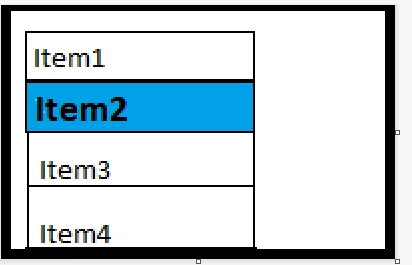
I have a list of Menu items. I'm handling the navigation with buttons. When curser/pointer pointed on a particular menu Item, The existing text should look darker than other items. Example (Sorry about the poor outline :grinning_face_with_sweat:). 

Seeking Help on: How to make text looks darker on run time ?
Manu1_0-1690804183604.png

Thanks in advance,

This topic has been closed for replies.
Best answer by JTP1

Hello

You can change the text color or box background color when item is selected, thats the most simplest method.

If you want change font size or show selected item bolded, you must put two text areas on top of each other with different typography and show / hide one or the other based on selection.

BR J.T

1 reply

JTP1Best answer
Graduate II
July 31, 2023

Hello

You can change the text color or box background color when item is selected, thats the most simplest method.

If you want change font size or show selected item bolded, you must put two text areas on top of each other with different typography and show / hide one or the other based on selection.

BR J.T