
Solved
Can't recognize numbers with Unicode
Hi,
I'm building a program which has a part that is similar to the "Flex Button Example".
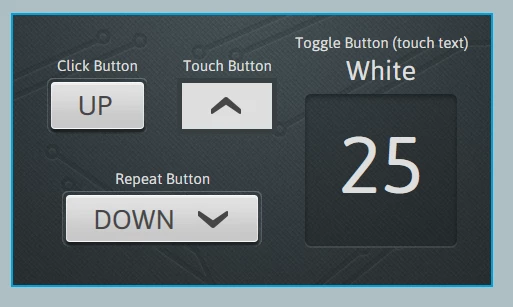
In my case I've got a problem with Unicode. My program works the same as the image above. When I reach to number 24, 26, 28, 29, this is what it shows:

This is my code:
touchgfx::TextAreaWithOneWildcard texto;
touchgfx::Unicode::UnicodeChar* memoria;
int tama;

IP_AdressView::IP_AdressView()
{

}

void IP_AdressView::adress1_button_pressed()
{
 adress1_button.setBoxWithBorderColors(touchgfx::Color::getColorFrom24BitRGB(169, 172, 173), touchgfx::Color::getColorFrom24BitRGB(169, 172, 173), touchgfx::Color::getColorFrom24BitRGB(0, 0, 0), touchgfx::Color::getColorFrom24BitRGB(0, 0, 0));
 texto = adress1;
	memoria = adress1Buffer;
	tama = ADRESS1_SIZE;
	buttonUppressed();
	buttonDownpressed();
}

void IP_AdressView::buttonUppressed()
{
 int tmpVal = Unicode::atoi(texto.getWildcard());
 if (tmpVal >= 0)
 {
 tmpVal++;
 Unicode::snprintf(memoria, tama, "%d", tmpVal);
 texto.invalidate();
 	touchgfx_printf("%d\n", tmpVal);

 if (tmpVal >= 300)
 {
 buttonUp.setAlpha(100);
 buttonUp.setTouchable(false);
 buttonUp.setPressed(false);
 buttonUp.invalidate();
 }
 }
}

void IP_AdressView::buttonDownpressed()
{
 int tmpVal = Unicode::atoi(texto.getWildcard());
 if (tmpVal >= 0)
 {
 tmpVal--;
 Unicode::snprintf(memoria, tama, "%d", tmpVal);
 texto.invalidate();

 if (tmpVal <= 0)
 {
 buttonDown.setAlpha(100);
 buttonDown.setTouchable(false);
 buttonDown.setPressed(false);
 buttonDown.invalidate();
 }
 }
}
And then, when I print the number through the TouchGFX Terminal, it works fine:
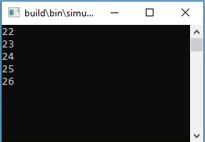
I would appreciate your help.
Thanks,
Dani