


ksale.1
Senior II
December 3, 2025
Solved

boxProgress orientation, and circleProgress size

  • December 3, 2025
  • 1 reply
  • 549 views

Hi, In my UI project I need a vertucal boxProgress while all available backgrouds and images are horizontal while w&h are greyed out. When I create a custom background, the progress bar is not working. Same for circleProgress (size control). Can you help please.

    This topic has been closed for replies.
    Best answer by Osman SOYKURT

    Hello @ksale.1 ,

    I attempted to replicate the issue but did not encounter any problems when setting up and using a vertical BoxProgress. Please verify the following two points:

    • Ensure that the height of your background image is sufficiently large.
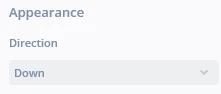
    • In the properties panel of your BoxProgress widget (on the right side), adjust the "Appearance" setting—either up or down—according to your desired orientation.
      OsmanSOYKURT_1-1764943423095.png


    1 reply

    Osman SOYKURT
    Osman SOYKURTBest answer
    ST Technical Moderator
    December 5, 2025

    Hello @ksale.1 ,

    I attempted to replicate the issue but did not encounter any problems when setting up and using a vertical BoxProgress. Please verify the following two points:

    • Ensure that the height of your background image is sufficiently large.
    • In the properties panel of your BoxProgress widget (on the right side), adjust the "Appearance" setting—either up or down—according to your desired orientation.
      OsmanSOYKURT_1-1764943423095.png


    ST Software Developer | TouchGFX