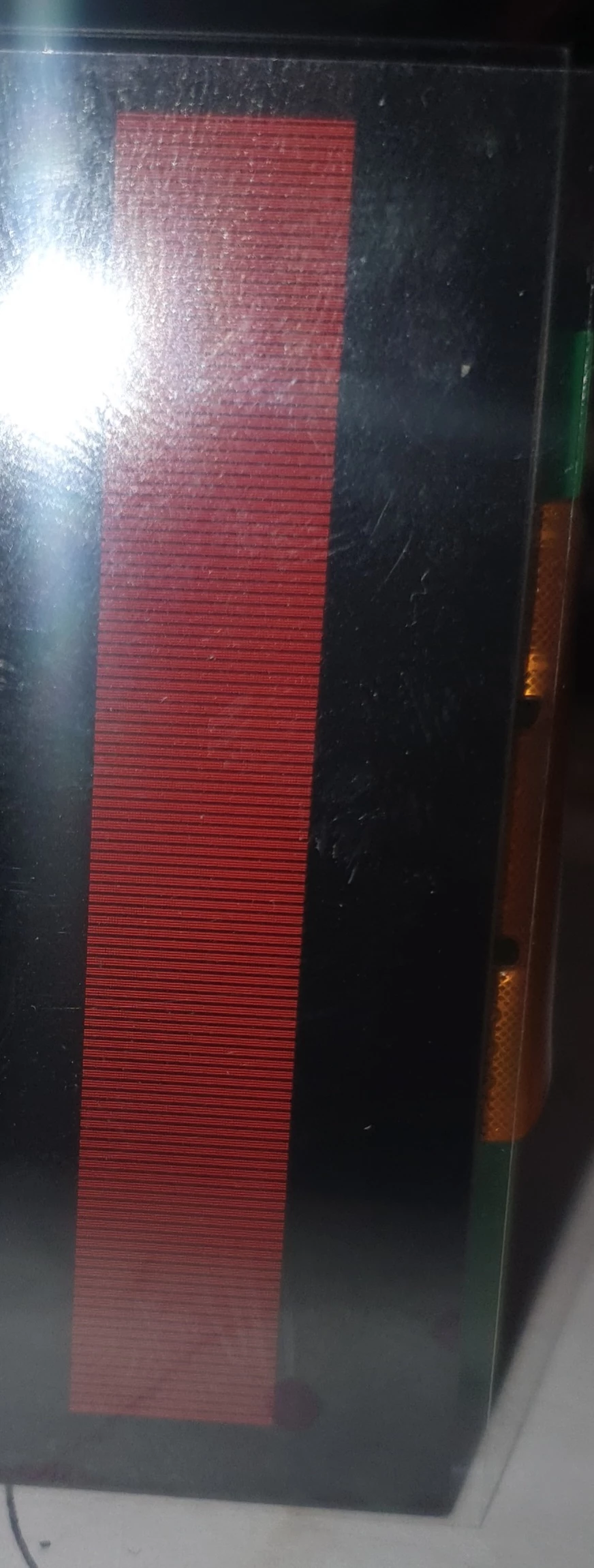
Black horizontal lines when SDRAM is used. Why?
Hello,
another day, another problem...
I just started with a custom board. But i am using parts which are already working on boards from ST so i thought it will be easy to adapt.
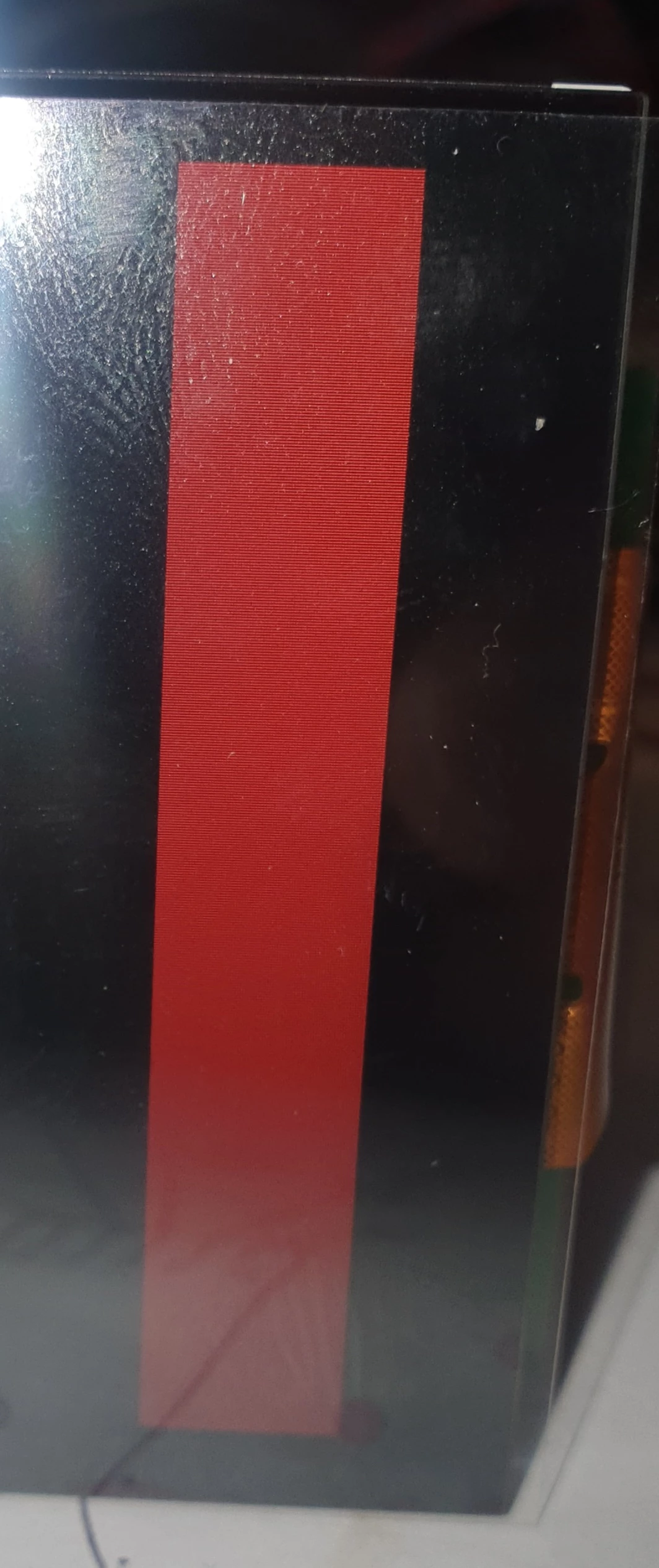
I started a new project and if i use internal RAM for a touchgfx box everything is fine.
As soon as i add the SDRAM to the linker file i have a lot of lines (black or just not read from sdram correctly?).
For SDRAM the MT48LC4M32B2 with 16MB is used like in a lot of disco or eval boards.
MCU is running at 200MHz
My FMC / SDRAM Settings:
#define REFRESH_COUNT 		 ((uint32_t)0x0603) /* SDRAM refresh counter */
#define SDRAM_TIMEOUT ((uint32_t)0xFFFF)
#define SDRAM_MODEREG_BURST_LENGTH_1 ((uint16_t)0x0000)
#define SDRAM_MODEREG_BURST_LENGTH_2 ((uint16_t)0x0001)
#define SDRAM_MODEREG_BURST_LENGTH_4 ((uint16_t)0x0002)
#define SDRAM_MODEREG_BURST_LENGTH_8 ((uint16_t)0x0004)
#define SDRAM_MODEREG_BURST_TYPE_SEQUENTIAL ((uint16_t)0x0000)
#define SDRAM_MODEREG_BURST_TYPE_INTERLEAVED ((uint16_t)0x0008)
#define SDRAM_MODEREG_CAS_LATENCY_2 ((uint16_t)0x0020)
#define SDRAM_MODEREG_CAS_LATENCY_3 ((uint16_t)0x0030)
#define SDRAM_MODEREG_OPERATING_MODE_STANDARD ((uint16_t)0x0000)
#define SDRAM_MODEREG_WRITEBURST_MODE_PROGRAMMED ((uint16_t)0x0000)
#define SDRAM_MODEREG_WRITEBURST_MODE_SINGLE ((uint16_t)0x0200)
FMC_SDRAM_CommandTypeDef command;
/* Program the SDRAM external device */
BSP_SDRAM_Initialization_Sequence(&hsdram1, &command);
//Deactivate speculative/cache access to first FMC Bank to save FMC bandwidth
FMC_Bank1->BTCR[0] = 0x000030D2;And the Init sequence:
static void BSP_SDRAM_Initialization_Sequence(SDRAM_HandleTypeDef *hsdram, FMC_SDRAM_CommandTypeDef *Command)
{
 __IO uint32_t tmpmrd = 0;

 /* Step 1: Configure a clock configuration enable command */
 Command->CommandMode = FMC_SDRAM_CMD_CLK_ENABLE;
 Command->CommandTarget = FMC_SDRAM_CMD_TARGET_BANK1;
 Command->AutoRefreshNumber = 1;
 Command->ModeRegisterDefinition = 0;

 /* Send the command */
 HAL_SDRAM_SendCommand(hsdram, Command, SDRAM_TIMEOUT);

 /* Step 2: Insert 100 us minimum delay */
 /* Inserted delay is equal to 1 ms due to systick time base unit (ms) */
 HAL_Delay(1);

 /* Step 3: Configure a PALL (precharge all) command */
 Command->CommandMode = FMC_SDRAM_CMD_PALL;
 Command->CommandTarget = FMC_SDRAM_CMD_TARGET_BANK1;
 Command->AutoRefreshNumber = 1;
 Command->ModeRegisterDefinition = 0;

 /* Send the command */
 HAL_SDRAM_SendCommand(hsdram, Command, SDRAM_TIMEOUT);

 /* Step 4: Configure an Auto Refresh command */
 Command->CommandMode = FMC_SDRAM_CMD_AUTOREFRESH_MODE;
 Command->CommandTarget = FMC_SDRAM_CMD_TARGET_BANK1;
 Command->AutoRefreshNumber = 8;
 Command->ModeRegisterDefinition = 0;

 /* Send the command */
 HAL_SDRAM_SendCommand(hsdram, Command, SDRAM_TIMEOUT);

 /* Step 5: Program the external memory mode register */
 tmpmrd = (uint32_t)SDRAM_MODEREG_BURST_LENGTH_1 | \
 SDRAM_MODEREG_BURST_TYPE_SEQUENTIAL | \
 SDRAM_MODEREG_CAS_LATENCY_3 | \
 SDRAM_MODEREG_OPERATING_MODE_STANDARD | \
 SDRAM_MODEREG_WRITEBURST_MODE_SINGLE;

 Command->CommandMode = FMC_SDRAM_CMD_LOAD_MODE;
 Command->CommandTarget = FMC_SDRAM_CMD_TARGET_BANK1;
 Command->AutoRefreshNumber = 1;
 Command->ModeRegisterDefinition = tmpmrd;

 /* Send the command */
 HAL_SDRAM_SendCommand(hsdram, Command, SDRAM_TIMEOUT);

 /* Step 6: Set the refresh rate counter */
 /* Set the device refresh rate */
 HAL_SDRAM_ProgramRefreshRate(hsdram, REFRESH_COUNT);

}
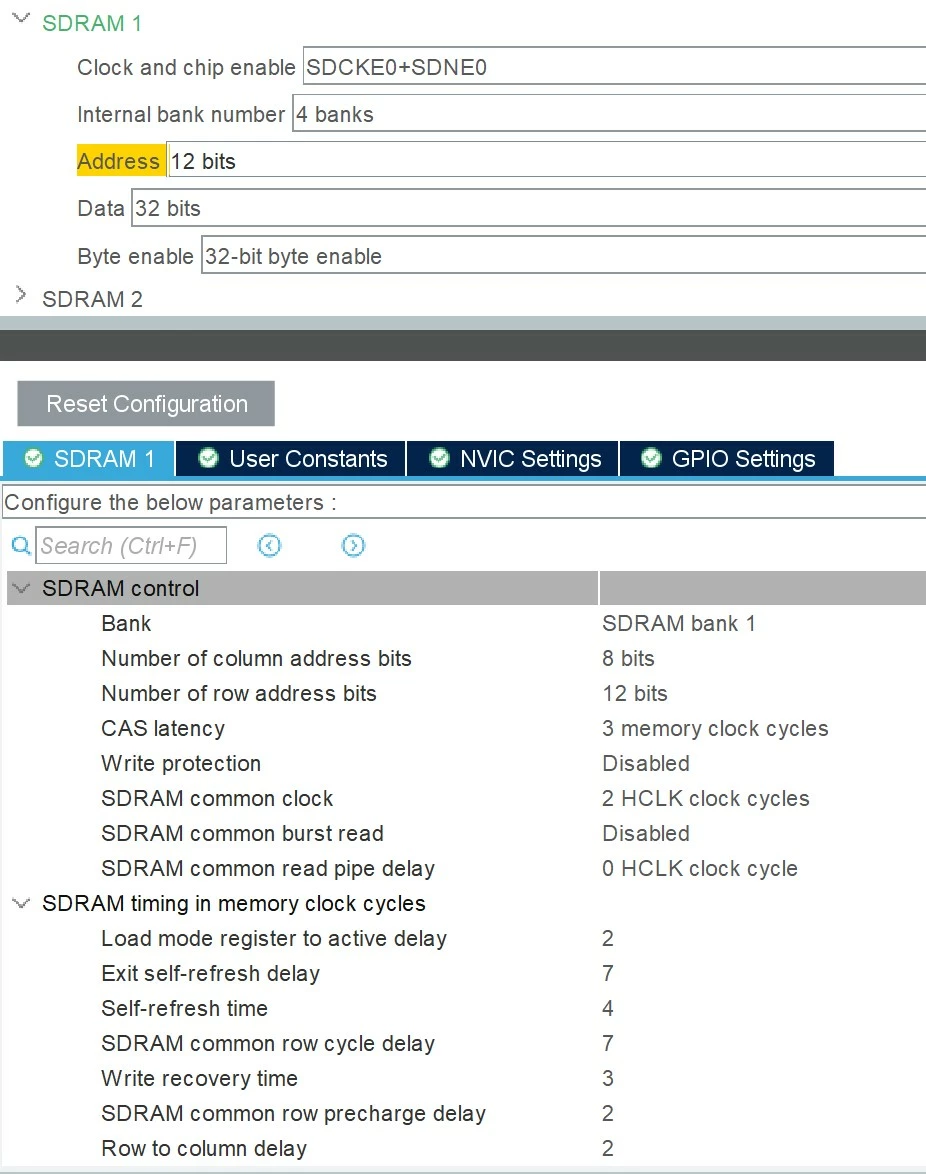
Here are the SDRAM Settings in MX and the pictures of the display with and without SDRAM active.
What did i forget?
Can it be a not proper soldered connection? Should this not end in a hardfault?
Thanks a lot for helping.