


PBU
Associate III
February 8, 2019
Solved

Bitmap::dynamicBitmapCreate() fails to allocate (JPEG decoding)

  • February 8, 2019
  • 13 replies
  • 6190 views

Hi,

I'm trying to load jpeg files in TouchGFX by using the JPEG Loader Library. I have downloaded that from the Git using the link given in TouchGFX Forum. I have added the Library in my project and tried to load a jpeg image. The image was not loaded, the image is placed in the working folder alone. I have set the break point and checked if the file is opened successfully or not. The file was opened successfully but i didn't the image in simulator output . Suggest me a solution for this issue.

This topic has been closed for replies.
Best answer by Martin KJELDSEN

0690X000006DSg1QAG.png

Fixed it.

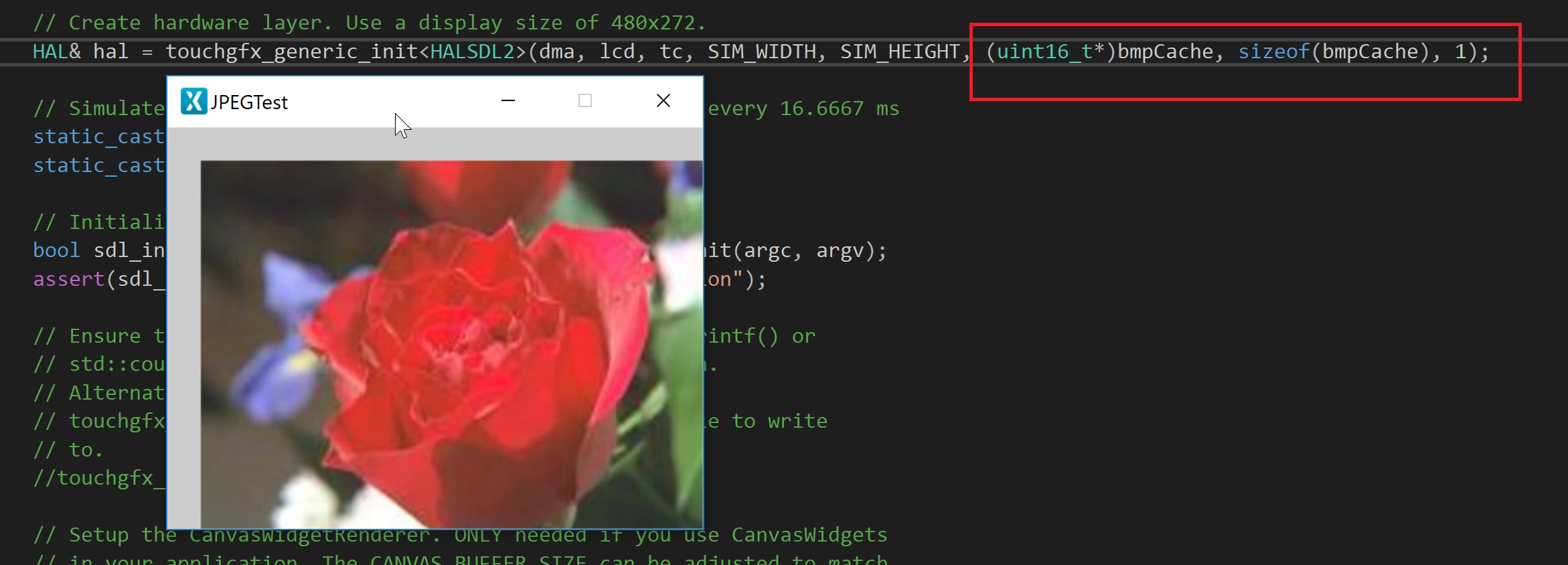
You're missing additional parameters to your touchgfx init call. Pointer to cache, size of cache and number of cached bitmaps. If you stepped through the code in your view you would have seen that a dynamic bitmap could not be allocated so the JPEG was never decoded.

Allocate your cache (e.g. in main.cpp) to be large enough to contain the image (240*320)

uint8_t bmpCache[240*320*4];

 EDIT: Working project is attached to a post further down this thread.

13 replies

Martin KJELDSEN
Principal III
February 8, 2019

Hi @PBU​,

I have your test project. Which compiler are you using?

PBU
PBUAuthor
Associate III
February 8, 2019

Hi Martin,

I'm using GCC Compiler. But Right now i am using Microsoft Visual Studio for Simulation. The Files are inside the msvs folder generated by TouchGFX Tool.

Martin KJELDSEN
Martin KJELDSENBest answer
Principal III
February 8, 2019

0690X000006DSg1QAG.png

Fixed it.

You're missing additional parameters to your touchgfx init call. Pointer to cache, size of cache and number of cached bitmaps. If you stepped through the code in your view you would have seen that a dynamic bitmap could not be allocated so the JPEG was never decoded.

Allocate your cache (e.g. in main.cpp) to be large enough to contain the image (240*320)

uint8_t bmpCache[240*320*4];

 EDIT: Working project is attached to a post further down this thread.

PBU
PBUAuthor
Associate III
February 8, 2019

Hi Martin,

I have allocated the cache as you said. After that i have another error. Can you share the project if possible. Thanks

Martin KJELDSEN
Principal III
February 10, 2019

Hi @PBU​,

Here it is. I've ommitted the touchgfx folder to conserve space. It should get copied when you open the project in the designer.

Hope this helps!

Best regards,

Martin

PBU
PBUAuthor
Associate III
February 10, 2019

Hi Martin,

Thank you. It Works.

PBU
PBUAuthor
Associate III
February 12, 2019

Hi Martin,

I have tried the same project using Atollic True Studio. The fopen return FAIL while trying to open .jpg file. Do we need to change any settings to solve this?

Martin KJELDSEN
Principal III
February 12, 2019

What does printing errno tell you from that failing call? #include <errno.h>

​ 

PBU
PBUAuthor
Associate III
February 12, 2019

Hi Martin,

Getting Error no as 88 (Function not Implemented).0690X000006DZRHQA4.png

JaHnu
Associate II
March 18, 2019

How can I add a library to my project? I am completely in the novice stage

Martin KJELDSEN
Principal III
March 18, 2019

If you mean LibJPEG you can download the JPEGTest application in this thread and check out how.

/Martin

JaHnu
Associate II
March 18, 2019

Thank you reply! I put LibJPEG in my project root directory and added LibJPEG \include to the Include directory. I tried #include "jinclude.h", but the output could not open the include file: 'assert.h': no such file or directory. Cannot open include file: 'stdio.h' in jinclude.h