


Zui
Senior
October 15, 2019
Question

Any way to have in the same project Landscape and Portrait orientation?

  • October 15, 2019
  • 13 replies
  • 4307 views

Since the new TouchGFX 4.12.3 came out, i saw it's finally possible to swtch from landscape to portrait orientation, which is great because i was asked to develop my project with both orientations.

i saw the orientation is changed by this line of code :

touchgfx::HAL::getInstance()->setDisplayOrientation(touchgfx::ORIENTATION_LANDSCAPE);

just switching the function argument.

so i changed my code calling that function changing that parameter, and the effective orientation of the simulator changed, but the problems are the images0690X00000AqMdEQAV.png
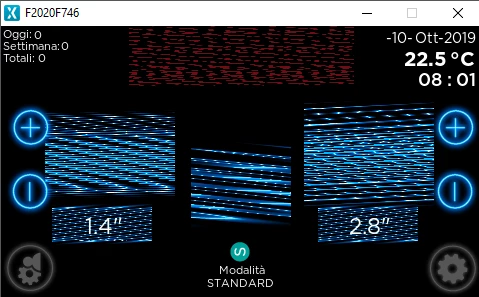
as you can see the images are rotated if are square, and just a mess if are rectangle.

i saw you can change the image oriantation in the designer, but that make all the images cpp file recompiled, so impracticable for changing orientation runtime...

Any way to accomplish what i'm looking for?

Thanks

Stefano

This topic has been closed for replies.

13 replies

Martin KJELDSEN
Principal III
October 15, 2019

Lanscape/Portrait has always been possible, but now it can be configured through the designer, yes!

What you're trying to do now is create an application oriented natively to landscape. But you haven't generated your images in that format, so you're seeing some "garbage", or, images drawn in the wrong direction.

You can read more about how to create applications that support dynamic rotation:

https://touchgfx.zendesk.com/hc/en-us/articles/203563972-Display-Orientation

/Martin

Zui
ZuiAuthor
Senior
October 15, 2019

ok, thanks, just a question before i dive in... will i need to load images in both orientation?

Martin KJELDSEN
Principal III
October 15, 2019

Yes, "unfortunately" (but not surprisingly) - You need to have the assets in both configurations if you intend on doing it runtime.

/Martin

Zui
ZuiAuthor
Senior
October 15, 2019

uhm, i tryed to rename myImage.png in myImage.90.png, and touchGFX creates a myImage.90.cpp of the same size, and there is not any myImage.cpp, and i loaded only the myImage.90.png, so your comment confuses me... unless by assets you means the picture and other elements spatial positions, and not the images themselves (i have a LOT of images, my memory is almost full, can't afford to double images for portrait orientation)

Zui
ZuiAuthor
Senior
October 16, 2019

OK now i'm definitey confused, yesterday my app seems to worked fine after renamin all the image.png in image.90.png, but this morning all went back to the situation in the picture i linked above, and worst things is that if i put layout rotation 90 in touchGFX, TODAY he acts like was rotation 270 (see picture)0690X00000AqPb1QAF.png

also you can see behind the cup and hand images some remains of the previous screen (although i have a black box filling the whole background)

pls help

Martin KJELDSEN
Principal III
October 17, 2019

Okay, not haveing to support dynamic rotation simplifies things a bit, in a way. But i think there are things you're not considering. You can't just rotate an application and expect touchgfx to magically guess how your application should look. By enabling "PORTRAIT" mode, you're just telling TouchGFX to render things in a different way. It will not "rotate" your box for you, for instance. So whoever told you to just have it all as one application might not have thought things completely through.

If you're using 4.12.3 you can configure your application to be portrait mode or landscape mode from within the designer gui (Otherwise you just pass "-rotate90" to imageconverter and tell HAL to set the display orientation).

You will have to create an application for each. Your background box will no longer be .e.g 800 x 480, but now it should be 480 x 800. And you need to handle that in application code one way or the other. Does that make sense?

You could have everything in the same application but you'd have additional code that checked for the current ORIENTATION and then set up the view accordingly, OR you would have to use preprocessor directives that set up the view depending on the orientation.

What changing orientation through the designer will also do is tell the "image converter" to rotate all images when it generates pixels to c++ code.

/Martin

Zui
ZuiAuthor
Senior
October 17, 2019

Well, OFC i wasn't expecting TouchGfx would magically know where i would all things to be located in the portrait mode, i've already wrote the code that moves everything in the right place.

you say :"[quote] our background box will no longer be .e.g 800 x 480, but now it should be 480 x 800. And you need to handle that in application code one way or the other. Does that make sense?"[/quote]

Maybe i'm wrong, but doesn't make sense to me, the 800 x 480 is the same that the 480 x 800 just rotated, but the bytes are the same, that's why i was wondering if there was a way to tell touchGFX to rotate the image from the image.cpp file instead of having to recompile all the images every time i need to rotate my app...

[quote]You could have everything in the same application but you'd have additional code that checked for the current ORIENTATION and then set up the view accordingly, OR you would have to use preprocessor directives that set up the view depending on the orientation.[/quote]

How to do that? because actually i need to recompile after changing layout rotation in touchGfx...

Aling.1
Visitor II
July 16, 2020

Dear Martin KJELDSEN :

I'm trying to create an application oriented natively to landscape. But I don't know how to generate my images in that format ,because I can't open the website you offered before .Can you give me a new website ? And my device is F429 Discovery . I only need landscape mode .0693W000001szL7QAI.jpg

Martin KJELDSEN
Principal III
July 16, 2020

Hi, the new documentation site is https://support.touchgfx.com

In regards to your issue: Go to the "Config" tab in the designer and you can specify "display orientation" of the application itself and also rotation for images.

/Martin