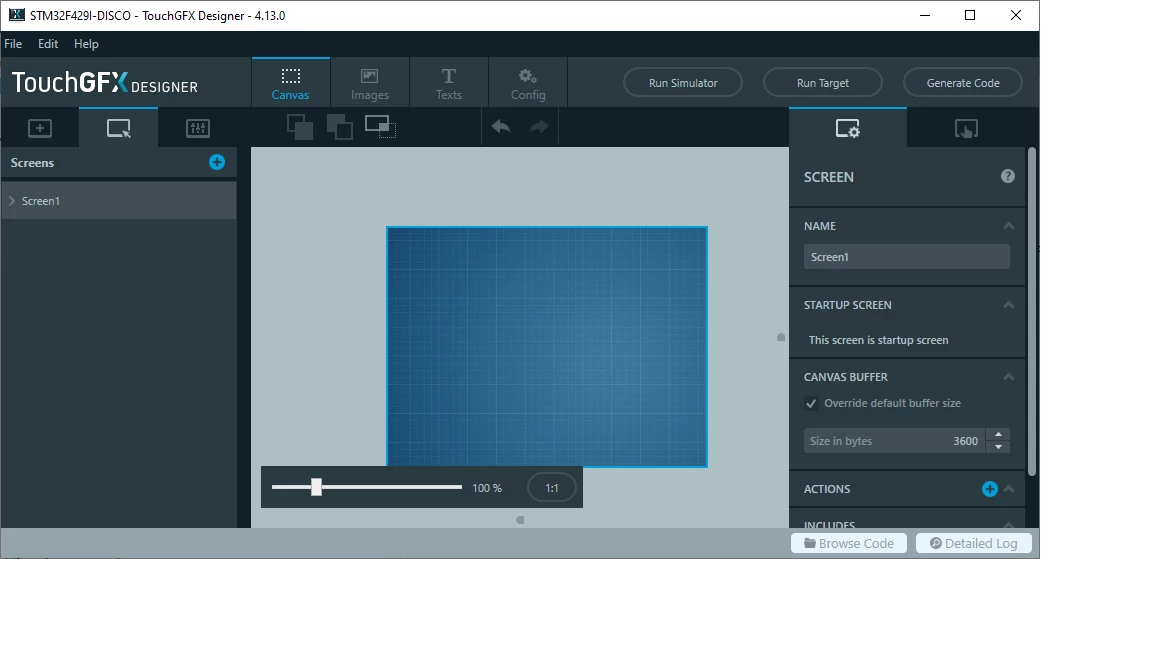
Added a Graph Widget but nothing is shown on the display
I downloaded GraphApplication from this post to try Graph Widget.
I am using STM32F429i-Discovery Board to display this graph, after adding necessary code to my Screen1View.cpp and importing these files,
Graph.hpp, GraphLine.hpp, AbstractGraph.hpp ,
Graph.cpp, GraphLine.cpp, AbstractGraph.cpp.
The graph is still not shown on my Screen1View. On the display, it just show the blue background image from the GraphApplication example.
Here is my code.
File Screen1View.hpp

#ifndef SCREEN1VIEW_HPP
#define SCREEN1VIEW_HPP

#include <gui_generated/screen1_screen/Screen1ViewBase.hpp>
#include <gui/screen1_screen/Screen1Presenter.hpp>
#include <Graph.hpp>

class Screen1View : public Screen1ViewBase
{
public:
 Screen1View();
 virtual ~Screen1View() {}
 virtual void setupScreen();
 virtual void tearDownScreen();
 virtual void handleTickEvent();
protected:

 int tickCounter;
 Graph graph;
};

#endif // SCREEN1VIEW_HPP
File Screen1View.cpp
#include <gui/screen1_screen/Screen1View.hpp>
static int randomNumberBetween(int lowest, int highest);
static int randomNumberBetween(int lowest, int highest)
{
#ifdef SIMULATOR
return lowest + (highest - lowest) * rand() / RAND_MAX;
#else
uint32_t random = (touchgfx::HAL::getInstance()->getCPUCycles() * HAL::getInstance()->getCPUCycles());
return lowest + (random % (highest - lowest));
#endif
}
Screen1View::Screen1View()
{
}
void Screen1View::setupScreen()
{
//Screen1ViewBase::setupScreen();
// Place the graph on the screen
graph.setXY(20, 20);
// Set the outer dimensions and color of the graph
graph.setup(440, 200, Color::getColorFrom24BitRGB(0xFF, 0xFF, 0xAC));
// Set the range for the x and y axis of the graph. That is
// the max and min x/y value that can be displayed inside the
// dimension of the graph.
graph.setRange(0, 50, 0, 200);
// Set the line width in pixels
graph.setLineWidth(2);
add(graph);
}
void Screen1View::tearDownScreen()
{
Screen1ViewBase::tearDownScreen();
}
void Screen1View::handleTickEvent()
{
// Number of ticks between inserting a point in the graph
int interval = 5;
tickCounter++;
if (tickCounter % interval == 0)
{
// Insert a point in the graph.
// The Y value is a random number in the y range of the graph.
graph.addValue(tickCounter / interval, randomNumberBetween(graph.getRangeBottom(), graph.getRangeTop()));
}
if (tickCounter == 37 * interval)
{
// Change the range of the Y axis
graph.setRange(0, 50, 0, 400);
graph.invalidate();
}
if (tickCounter == 50 * interval)
{
// Reset the graph and start over
graph.setRange(0, 50, 0, 200);
graph.setLineWidth(2);
graph.clear();
graph.invalidate();
tickCounter = 0;
}
}Attached my project. Just unzip the workspace, open workspace1\GraphTest\STM32CubeIDE\.cproject and use workspace1 as workspace directory.

Edit 1:
I found that i should add a canvas buffer in main.c , i will try to convert the example main.cpp to main.c
Edit 2:
I added a canvas buffer 3600 to screen 1 through TouchGfx designer, and the graph line started to appear at last!