大家好,我遇到了STM32H503CBT6,PROVISIONED后如何恢复OPEN
Edited by an ST Community moderator to translate the content. Please use English in this community. Thank you for your understanding.
当初的操作是:
1. STM32H503CBT6原本处于 OPEN。
2.在STM32CubeProgrammer 2.23.0.0里手动将 PRODUCT_STATE 设置为 PROVISIONING (0x17)。
3. 没有烧录 DA 密码 HASH 到 OTP。
4. 在STM32CubeProgrammer 2.23.0.0里手动将 PRODUCT_STATE 设置为 PROVISIONED (0x2E)。
现在希望恢复 OPEN,我改如何操作?自己设计的最小系统板。
也尝试使用
./STM32_Programmer_CLI.exe -c port=SWD pwd=da_password.bin debugauth=2得到的结果是
PS D:\software\STMicroelectronics\STM32CubeProgrammer\bin> ./STM32_Programmer_CLI.exe -c port=SWD pwd=da_password.bin debugauth=2
      -------------------------------------------------------------------
                       STM32CubeProgrammer v2.23.0
      -------------------------------------------------------------------

Password file path submitted : da_password.bin


Start Debug Authentication Sequence

Open SDM Lib
SDMOpen                       :   765 : open       : SDM API v1.0

SDMOpen                       :   766 : open       : SDM Library version v1.4.0

open_comms                    :   606 : open       : Asserting target reset

open_comms                    :   614 : open       : Writing magic number

open_comms                    :   678 : open       : De-asserting target reset

open_comms                    :   713 : open       : Communication with the target established successfully

response_packet_lock
response_packet_lock
discovery: target ID.......................:0x474
discovery: SoC ID..........................:0x00000000_35373436_32345102_00510052
discovery: SDA version.....................:1.2.0
discovery: Vendor ID.......................:STMicroelectronics
discovery: PSA lifecycle...................:ST_LIFECYCLE_IROT_PROVISIONED
discovery: PSA auth version................:1.0
discovery: ST HDPL1 status.................:0x11111111
discovery: ST HDPL2 status.................:0x22222222
discovery: ST HDPL3 status.................:0x33333333
discovery: Token Formats...................:0x00000200
discovery: Certificate Formats.............:0x00000201
discovery: cryptosystems...................:ST Password
discovery: ST provisioning integrity status:0xFFFFFFFF
discovery: ST provisioning integrity status message:UNKNOWN
discovery: permission if authorized...........:(a/14) ==> Full Regression
To select multiple permission/actions:
    Using numerical values: List the needed bit numbers, separated by commas without spaces.
    Using symbolic letters: List the needed letters by concatenating them without separators.

Debug Authentication: Discovery Success
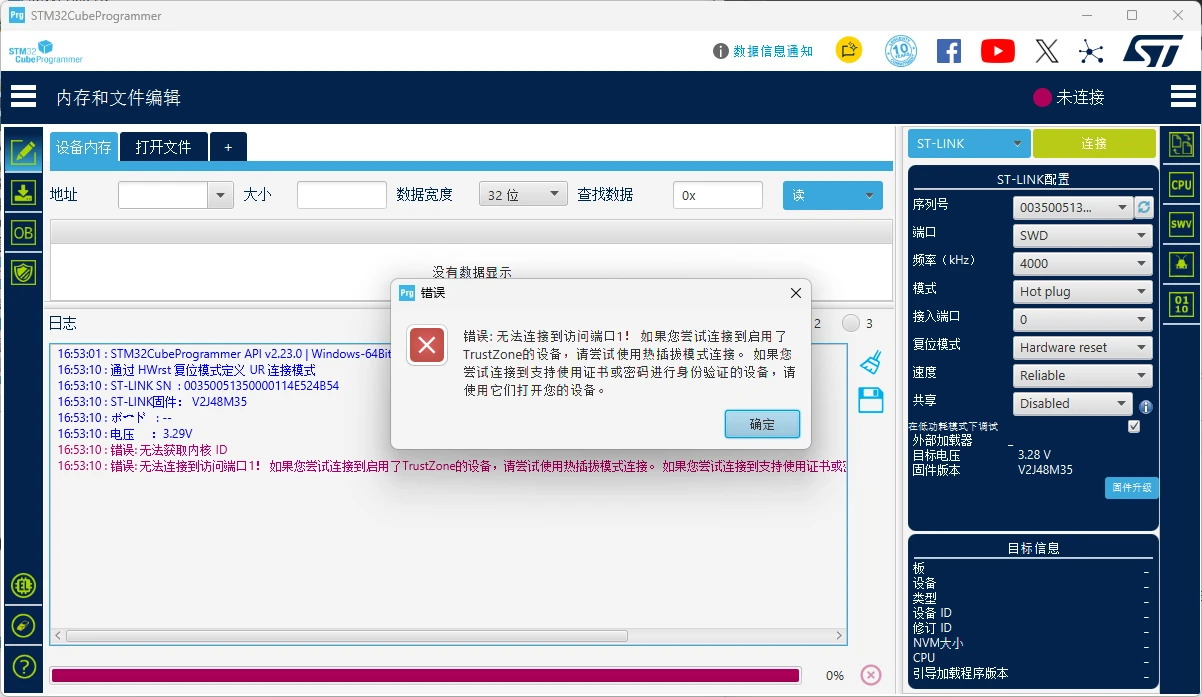
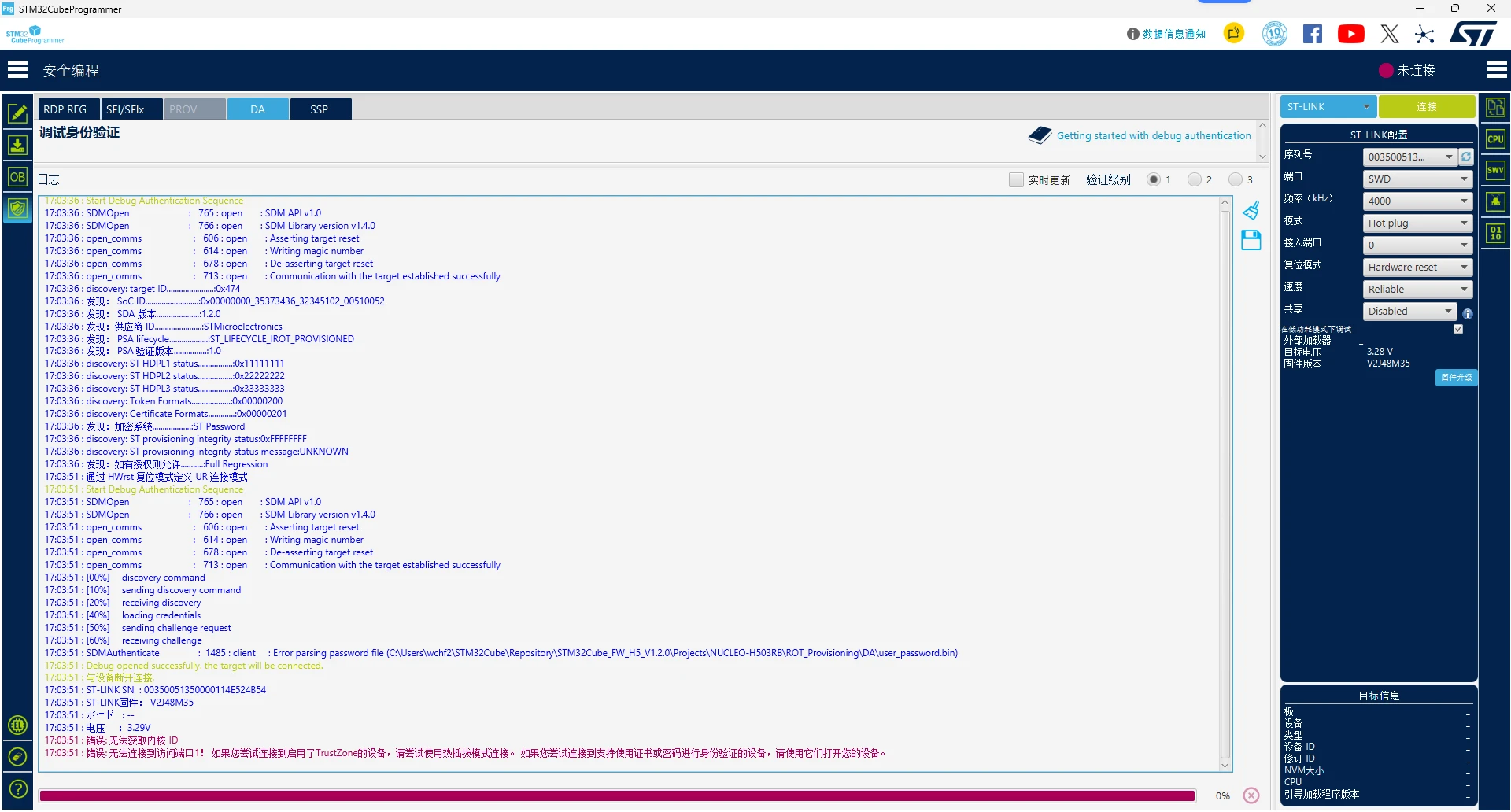
尝试了几种方法,均无法回归,
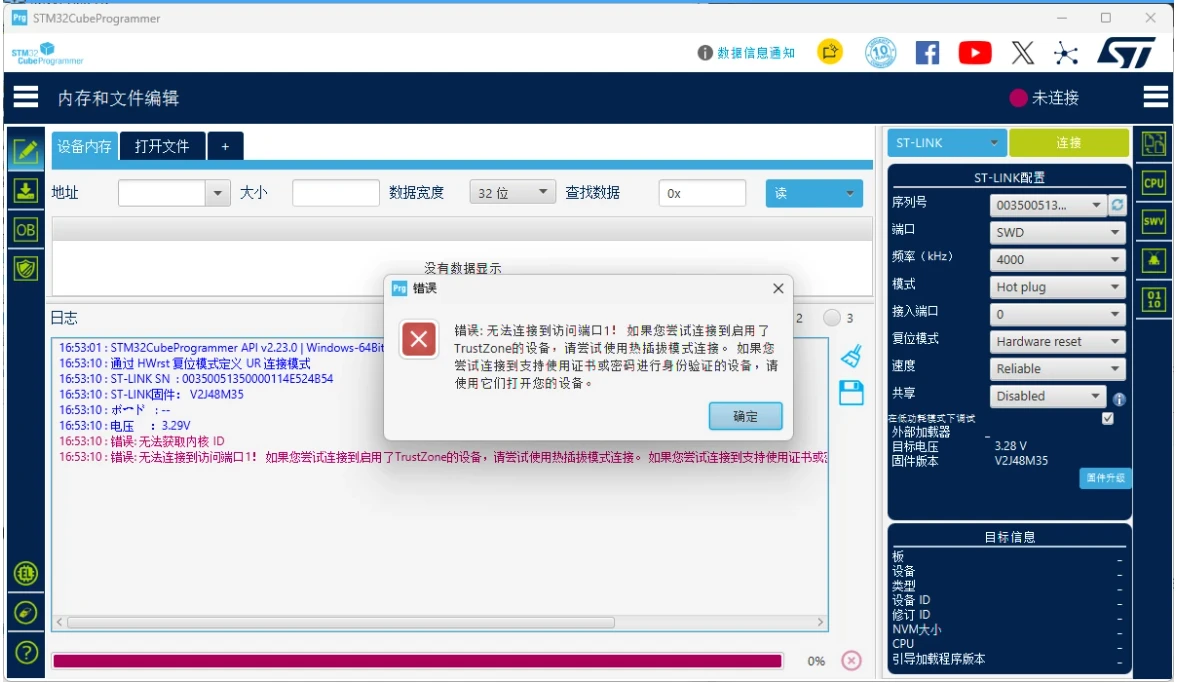
方法1:将stlink连接目标板,连接MCU的NRST到stlink的NRST。
使用STM32CubeProgrammer,无法连接,也无法关闭
方法2:尝试将boot0短接到3.3V,再将USB连接到windows PC,MCU无法进入Bootloader,直接运行之前烧录的程序。
测试在没有更改PRODUCT_STATE是可以进入Bootloader。
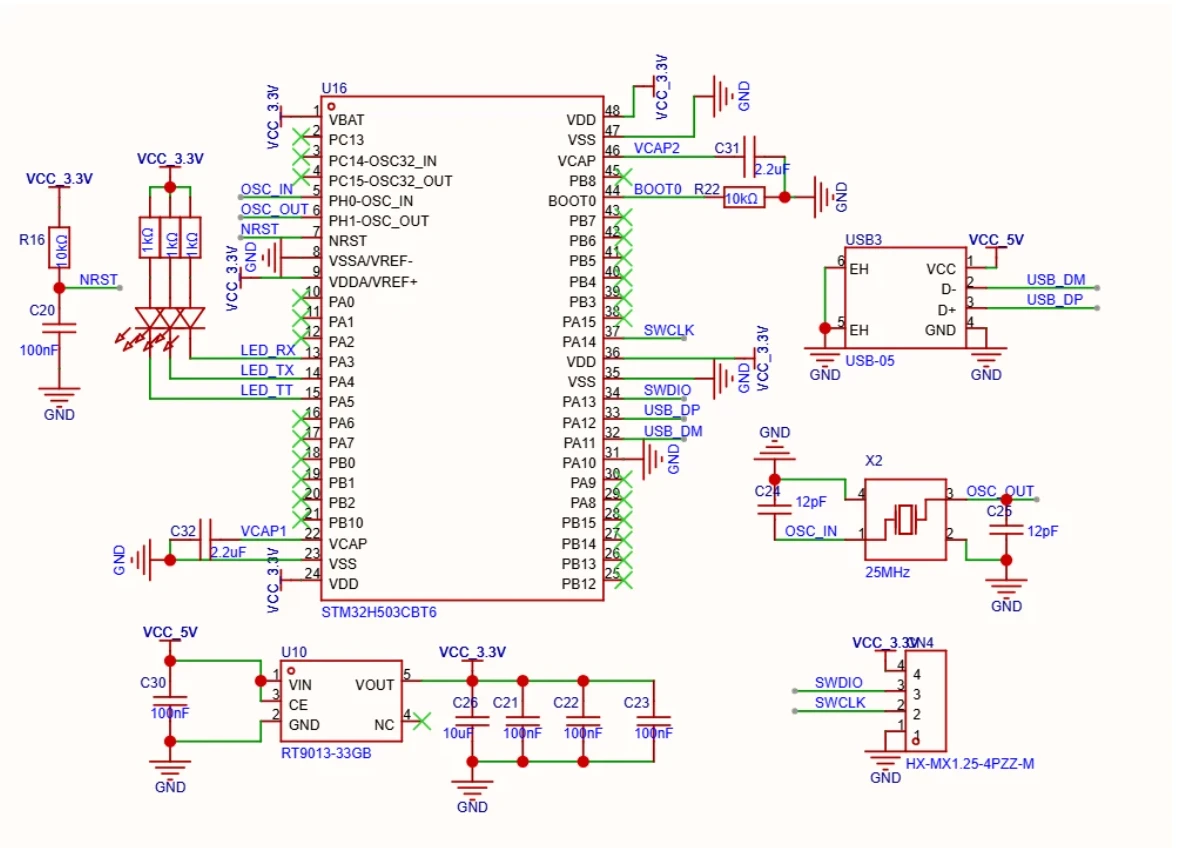
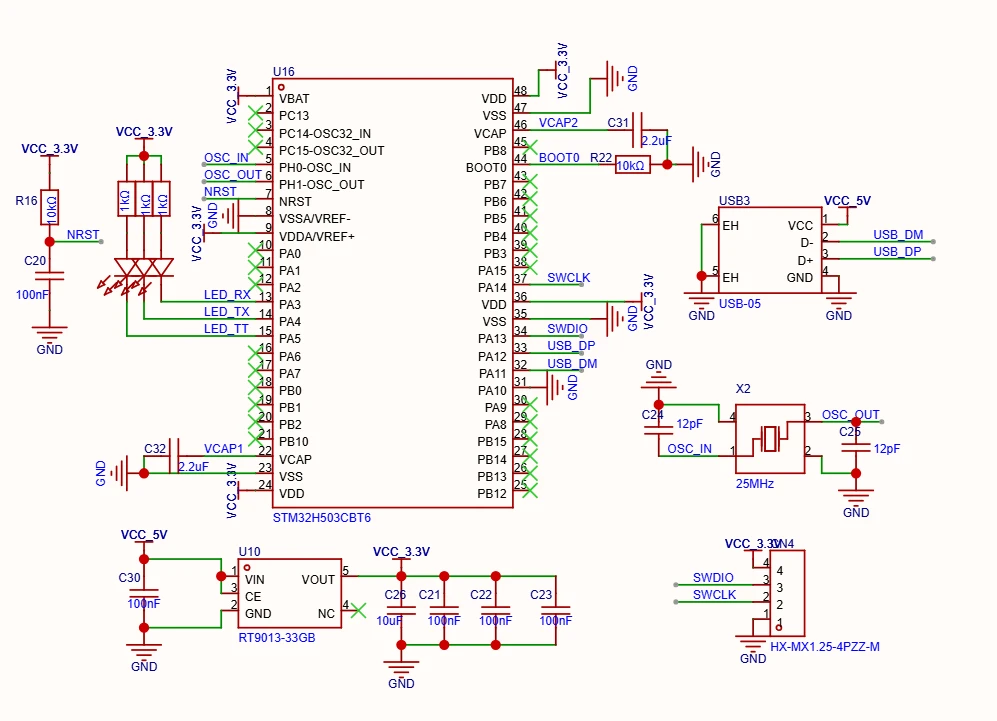
附上我的原理图。
Translation; by Google translator:
The procedure followed at the time was:
1. The STM32H503CBT6 was initially in the OPEN state.
2. The PRODUCT_STATE was manually set to PROVISIONING (0x17) using STM32CubeProgrammer 2.23.0.0.
3. The DA password hash was not programmed into the OTP.
4. The PRODUCT_STATE was manually set to PROVISIONED (0x2E) using STM32CubeProgrammer 2.23.0.0.
Now I want to restore OPEN, what should I do? The smallest system board designed by myself.
Also try using
./STM32_Programmer_CLI.exe -c port=SWD pwd=da_password.bin debugauth=2The result obtained is
PS D:\software\STMicroelectronics\STM32CubeProgrammer\bin> ./STM32_Programmer_CLI.exe -c port=SWD pwd=da_password.bin debugauth=2
      -------------------------------------------------------------------
                       STM32CubeProgrammer v2.23.0
      -------------------------------------------------------------------

Password file path submitted : da_password.bin


Start Debug Authentication Sequence

Open SDM Lib
SDMOpen                       :   765 : open       : SDM API v1.0

SDMOpen                       :   766 : open       : SDM Library version v1.4.0

open_comms                    :   606 : open       : Asserting target reset

open_comms                    :   614 : open       : Writing magic number

open_comms                    :   678 : open       : De-asserting target reset

open_comms                    :   713 : open       : Communication with the target established successfully

response_packet_lock
response_packet_lock
discovery: target ID.......................:0x474
discovery: SoC ID..........................:0x00000000_35373436_32345102_00510052
discovery: SDA version.....................:1.2.0
discovery: Vendor ID.......................:STMicroelectronics
discovery: PSA lifecycle...................:ST_LIFECYCLE_IROT_PROVISIONED
discovery: PSA auth version................:1.0
discovery: ST HDPL1 status.................:0x11111111
discovery: ST HDPL2 status.................:0x22222222
discovery: ST HDPL3 status.................:0x33333333
discovery: Token Formats...................:0x00000200
discovery: Certificate Formats.............:0x00000201
discovery: cryptosystems...................:ST Password
discovery: ST provisioning integrity status:0xFFFFFFFF
discovery: ST provisioning integrity status message:UNKNOWN
discovery: permission if authorized...........:(a/14) ==> Full Regression
To select multiple permission/actions:
    Using numerical values: List the needed bit numbers, separated by commas without spaces.
    Using symbolic letters: List the needed letters by concatenating them without separators.

Debug Authentication: Discovery Success
I have tried several methods, but none have succeeded in restoring the device.
Method 1: Connect the ST-LINK to the target board, linking the MCU’s NRST pin to the ST-LINK’s NRST pin.
Using STM32CubeProgrammer, it is impossible to establish a connection, nor is it possible to close the application.
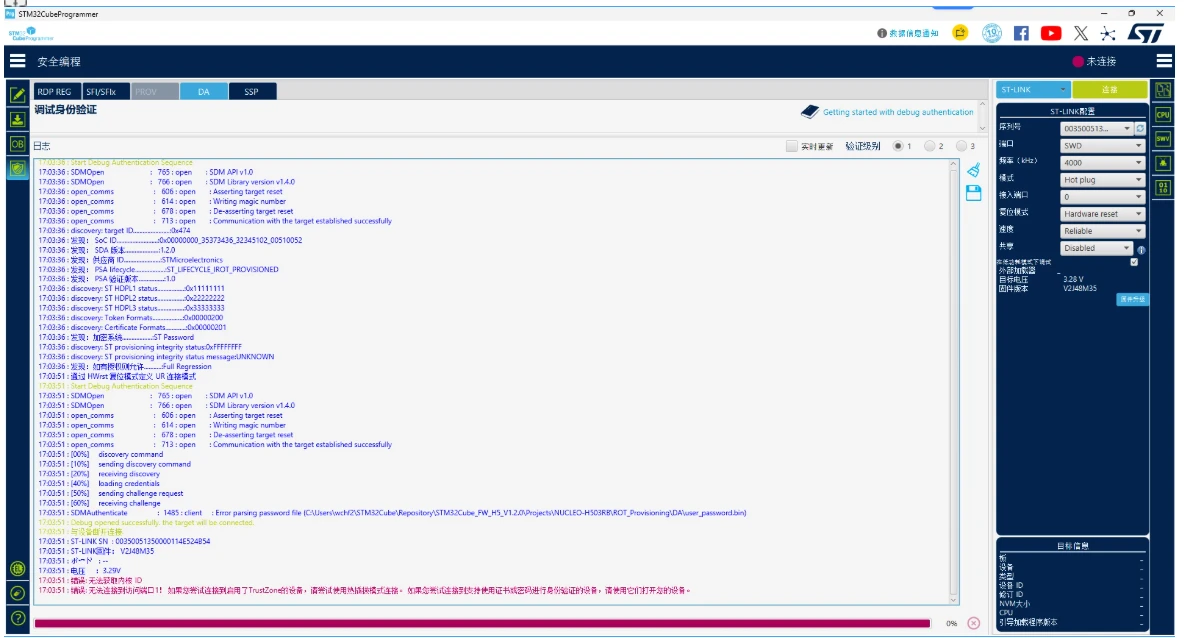
Method 2: I tried shorting `boot0` to 3.3V and then connecting the device to a Windows PC via USB; however, the MCU fails to enter the bootloader and instead proceeds to execute the previously flashed program.
Testing confirms that the device can successfully enter the bootloader when `PRODUCT_STATE` remains unchanged.
I have attached my schematic.