

Unable to unlock RDP1 and regress to RDP=0 through the command line, but am able to through the GUI
I am working on a batch script to disable TrustZone on an STM32U595VJT connected via JLINK using the STM32CubeProgrammer CLI tool.
The device has both OEM1KEY and OEM2KEY set to [31:0] = 0xABCDEFAB, [63:32] = 0x12345678
I am trying to run the following command when the RDP level is 1 and TrustZone is enabled with the device booted into the root secure services:
STM32_Programmer_CLI.exe -c port=JLINK mode=HotPlug reset=HWrst freq=4000 ap=0 speed=Reliable -unlockRDP1 0xABCDEFAB 0x12345678 -ob RDP=0xAA TZEN=0The command fails to set the RDP level and TZEN flag with the following output:
      -------------------------------------------------------------------
                       STM32CubeProgrammer v2.20.0
      -------------------------------------------------------------------

Connecting to J-Link/Flasher Probe
Warning: The frequency input is not supported by the connected J-Link/Flasher !
Device=Cortex-M33

Unlock RDP1 password successfully done
Device ID   : 0x481
Voltage     : 3.33V
Frequency   : 3847 KHz
Flash size  : 4 MBytes

UPLOADING OPTION BYTES DATA ...

  Bank          : 0x00
  Address       : 0x40022040
  Size          : 48 Bytes

██████████████████████████████████████████████████ 100%


PROGRAMMING OPTION BYTES AREA ...

  Bank          : 0x00
  Address       : 0x40022040
  Size          : 48 Bytes

▒▒▒▒▒▒▒▒▒▒▒▒▒▒▒▒▒▒▒▒▒▒▒▒▒▒▒▒▒▒▒▒▒▒▒▒▒▒▒▒▒▒▒▒▒▒▒▒▒▒


Reconnecting...
Reconnected !


UPLOADING OPTION BYTES DATA ...

  Bank          : 0x00
  Address       : 0x40022040
  Size          : 48 Bytes

██████████████████████████████████████████████████ 100%

OPTION BYTE PROGRAMMING VERIFICATION:

Error: Expected value for Option Byte "rdp": 0xAA, found: 0xDC
Error: Expected value for Option Byte "tzen": 0x0, found: 0x1
Error: Option Byte Programming failed Or modified by application after OB_LAUNCH
However, if I connect to the device in the GUI tool, unlock RDP1, then disconnect from the GUI tool and re-run the above command, then the command succeds:
      -------------------------------------------------------------------
                       STM32CubeProgrammer v2.20.0
      -------------------------------------------------------------------

Connecting to J-Link/Flasher Probe
Warning: The frequency input is not supported by the connected J-Link/Flasher !
Device=Cortex-M33

Unlock RDP1 password successfully done
Device ID   : 0x481
Voltage     : 3.33V
Frequency   : 3847 KHz
Flash size  : 4 MBytes

UPLOADING OPTION BYTES DATA ...

  Bank          : 0x00
  Address       : 0x40022040
  Size          : 48 Bytes

██████████████████████████████████████████████████ 100%


PROGRAMMING OPTION BYTES AREA ...

  Bank          : 0x00
  Address       : 0x40022040
  Size          : 48 Bytes

▒▒▒▒▒▒▒▒▒▒▒▒▒▒▒▒▒▒▒▒▒▒▒▒▒▒▒▒▒▒▒▒▒▒▒▒▒▒▒▒▒▒▒▒▒▒▒▒▒▒


Reconnecting...
Reconnected !


UPLOADING OPTION BYTES DATA ...

  Bank          : 0x00
  Address       : 0x40022040
  Size          : 48 Bytes

██████████████████████████████████████████████████ 100%

OPTION BYTE PROGRAMMING VERIFICATION:

Option Bytes successfully programmed
Time elapsed during option Bytes configuration: 00:00:02.966
This leads me to believe that somehow the CLI tool is failing to unlock RDP1 like the GUI tool is able to do.
Here’s a screenshot of my settings in the GUI tool, all the settings line up with my CLI arguments as far as I can tell:
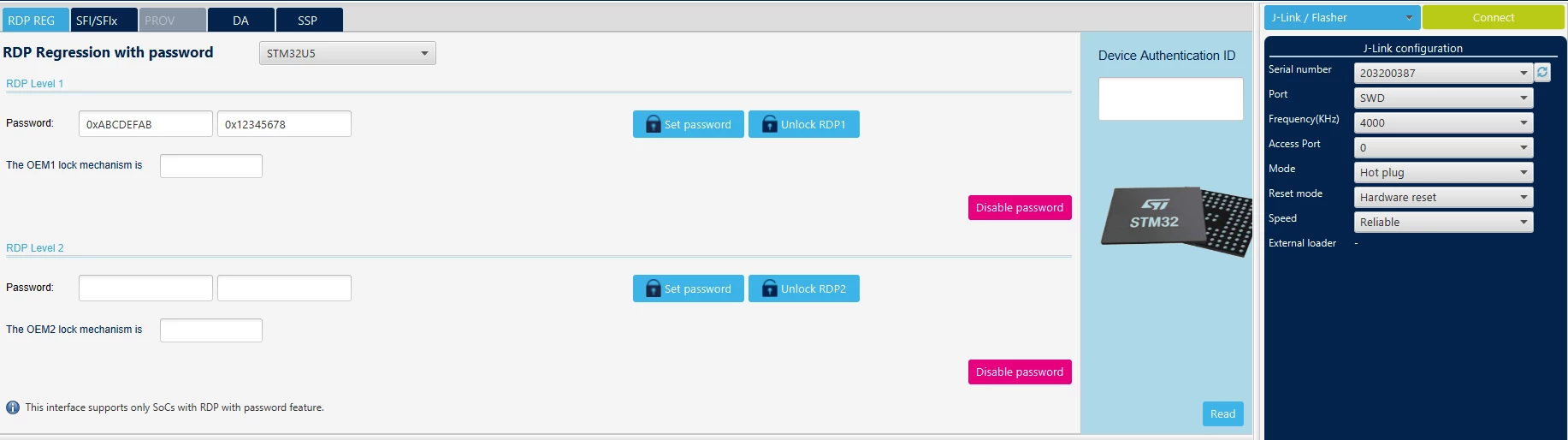
My IWDG and WWDG option bytes are also checked, so the watchdog shouldn’t be interfering with the unlock process.
Am I missing something? Are there any other steps I need to perform to unlock RDP1 through the command line?