

Visitor
August 7, 2026
Question

Unable to Get Core ID after Changing PRODUCT_STATE

  • August 7, 2026
  • 1 reply
  • 33 views

So have an STM32H563 that I was trying to get to work with DFU. I read through the Docs and saw that for that to work I needed PRODUCT_STATE in Open with Boot Pin high or PRODUCT_STATE in Providing. I tested the first option and couldn’t get that working and so figured to test if the Boot Pin was the issue I set the PRODUCT_STATE to Providing. It still didn’t work, however the more important issue now is when I was trying to set it back to Open it wouldn’t let me do that. I then flailed a little and think I may have set the PRODUCT_STATE to Closed or Off or something and saved that. Now, I can’t get back into the chip at all. I get either this error:



Or if I try it in Under Reset mode I get this error:
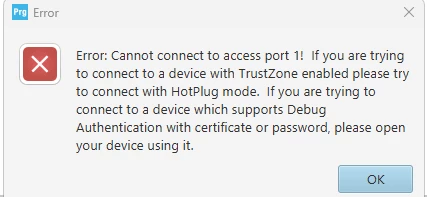
 

So Im wondering, did I completely brick this chip, is there a way to check that, and if I didn’t, what can I do to get this to let me back in

1 reply

AScha.3
Super User
August 7, 2026

So you played with fire….good luck.

See the Ai info:

## Summary

To get an **STM32H5** device back from **Provisioning** to **Open**, you must perform a **full regression**.  
This operation **erases user flash, OBKeys, SRAM, backup RAM, and resets secure option bytes to default values**, then sets the product state back to **Open**.

## Detailed Explanation

### What you need to do

The documented way to return from **Provisioning** to **Open** is a **full regression**.  
This regression mechanism is described as allowing a return from **Provisioning** back to **Open**.

### What full regression does

A full regression:

- **erases the user flash memory content**
- **erases OBKeys**
- **erases SRAM and backup RAM**
- **resets secure option bytes to default values**
- **sets the product state to Open**

So, returning to **Open** is possible, but it is a **destructive reset of the secure configuration and stored contents**.

### Methods mentioned in the documentation

#### 1. Using the regression script

A regression script is provided in the STM32Cube firmware package, and launching that script performs the regression back to **Open**.  
An example mentioned is running **`regression.bat`** from the firmware package.

#### 2. Using STM32CubeProgrammer

In **STM32CubeProgrammer**, the documented flow is to go to **Debug Authentication**, click **Discover**, and then perform a **full regression**.  
After a successful regression, the flash is erased and the product state returns to **Open**.

#### 3. Using STM32_Programmer_CLI

For supported STM32H5 series, examples are given for full regression through CLI using **debug authentication**.

Examples shown are:

- Certificate method:  
  `.\STM32_Programmer_CLI.exe -c port=SWD speed=fast per=a key=.\key.pem cert=.\certificates_chain debugauth=1`

- Password method:  
  `.\STM32_Programmer_CLI.exe -c port=SWD per=a pwd=.\password.bin debugauth=1`

### Important note

The documentation states that the **full regression service is not available in product state Open or Locked**.  
For your case, since you asked about returning from **Provisioning** to **Open**, the documented path is exactly this **full regression**.

**Would you like the exact STM32CubeProgrammer click-by-click sequence for doing the full regression?**

If you feel a post has answered your question, please click on " Best Answer ".