


CTapp.1
Senior III
June 24, 2026
Solved

Unable to disable write protection on an STM32G431K using CubeProgrammer

  • June 24, 2026
  • 4 replies
  • 24 views

I am trying to disable the write protection on an STM32G431K (on a Nucleo-G431KB) by settings the option bytes using CubeProgrammer:
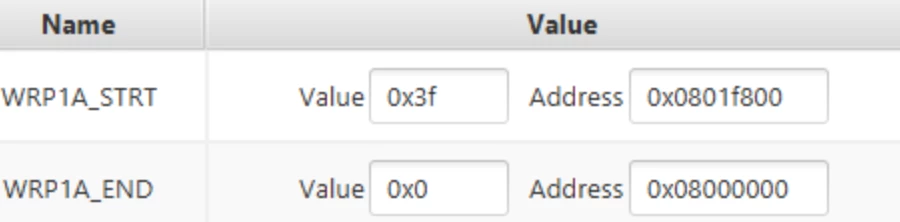
However, “Apply” fails with the log showing:

11:14:40:365 : Option byte command : -ob WRP1A_STRT=0x3f WRP1A_END=0x0 
11:14:40:367 : qCmd : -ob WRP1A_STRT=0x3f WRP1A_END=0x0
11:14:40:367 : PROGRAMMING OPTION BYTES AREA ...
11:14:40:368 : Database: Config 0 is active.
11:14:40:368 : Bank : 0x00
11:14:40:368 : Address : 0x40022020
11:14:40:368 : Size : 84 Bytes
11:14:40:373 : halt ap 0
11:14:40:381 : Loader write option bytes...
11:14:40:381 : Init flashloader...
11:14:40:381 : halt ap 0
11:14:40:389 : run ap 0
11:14:40:390 : halt ap 0
11:14:40:396 : run ap 0
11:14:40:420 : Reconnecting...
11:14:41:549 : ST-LINK SN : 001900363133511236303739
11:14:41:549 : ST-LINK FW : V3J17M10
11:14:41:549 : Board : NUCLEO-G431KB
11:14:41:550 : Voltage : 3.27V
11:14:41:739 : Error: Unable to get core ID
11:14:41:739 : Error: Cannot connect to access port 0! If you are trying to connect to a device with TrustZone enabled please try to connect with HotPlug mode. If you are trying to connect to a device which supports Debug Authentication with certificate or password, please open your device using it.

<Above repeated a number of times>

11:14:44:357 : ...retrying...
11:14:44:689 : Error: failed to reconnect after reset !
11:14:44:996 : Error: Database: There's no active configuration for this device. All the 3 configurations are disabled!
11:14:45:007 : Error: Unable to reconnect after setting the Option Bytes
11:14:45:688 : Error: Unable to get core ID
11:14:45:689 : Error: Unable to get core ID
11:14:45:690 : Warning: Connection to device 0x468 is lost
11:14:45:715 : Disconnected
11:14:45:715 : Disconnected from device.
11:14:45:717 : Selected loader: C:\Program Files\STMicroelectronics\STM32Cube\STM32CubeProgrammer\bin/ExternalLoader/MX25LM51245G_STM32H7B3I-DISCO.stldr
11:14:45:718 : External loader C:\Program Files\STMicroelectronics\STM32Cube\STM32CubeProgrammer\bin/ExternalLoader/MX25LM51245G_STM32H7B3I-DISCO.stldr is loaded

I then need to power cycle the board to reconnect, and the WRP1A register has not been changed.

Readout protection is not set (level 0) and PCPROP is not active.

Any idea what’s going on here?

Best answer by Onizuka09

Hello ​@CTapp.1
did you try to connect to the board in hot plug mode and reset the WRP area ? 
B.R

4 replies

CTapp.1
CTapp.1Author
Senior III
June 24, 2026

I think I have have got the device into an unrecoverable state.

The first two pages hold a boot loader that sets WPR1A to protect itself from being erased if the protection is not set at startup.

Using CubeProgrammer to reset this protection results in an option byte reset, causing the bootloader to run and protect itself again (there should be a check in there to say “don’t enable protection if the last reset was an option byte reset” Doh!

I have tried setting the boot option bytes to stop the bootloader from running:

nSWBOOT0 = 0 (BOOT0 taken from nBOOT0)
nBOOT0  = 1
nBOOT1 = 1 (Boot from system memory)

However, it appears as if my application code still runs.

Is there any way I can recover this? It needs the debug probe to assert reset before the application code gets a chance to run...

All posts are made in a personal capacity. MISRA C++ Chair, MISRA C WG Member, Director The MISRA Consortium Limited (TMCL)
Onizuka09
Onizuka09Best answer
ST Employee
June 24, 2026

Hello ​@CTapp.1
did you try to connect to the board in hot plug mode and reset the WRP area ? 
B.R

CTapp.1
CTapp.1Author
Senior III
June 24, 2026

I’m not sure what hot plug mode is?

However, I’ve now managed to recover the device by setting RDP to Level 1 and then back to Level 0 - this erased the bootloader that was re-writing WRP1A and I was then able to remove the write protection.

All posts are made in a personal capacity. MISRA C++ Chair, MISRA C WG Member, Director The MISRA Consortium Limited (TMCL)
CTapp.1
CTapp.1Author
Senior III
June 24, 2026

Looks like hot plug mode means the the RDP level change is not needed.


All posts are made in a personal capacity. MISRA C++ Chair, MISRA C WG Member, Director The MISRA Consortium Limited (TMCL)
Onizuka09
ST Employee
June 24, 2026

Hello ​@CTapp.1 ,
In STM32CubeProgrammer, you can choose the connection mode you prefer when connecting to the device.
 

The available modes are:

  • Normal: the target is reset then halted.
  • Under Reset: Keeps the MCU in reset state while establishing the debug connection.
  • Hot Plug: enables connection to the target without a halt or reset.
  • Power Down: Used when the target is powered off or in a very low-power state.
  • hwRstPulse: Uses a hardware reset pulse to briefly force the MCU into reset during connection.

In your case CubeProgrammer triggers a reset after updating the option bytes, and target could not be reconnected after that reset. That is why I suggested Hot Plug, which avoids resetting the device during connection.

For more information on CubeProgrammer you can refer to the this UM2237 User manual STM32CubeProgrammer software description.

Best regards,