

STM32H523: Device stuck after using NUCLEO-H533RE provisioning project – DA reports success but cannot regain debug access
Hello ST Community,
I am facing a critical issue while configuring OEMiRoT on an STM32H523 device. I used the official provisioning project from the NUCLEO-H533RE example in STM32Cube_FW_H5_V1.7.0 (since there is no dedicated H523 example). I need help recovering the device.
Background:
-
I‘ve modified the <DoEncryption> value to 0 according to ‘How to create ROT examples for STM32H5’.
-
I ran the provisioning project (from the NUCLEO-H533RE example) to configure OEMiRoT on the target STM32H523 device.
-
During provisioning, the configuration failed and the product state became Provisioned.
-
After that, the device could no longer be connected via ST-LINK SWD. DA also failed. Then I regenerated a new Key file to confirm if there was any problem during the configuration process.
-
I still have the private key file
key_1_root.pem. But the public key filekey_1_root_pub.pemand certificate filecert_root.certhave been overwritten. So I tried the method provided by the AI assistant to generate a public key using OpenSSL, and used this public and private keys to regenerate the certificate file.Current situation:
When I try Debug Authentication (DA) now with STM32CubeProgrammer, the discovery phase shows the following:
discovery: target ID: 0x478discovery: SoC ID: 0x00000000_39323639_31355117_0028002Adiscovery: SDA version: 1.2.0discovery: vendor ID: STMicroelectronicsdiscovery: PSA lifecycle: ST_LIFECYCLE_IROT_PROVISIONEDdiscovery: PSA verification version: 1.0discovery: Token Formats: 0x00000200discovery: Certificate Formats: 0x00000201discovery: Crypto system: Ecdsa-P256 SHA256discovery: ST provisioning integrity status: 0xEAEAEAEAdiscovery: ST provisioning integrity status message: VALIDdiscovery: Allowed with authorization: Full Regressiondiscovery: Allowed with authorization: To TZ Regressiondiscovery: Allowed with authorization: Level 3 Intrusive Debugdiscovery: Allowed with authorization: Level 2 Intrusive Debugdiscovery: Allowed with authorization: Level 1 Intrusive Debugdiscovery: Allowed with authorization: Level 3 Intrusive Non Secure Debugdiscovery: Allowed with authorization: Level 2 Intrusive Non Secure Debugdiscovery: Allowed with authorization: Level 1 Intrusive Non Secure Debug
So the DA configuration now appears valid, and the device is in ST_LIFECYCLE_IROT_PROVISIONED with Full Regression permission.
However, during the authentication step, the CubeProgrammer displays ‘Error:Debug Authentication Failed’. But when I choosed
cert_root.certfile, I get this: -
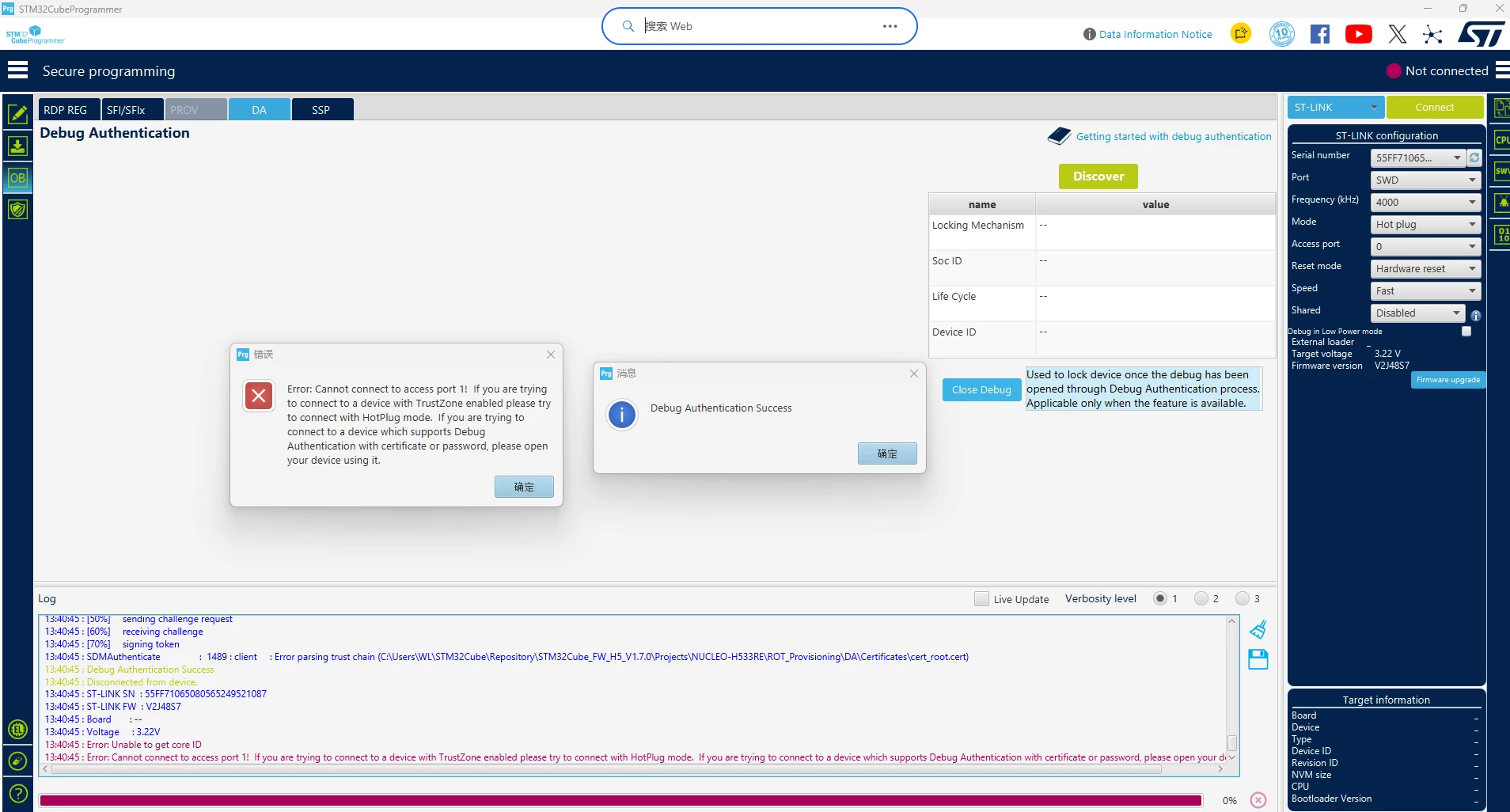
[70%] signing tokenSDMAuthenticate : client : Error parsing trust chain (C:\Users\WL\STM32Cube\Repository\STM32Cube_FW_H5_V1.7.0\Projects\NUCLEO-H533RE\ROT_Provisioning\DA\Certificates\cert_root.cert)Debug Authentication SuccessDisconnected from device.Error: Unable to get core IDError: Unable to connect to access port 1! If you are trying to connect to a device with TrustZone enabled, please try to connect using hot plug mode. If you are trying to connect to a device that supports authentication using certificate or password, please use them to open your device.
It seems that the tool reports Debug Authentication Success, but then it still cannot read the core ID or connect to access port 1.
What I have tried:
-
Used STM32CubeProgrammer with ST-LINK SWD.
-
Checked the NRST connection: MCU NRST is connected to ST-LINK NRST (not TRST), as expected on the NUCLEO board.
Questions:
-
How can I perform a Full Regression to bring the device back to Open or at least to a state where I can reconnect and re-provision it?
-
Why does the tool say “Error parsing trust chain (cert_root.cert)” but then still report “Debug Authentication Success”? Is the authentication actually successful?
-
After DA authentication, why do I still get “Unable to get core ID” and “Unable to connect to access port 1”? What is the correct sequence to regain debug access?
-
Should I use the system bootloader (UART/USB) instead of ST-LINK SWD for DA on a device in this state? If so, what are the exact steps?
-
Is the device recoverable with the private key
key_1_root.pem? If yes, what is the correct procedure? -
Any help would be greatly appreciated. I can provide more logs or details if needed.
Thank you.