Associate
Oct 30, 2026 11:49 AM UTC
Solved

Secure Boot and firmware update for STM32U575 (over UART and OTA)

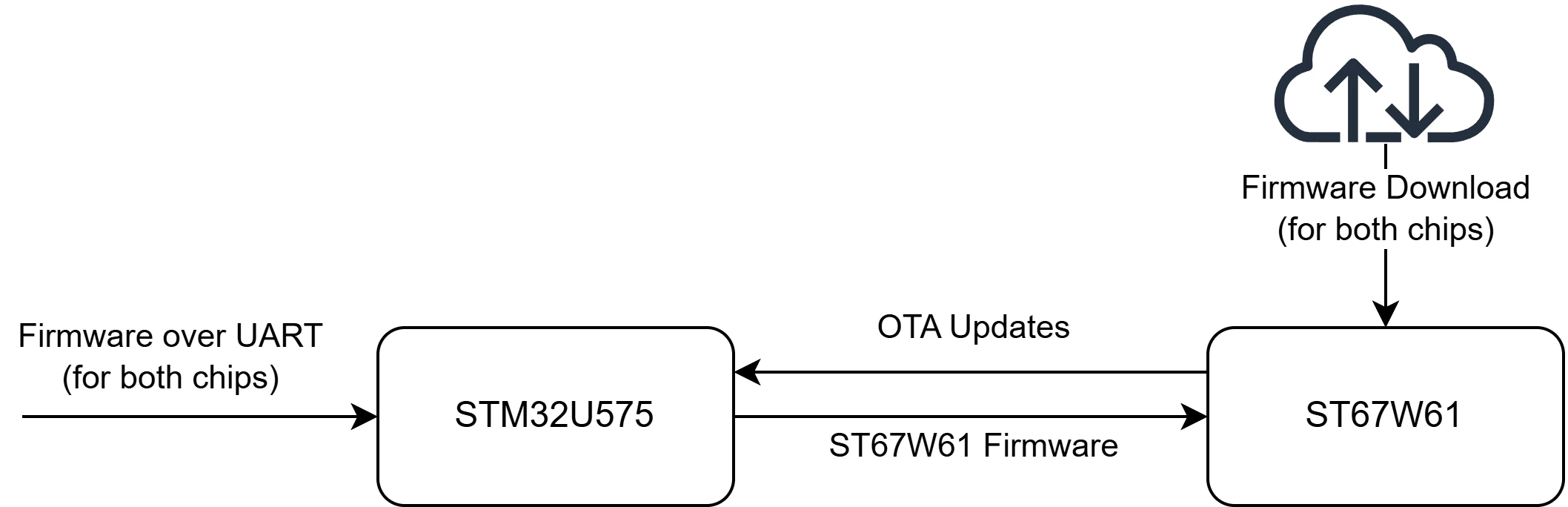
I’m building a product with the STM32U575 that needs to be able to support secure boot and firmware upgrades through UART. It should also be able to program the ST67W61 through this bootloader. I have almost no experience with secure bootloaders however. I found SBSFU by MCUBoot, which seems to be the best option for the STM32U5 series.

I got the SBSFU example from the STM32CubeU5 package running on my Nucleo U575ZI-Q. This uses secure and non-secure parts however, while my own firmware is completely non-secure. From what I understand only the bootloader needs to run in the secure domain, while the firmware and loader can run in a non-secure domain. Is this correct?

I also have a requirement to support OTA firmware updates. I would envision this download to use the loader application. Is this correct or do I require dual slot mode?

Do I also understand correctly that to implement this bootloader for my custom firmware the best way is to modify the example in STM32CubeU5 to my needs?

If there are other (better or simpler) solutions that are also able to do this or you have experience in this field I would love to hear about it.


Jocelyn RICARD
Jocelyn RICARDBest answer
ST Employee
Nov 4, 2026 6:30 PM UTC

Hello  ​@Iwan,

The STM32U5 SBSFU offers many options, using either your own application to download the new firmware in the download slot or use the standalone loader to update in one slot configuration.

The choice depends on your constraints in size, in the way the update should be performed from final user point of view (requiring specific action or done automatically for instance).

The SBSFU is a secure only application.

The user application is composed of a secure and a non secure application as you can see in the example.

The standalone loader is either just a non secure application or a secure + non secure application. It depends on the configuration, basically if you are in single slot, you need to be able to overwrite the secure app, so you need a secure loader.

For the ST67 firmware this is completely upon your application to download it in internal flash or possibly in an external flash and then to manage the update. It is independent from the SBSFU.

Best regards

Jocelyn


1 reply

Jocelyn RICARD
Jocelyn RICARDBest answer
ST Employee
Nov 4, 2026 6:30 PM UTC

Hello  ​@Iwan,

The STM32U5 SBSFU offers many options, using either your own application to download the new firmware in the download slot or use the standalone loader to update in one slot configuration.

The choice depends on your constraints in size, in the way the update should be performed from final user point of view (requiring specific action or done automatically for instance).

The SBSFU is a secure only application.

The user application is composed of a secure and a non secure application as you can see in the example.

The standalone loader is either just a non secure application or a secure + non secure application. It depends on the configuration, basically if you are in single slot, you need to be able to overwrite the secure app, so you need a secure loader.

For the ST67 firmware this is completely upon your application to download it in internal flash or possibly in an external flash and then to manage the update. It is independent from the SBSFU.

Best regards

Jocelyn