OEMuRoT key update via STiRoT data-image update not initiated
I am evaluating STiRoT + OEMuRoT on an STM32H5F5J-DK using the STM32CubeH5 v1.7.0 package by following the ST documentation:
- Security:OEMiRoT OEMuRoT for STM32H5 - stm32mcu
- How to start with STiRoT_OEMuRoT on STM32H573 - stm32mcu
- Getting started with STiRoT (ST immutable Root of Trust) for STM32H5 MCUs - Application note
The board can be provisioned and the following currently work correctly:
- STiRoT starts successfully.
- OEMuRoT starts successfully.
- Secure and non-secure applications are authenticated and executed normally.
- Application updates (swap mode) through the OEMuRoT flow are functional.
The next step is to confirm whether the OEMuRoT authentication and encryption keys can be updated after the board has already been provisioned, without reprovisioning the complete board. Test procedures as below:
- Generate new OEMuRoT keys
Using STM32TrustedPackageCreator (TPC), a new set of OEMuRoT authentication/encryption keys were generated through ‘OEMuRoT_Config_Keys.xml’ - Generate the OEMuRoT configuration binary ‘OEMuRoT_Config_intermediate.bin’
- Generate the ‘OEMuRoT_Config.bin’ by using TPC Image Gen through ‘OEMuRoT_ST_Settings_1.xml’
- Generate the ‘OEMuRoT_Config.hex’ by using TPC Image Gen through ‘STiROT_Data_Image.xml’
- Enter Bootloader from the non-secure application menu via TeraTerm
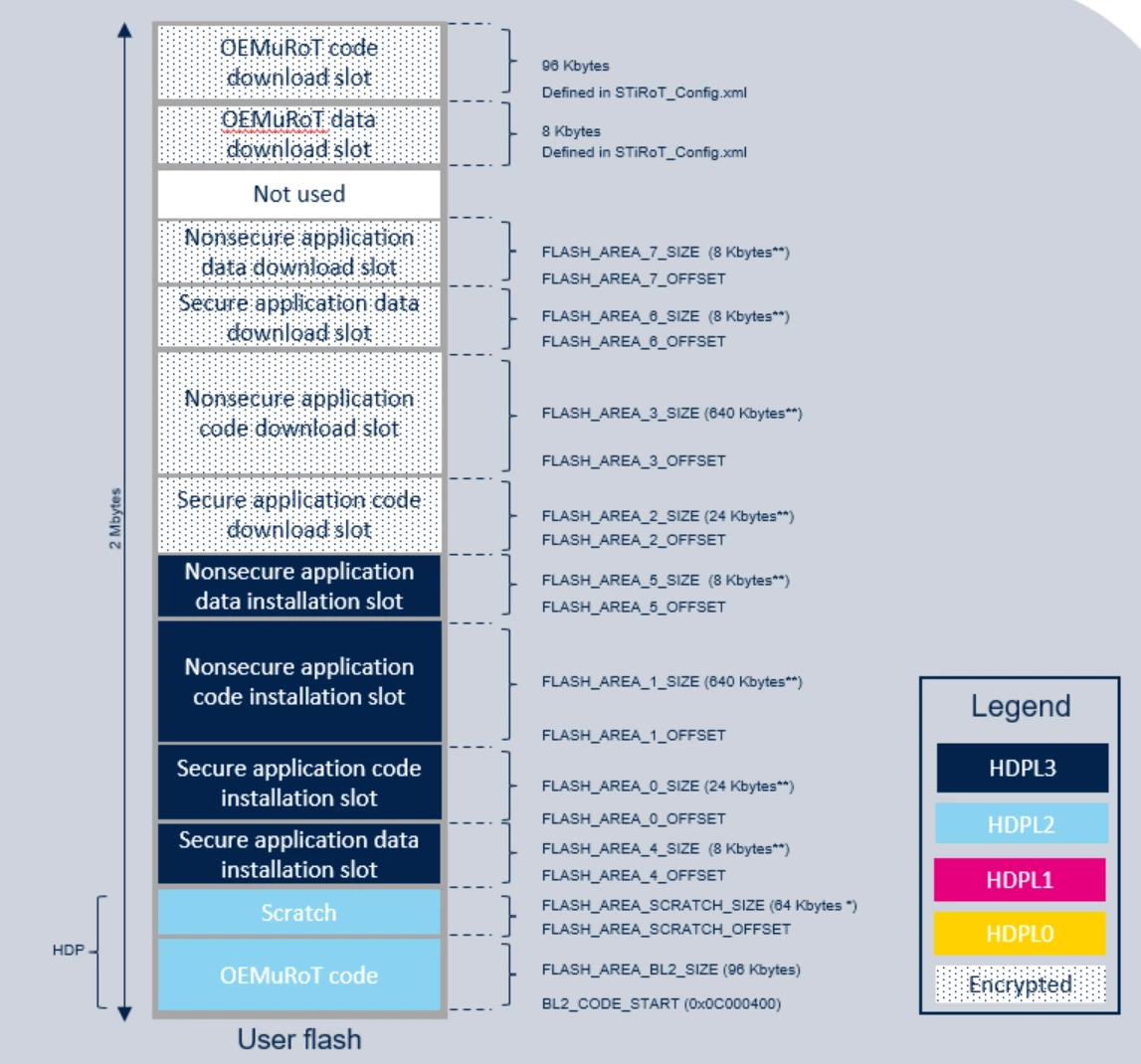
- Connect via STM32CubeProgrammer and download the ‘OEMuRoT_Config.hex’ to the dev board. Memory address to be downloaded is 0x81E6000 which is correct (refer to the OEMuROT data download slot in the below diagram)
- After resetting the board, the existing application still passed authentication / integrity verification and started normally
At this point, I would expected the new OEMuRoT key configuration have been installed into HDPL2 OBKeys and the existing application to fail verification if the authentication/encryption keys had actually changed.
Additionally, when inspecting memory at 0x081E6000 via CubeProgrammer, the downloaded data image is still present after reset. I would expect the STiRoT data-download area to be erased after the installation attempt, whether installation succeeded or failed.
I have also tried to recompile the NS app with the new key and downloaded the generated ‘rot_tz_ns_app_enc_sign.hex’ into the board. However, it could not pass the verification stage and was reported invalid. It looks like the keys are still old which failed the authentication process on the newly encrypted / signed NS app.
Am I doing anything wrong in the below steps? Could you please confirm if this is possible to update the OEMuRoT authentication and encryption keys after provisioning? Your help is very much appreciated.
The following projects have been used for my testing:
- Projects\STM32H5F5J-DK\Applications\ROT\OEMiROT_Boot
- Projects\STM32H5F5J-DK\Applications\ROT\OEMiROT_Appli_TrustZone
- Projects\STM32H5F5J-DK\ROT_Provisioning\STiROT_OEMuROT