

Associate III
June 9, 2026
Question

no stm32 target found! if your product embeds debug authentication, please perform a discovery using debug authentication on STM32H755

  • June 9, 2026
  • 8 replies
  • 153 views

Hello ST Community,

Following your suggestion @Onizuka09, I developed a software program as per the example STM32H753_SecureMem_ExampleV1.1.

After updating the software, I noticed that the part for printing strings via UART (printf) was missing, but it had already been downloaded to the MCU and the software was started. After correcting the code for the printf prints, I no longer want to connect via ST-LINK to download the software to the MCU.

So, I try connecting with the STM32CubeProgrammer to attempt to erase all the flash memory. This popup appears:
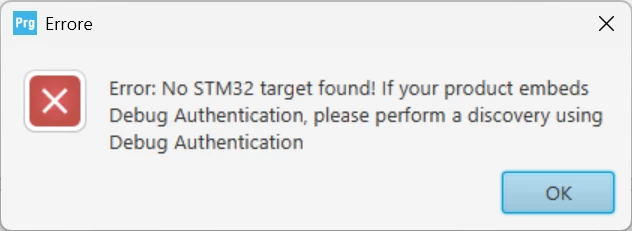
Even if I change modes such as "Under Reset" and "Core Reset," this popup appears:
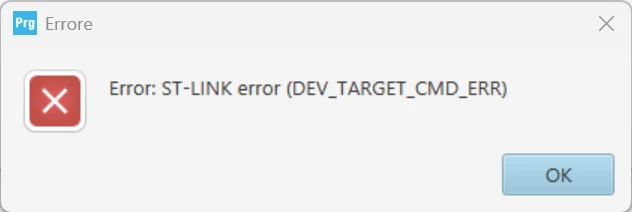
I'm afraid that when the software started, even without seeing the strings in printf via UART, it may have set some security parameters, or option bytes, or disabled Boot for CM7 and CM4.
The software had an option that allowed you to reset those parameters and return to the ST-LINK connection mode without any problems.

So, is there a way to connect to the STM32CubePRogrammer and reset the above parameters to default?

I also tried entering the bootloader by setting VDD for boot0 to high, but the bootloader doesn't activate.

Any ideas for resetting everything?

Thanks for your valuable support.

8 replies

mƎALLEm
ST Technical Moderator
June 9, 2026

Hello,

I suspect a bad power configuration:

“no stm32 target found! if your product embeds debug authentication, please perform a discovery using debug authentication on STM32H755

“ I developed a software program as per the example STM32H753_SecureMem_ExampleV1.1.”

What board are you using? Nucleo-H755? if yes what power configuration you set in your software for that board? SMPS or LDO? for that board you need to set it to Direct SMPS.

If you set it to LDO you’ve temporarily broken the target and you need to recover it by following this knowledge base article:

How can I recover my STM32H7/STM32H7RS board after facing a power configuration deadlock?

To give better visibility on the answered topics, please click "Best answer" on the reply which solved your issue or answered your question.
Domy_STAuthor
Associate III
June 9, 2026

hello ​@mƎALLEm ,

The configured power supply was SMPS 

  /** Supply configuration update enable
*/
HAL_PWREx_ConfigSupply(PWR_DIRECT_SMPS_SUPPLY);

/** Configure the main internal regulator output voltage
*/
__HAL_PWR_VOLTAGESCALING_CONFIG(PWR_REGULATOR_VOLTAGE_SCALE3);

But I still tried following the instructions to enter boot mode. Connecting the BOOT0 pin to VDD (3V3_VDD pin 5 of CN11 - BOOT0 pin 7 of CN11) doesn't let me enter the bootloader.

why? Could something else have been set up?

mƎALLEm
ST Technical Moderator
June 9, 2026

You didn't tell what board are you using:


To give better visibility on the answered topics, please click "Best answer" on the reply which solved your issue or answered your question.
Domy_STAuthor
Associate III
June 9, 2026

Hi STM32 Security Forum,

As described in the post above, do you have any ideas on how to reset the ST-LINK connection to the STM32CubeProgrammer?

Thanks for your support.

Domy_STAuthor
Associate III
June 10, 2026

Hi ST Community,

Do you have any ideas/solutions on how to fix this problem?

thanks

Onizuka09
ST Employee
June 10, 2026

hello ​@Domy_ST
did you try to connect to the board in Hot plug mode using STM32CubeProgrammer ? 
Also what security features did you activate ? 

B.R

Domy_STAuthor
Associate III
June 10, 2026

hello ​@Onizuka09,

Even with that "hot plug" mode, it won't let me connect. I get the same error as in this popup:

I'm also wondering what parameter it set, but I haven't been able to figure it out since I forgot to print via terminal in print.


Is there a way to figure it out or reset it all to default?


Thanks

Onizuka09
ST Employee
June 10, 2026

Hello, ​@Domy_ST , 

  • Please locate the BOOT0 pin and connect it to VDD using a wire.
  • Then try to connect to the device using STM32CubeProgrammer in Hot Plug mode.

Also, could you please confirm which security features were enabled?
It seems that your code may have activated one or more security mechanisms. Please let me know which ones are active.

B.R 


Domy_STAuthor
Associate III
June 10, 2026

hello ​@Onizuka09,

I've already tried this connection method between VDD and BOOT0, but this method doesn't activate the bootloader, so it won't connect.

I can't see which security parameters have been changed unless I'm connected via ST-LINK. I'm worried that the boot settings for CM7 and CM4 have been disabled due to security parameters.

Thanks

Onizuka09
ST Employee
June 10, 2026

Hello ​@Domy_ST , 
Please trace the code you ran and try to understand what happened and what may have caused this issue.
B.R

Domy_STAuthor
Associate III
June 10, 2026

 hello ​@Onizuka09,

In the code I only see that when it started without displaying the strings it was waiting for user input as in the following code:

void BootloaderMenu(void)
{
#ifndef RAM_EXEC
if (HAL_GPIO_ReadPin(BTN_GPIO_Port, BTN_Pin) == GPIO_PIN_SET)
{
printf("Setting security & launching bootloader\r\n");
SetSecurityBit(1);
if (!CheckSecureMem())
{
SetSecureMem();
}
LockFlash();
ExecuteBootloader();
}
#endif
printf("Bootloader menu ...\r\n");
uint8_t userInput;

while(1)
{
printf("\r\n");
printf("=================== Main Menu =================\r\n");
printf(" Show option bytes ------------ o\r\n");
printf(" Set security bit ------------ S\r\n");
printf(" Reset security bit ------------ s\r\n");
printf(" Enable jtag ------------ j\r\n");
printf(" Set write protection ------------ W\r\n");
printf(" Reset write protection ------------ w\r\n");
printf(" Set secure memory ------------ m\r\n");
printf(" Check secure memory ---------- c\r\n");
printf("\r\n");
printf(" Download image to the internal Flash ------ d\r\n");
printf(" Upload image from the internal Flash ------ u\r\n");
printf(" Execute the loaded application ------------ e\r\n");
printf(" Execute system bootloader ------------ b\r\n");
printf("\r\n");
printf(" Set RDPL1 ------------ P\r\n");
printf(" Regression ------------ R\r\n");
printf(" Lock Flash ------------ l\r\n");
printf("===============================================\r\n\n");

userInput=ReadUserInput();
ExecuteUserCommand(userInput);
}
}

 It probably entered the RAM_EXEC macro in the SetSecurityBit() function which has the following function:

tatic void SetSecurityBit(uint32_t enable)
{
uint32_t flashUserOptOrig;
uint32_t flashUserOptToSet;
HAL_StatusTypeDef error;

printf("Program Security bit\r\n");

/* Clear Bank1 error flags */
__HAL_FLASH_CLEAR_FLAG_BANK1(FLASH_FLAG_ALL_ERRORS_BANK1);


flashUserOptOrig = FLASH->OPTSR_CUR;
printf("flashUserOpt before: 0x%lx\r\n", flashUserOptOrig);
if (enable)
{
flashUserOptToSet = flashUserOptOrig | FLASH_OPTSR_SECURITY;
}
else
{
flashUserOptToSet = flashUserOptOrig & ~ FLASH_OPTSR_SECURITY;
}
if (flashUserOptToSet == flashUserOptOrig)
{
printf("Value already set to %ld\r\n", enable);
}
else
{
printf("flashUserOpt after : 0x%lx\r\n", flashUserOptToSet);
if (HAL_FLASH_OB_Unlock() != HAL_OK)
{
printf("Error HAL_FLASH_OB_Unlock\r\n");
return;
}
FLASH->OPTSR_PRG = flashUserOptToSet;

if ((error=HAL_FLASH_OB_Launch()) != HAL_OK)
{
printf("HAL_FLASH_OB_Launch failed. HAL_ERROR: %d Error code : %8.8lx ...\r\n", error, pFlash.ErrorCode);
printf("Flash->SR1: 0x%8.8lx\r\n", FLASH->SR1);
return;
}
if (HAL_FLASH_OB_Lock()!= HAL_OK)
{
printf("Error HAL_FLASH_OB_Lock\r\n");
return;
}
printf("Security bit change successful!");
}
}

It didn't go any further, it just ended up at that BootLoaderMenu() function and it was waiting for character input from the user and I'm not sure if it executed the RAM_EXEC (in my opinion it shouldn't but I'm not sure) because in any case at that moment I pressed the User button to enter bootloader mode therefore (HAL_GPIO_ReadPin(BTN_GPIO_Port, BTN_Pin) == GPIO_PIN_SET) and set the security bit. Unfortunately I wasn't able to figure out what was happening at that moment because I had missed inserting this string spamming function into the code:

int _write(int file, char *ptr, int len)
{
HAL_UART_Transmit(&huart3, (uint8_t *)ptr, len, 1000);
return len;
}


Onizuka09
ST Employee
June 10, 2026

Hello ​@Domy_ST

RAM_EXEC is a macro that disables the code section when it is being run from RAM.

Now we know that the security bit has been activated and that the secure memory area is set.

please follow these steps:

  • Power-cycle the board if you have not done so already.
  • In the menu, we can reset the security.
    Using a UART terminal, configure the UART settings and then send s to reset the security bit.
  • Wait a while.
  • Then power-cycle the board again and try connecting with STM32CubeProgrammer .


B.R

Domy_STAuthor
Associate III
June 10, 2026

hello ​@Onizuka09 ,

The problem is that without having included this function in the code:

int _write(int file, char *ptr, int len)
{
HAL_UART_Transmit(&huart3, (uint8_t *)ptr, len, 1000);
return len;
}

Since then, I haven't even seen the options to configure bit security on the UART terminal. I know that you have to reset the security options by typing the s. command to connect an STM32CubeProgrammer, but the UART terminal won't display anything due to the lack of the above code.

Is there another way to reset bit security?

Domy_STAuthor
Associate III
June 10, 2026

hello ​@Onizuka09,

Is there another way to reset the bit security?

Perhaps with another ST environment of yours that allows you to connect and reset the security bits after powering the board and setting some jumpers?

Onizuka09
ST Employee
June 10, 2026

Hello ​@Domy_ST , 

Yes, you will be sending the 's' character without any visual feedback.
Although you haven't added the proper code to configure the UART transmission, the reception part should still work — so the board should be able to receive the 's' character correctly.
There isn’t another way to deactivate the security bit. 


Domy_STAuthor
Associate III
June 10, 2026

hello ​@Onizuka09,

I've already tried sending the character "s" even without any visual feedback, and it didn't change anything.

If there's no other way, then this card should basically be thrown away.


Onizuka09
ST Employee
June 10, 2026

hello ​@Domy_ST
At boot, the system jumps to RSS first. If it detects that a secure area is enabled, it will automatically jump to that secure area before even executing the bootloader or the user application (as shown in the state machine diagram above). Once in secure memory the board is closed.


I would recommend keep trying. When an led should be blinking however when the board is receiving, the LED that turns off,  did you notice that happening ? 
Also, you can try the following recovery options using the menu commands:

  • RDP Regression: Set the board to RDP Level 1 by sending 'P', then send 'R' to trigger the regression. When running the regression command, make sure to give it some time to complete.
  • Jump to application: If you have already downloaded your application, try jumping to it by sending 'e'.
  • Download application: You can also download the user application by sending 'd'. Note that this uses the YModem protocol, and then jump to it.

 Also when sending the characters make sure you configured the serial monitor properly. In my case i used vscode serial monitor extension:!-->


B.R