


FBIZA.1
Associate II
April 15, 2020
Solved

Which is the BOOT1 pin in STM32L0? Don't find in the pin description.

  • April 15, 2020
  • 7 replies
  • 2401 views

According to the ST boot mode selection (page 236), we can activate the bootloader following the pattern: Boot0(pin) = 1 and Boot1(pin) = 0; but the DatasheetSTM32L0 doesn’t specify which one is the BOOT1 pin in the pin description (page 33). I could only find the BOOT0 pin.

This topic has been closed for replies.
Best answer by Mohamed Aymen HZAMI

Hello,

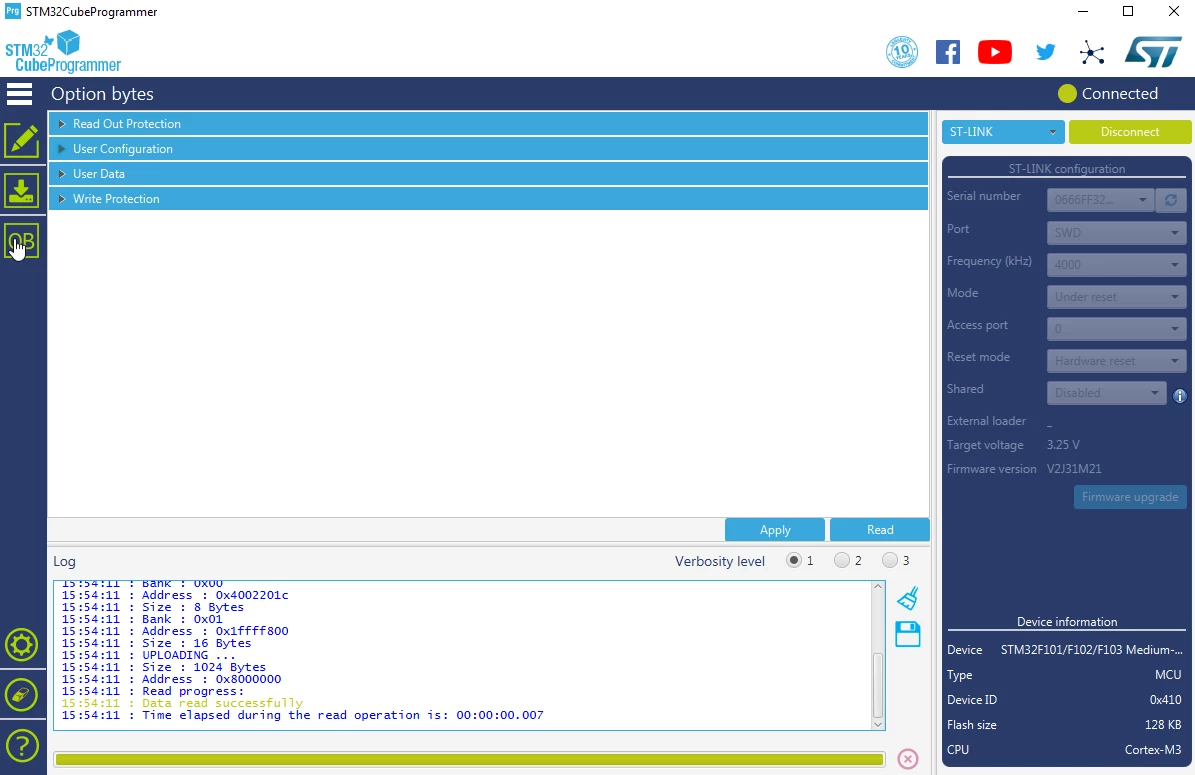
You can modify the BOOT1 state by using the option bytes.

  1. connect your device to the Cubeprogrammer
  2. select the option byte button "OB" like this :

0693W000000VsKRQA0.png

then you can modify BOOT0 and BOOT1 according to your needs.

Best Regards,

Mohamed Aymen.

7 replies

Uwe Bonnes
Chief
April 15, 2020

Boot1 is some Option Bit.

FBIZA.1
FBIZA.1Author
Associate II
April 15, 2020

Could you explain what you mean?

(just to make sure, did you mean optional?)

Thanks in advance!

berendi
Principal
April 15, 2020

It looks like an error in AN2606.

Option bits are non-volatile configuration bits that control booting and security features. Read about them in chapters 2 and 3 of the reference manual.

FBIZA.1
FBIZA.1Author
Associate II
April 15, 2020

Which reference manual? could you please send me the link, I can't find the information.

Thanks in advance!

berendi
Principal
April 15, 2020
Mohamed Aymen HZAMI
ST Employee
April 15, 2020

Hello,

You can modify the BOOT1 state by using the option bytes.

  1. connect your device to the Cubeprogrammer
  2. select the option byte button "OB" like this :

0693W000000VsKRQA0.png

then you can modify BOOT0 and BOOT1 according to your needs.

Best Regards,

Mohamed Aymen.

FBIZA.1
FBIZA.1Author
Associate II
April 15, 2020

Thanks a lot for your clarifying answer!