


bibble235
Associate III
April 27, 2024
Solved

VSCode Debugger Breakpoints jump

  • April 27, 2024
  • 3 replies
  • 3951 views

Hi

I am having problems setting breakpoints when using the debugger in VS Code. I can step through manually but cannot seem to set breakpoints. Before starting to debug I can add a breakpoint at 50
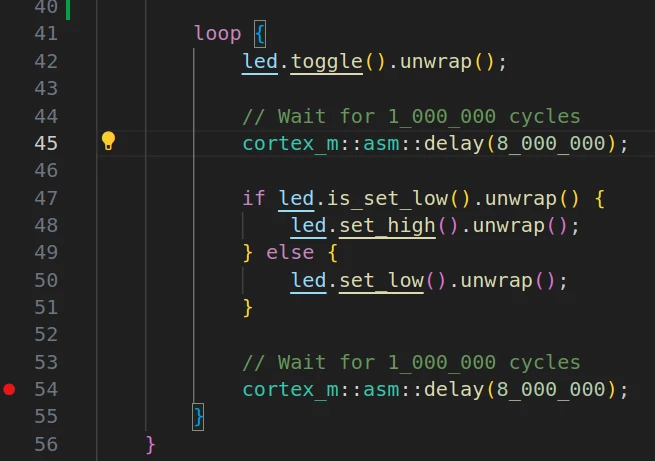
bibble235_1-1714222278230.png

But when I run the code the breakpoint changes to a different line number outside of the loop line 54. Removed the target and reflashed in case the code is out of sync but do not understand. 

If I attempt to add a breakpoint in says

bibble235_2-1714222427049.png

New install (because 24.04 came out) but it did not work on the old install either.

Thanks all - as ever

This topic has been closed for replies.
Best answer by Tesla DeLorean

Is this built with or without optimization?

3 replies

bibble235
bibble235Author
Associate III
April 27, 2024

I think this maybe me. Noticed 

[profile.dev]
opt-level = 3

 In my code. When at PC will check

Tesla DeLorean
Tesla DeLoreanBest answer
Guru
April 27, 2024

Is this built with or without optimization?

Tips, Buy me a coffee, or three.. PayPal Venmo (See Profile) Up vote any posts that you find helpful, it shows what's working..
bibble235
bibble235Author
Associate III
April 27, 2024
[profile.dev]
opt-level = 0

Setting to no optimization in Cargo.toml and all works.