

matt12345
Associate
June 7, 2021
Question

Utilize SDRAM on STM32H743 EVAL2 Board

  • June 7, 2021
  • 3 replies
  • 6351 views

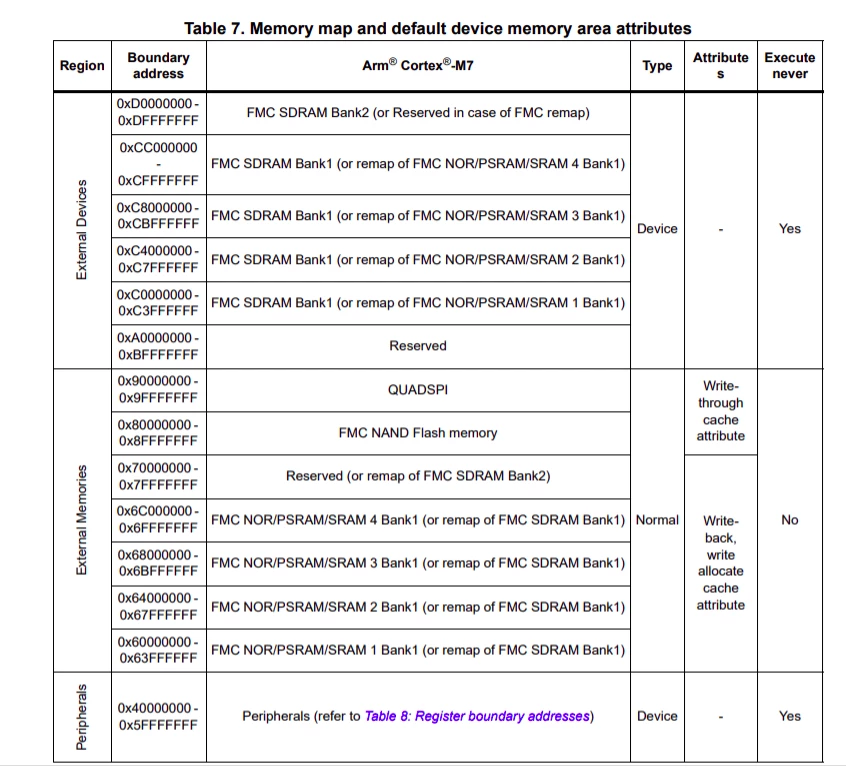
I'm having trouble making use of SDRAM (external device memory) on the STM32H743 EVAL2 board. Specifically, I'm trying to make use of FMC SDRAM Bank 2 (Region: External Devices) to store a large array.
0693W00000BaKybQAF.png 

Here are code snippets that I have added/modified

< STM32H743XIHX_FLASH.ld >
 
...
/* Specify the memory areas */
MEMORY
{
 FLASH (rx) : ORIGIN = 0x08000000, LENGTH = 2048K
 RAM (xrw) : ORIGIN = 0x20000000, LENGTH = 128K
 RAM_D1 (xrw) : ORIGIN = 0x24000000, LENGTH = 512K
 RAM_D2 (xrw) : ORIGIN = 0x30000000, LENGTH = 288K
 RAM_D3 (xrw) : ORIGIN = 0x38000000, LENGTH = 64K
 ITCMRAM (xrw) : ORIGIN = 0x00000000, LENGTH = 64K
 SDRAM (xrw)	 : ORIGIN = 0xD0000000, LENGTH = 64K
}
...
 
/* Define output sections */
SECTIONS
{
...
 
 /* SDRAM Section, store some application variables */
 .sdram : 
 {
 	. = ALIGN(4);
 	_ssdram = .;
 	*(.sdram)
 	*(.sdram*)
 	. = ALIGN(4);
 	_esdram = .;
 } >SDRAM
 
...
 
}
...
 
/**
 * @brief The application entry point.
 * @retval int
 */
int main(void)
{
 /* USER CODE BEGIN 1 */
 
 /* USER CODE END 1 */
 
 /* MCU Configuration--------------------------------------------------------*/
 
 /* Reset of all peripherals, Initializes the Flash interface and the Systick. */
 HAL_Init();
 
 /* USER CODE BEGIN Init */
 
 /* USER CODE END Init */
 
 /* Configure the system clock */
 SystemClock_Config();
 
 /* USER CODE BEGIN SysInit */
 
 /* USER CODE END SysInit */
 
 /* Initialize all configured peripherals */
 MX_GPIO_Init();
 MX_ADC1_Init();
 MX_DFSDM1_Init();
 MX_FMC_Init();
 MX_I2C1_Init();
 MX_LTDC_Init();
 MX_QUADSPI_Init();
 MX_SAI1_Init();
 MX_USART1_UART_Init();
 MX_USB_OTG_FS_PCD_Init();
 MX_USB_OTG_HS_PCD_Init();
 /* USER CODE BEGIN 2 */
 
 /* USER CODE END 2 */
 
 /* Infinite loop */
 /* USER CODE BEGIN WHILE */
 
 int value;
 
 srand(time(NULL));
 
 while (1)
 {
	 value = rand() % BUF_LEN;
	 buf[value] = (uint8_t)rand();
 
	 if (buf[value] % 2 == 0) {
		 HAL_GPIO_TogglePin(GPIOF, GPIO_PIN_10);
	 }
	 else {
		 HAL_GPIO_TogglePin(GPIOA, GPIO_PIN_4);
	 }
 
	 HAL_Delay(2000);
 /* USER CODE END WHILE */
 
 /* USER CODE BEGIN 3 */
 }
 /* USER CODE END 3 */
}
 
...

.ioc file has all default configurations

When trying to RUN/DEBUG, I receive this error:

Error in final launch sequence:
 
Failed to execute MI command:
load /home/<user_name>/<user_project>/use_sdram_example/Debug/use_sdram_example.elf 
 
Error message from debugger back end:
Load failed
Failed to execute MI command:
load /home/<user_name>/<user_project>/use_sdram_example/Debug/use_sdram_example.elf 
 
Error message from debugger back end:
Load failed
Failed to execute MI command:
load /home/<user_name>/<user_project>/use_sdram_example/Debug/use_sdram_example.elf 
 
Error message from debugger back end:
Load failed
Load failed

The paths are correct

    This topic has been closed for replies.

    3 replies

    TDK
    Super User
    June 7, 2021

    Try marking the SDRAM section as NOLOAD.

     /* SDRAM Section, store some application variables */
     .sdram (NOLOAD) : 
     {

    "If you feel a post has answered your question, please click ""Accept as Solution""."
    matt12345
    matt12345Author
    Associate
    June 7, 2021

    0693W00000BaL7OQAV.pngThanks! With this addition, I can now launch the program. However, if I try to access/read/write to buf, I get a hard-fault error. In the debugger, when I try to view an entry in buf, I am shown this error (specifically, this is me checking buf[2] explicitly)

    Failed to execute MI command:
    -data-evaluate-expression buf[2]
    Error message from debugger back end:
    Cannot access memory at address 0xd0000002

    Tesla DeLorean
    Guru
    June 7, 2021

    In terms of having it come up early and be able to copy data to it the CMSIS model really needs for the clocks, pins, peripheral and SDRAM to be brought up in SystemInit() and statics copied or zeroed in the startup.s code.

    I'm not sure CubeMX handles this, and if so badly.

    NOLOAD / NOINIT type functionality can be used to mask deficiencies, and allow the memory and chip to be brought up later.

    Tips, Buy me a coffee, or three.. PayPal VenmoUp vote any posts that you find helpful, it shows what's working..
    matt12345
    matt12345Author
    Associate
    June 7, 2021

    When I use NOINIT, I receive linker error:

    non constant or forward reference address expression for section .sdram

    See my response to TDK (above)

    TDK
    Super User
    June 7, 2021

    Recheck your SDRAM parameters. Yours do not match those found in the examples for that board.

    Also, you need to do more than just call HAL_SDRAM_Init. Again, see the example.

    https://github.com/STMicroelectronics/STM32CubeH7/blob/master/Projects/STM32H743I-EVAL/Applications/ExtMem_CodeExecution/ExtMem_Boot/Src/fmc.c

    "If you feel a post has answered your question, please click ""Accept as Solution""."
    matt12345
    matt12345Author
    Associate
    June 7, 2021

    Thanks for linking that example, it does appear very useful.

    However, the issue I'm facing on my application is that there are very large, uninitialized variables that cannot fit on RAM. I want to use RAM for .bss section, but specifically set certain large variables (think, array of size 200,000) to use SDRAM, specifically address 0xD0000000+. The linked example uses RAM for .bss (uninitialized variables).

    Does my issue make sense?

    TDK
    Super User
    June 7, 2021
    Yes, it makes sense.
    Take the SDRAM parameters and initialization from the example, but keep your initial linker script (with NOLOAD added). You were almost there except you weren't initializing SDRAM properly, so just take that part from the example.
    "If you feel a post has answered your question, please click ""Accept as Solution""."