
dreamcoder
Associate III
February 15, 2022
Question

UART debugging

  • February 15, 2022
  • 2 replies
  • 2073 views

I setup my custom board with STM32F401RE. I am using the HSI a the moment with configuration shown in the image below. All I am doing is printing some lines using this function on the UART2:

#ifdef __GNUC__
 /* With GCC, small printf (option LD Linker->Libraries->Small printf
 set to 'Yes') calls __io_putchar() */
int __io_putchar(int ch)
#else
int fputc(int ch, FILE *f)
#endif /* __GNUC__ */
{
 HAL_UART_Transmit(&huart2, (uint8_t *)&ch, 1, HAL_MAX_DELAY);
 return ch;
}

But on my serial terminal, I cannot read the right characters. I have tried with different baud rates and that did not make any difference. I am using a logic analyzer to read the data from the Tx pin and it always reads the correct characters. These are the bit timings on the UART pin:

104.160us for 9600

51.480us for 19200

8.60us for 115200

When I calculate the exact baud rates for these timings, they are a bit off to the exact value but AFAIK, it is always the case on the UART. What am I missing here? How can I print the correct characters on my serial terminal? I have tried putty and H-term so far and both always printed the garbage characters.
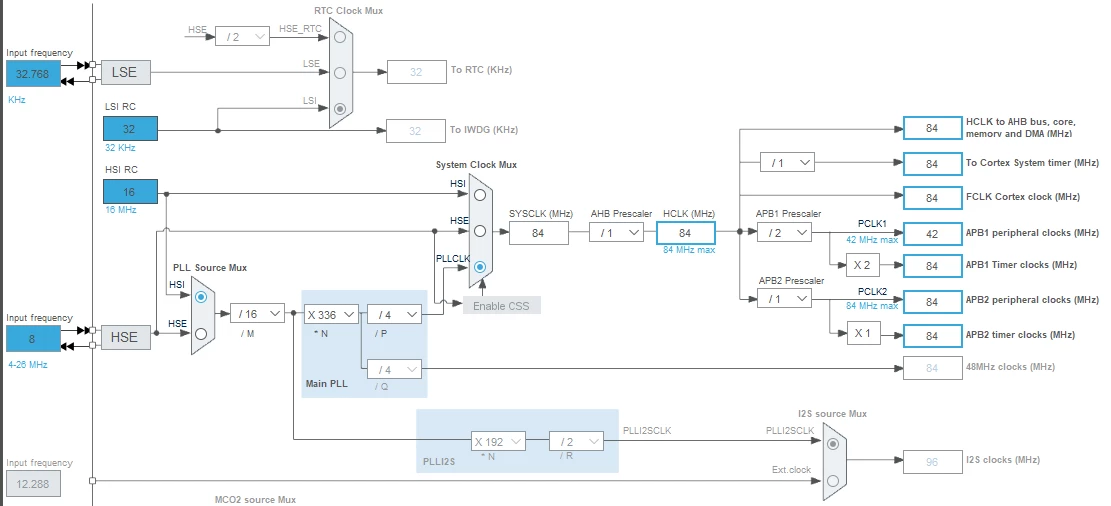
0693W00000JPw2VQAT.png

This topic has been closed for replies.

2 replies

KnarfB
Super User
February 15, 2022

This normally works. So check your hardware connection form the UART pins to the PC (via USB?). Cable lengths, voltage levels, waveforms (with a scope). For testing you might call HAL_UART_Transmit

directly in main(). Should make no difference, but there *must* be something going wrong.

You can also try a loopback from PC to PC using your HW setup.

hth

KnarfB

dreamcoder
Associate III
February 15, 2022

The USB to serial adapter I am using works fine as I tested that with another board.

The voltage levels on the UAT lines on my custom board look ok. As I mentioned, the logic analyzer does read the correct data but not my serial monitor. I am using UART 1, 2 and 6. None of them seem to be working as it should.

Tesla DeLorean
Guru
February 15, 2022

The STM32 also uses CMOS levels, not RS232 (higher, and inverted), so you need a level converter like a MAX3232 or use a USB-to-CMOS Serial adapter.

Baud rate, yes typically 3-5% error is tolerable, but the dividers should get you to within 1% as I recall.

If you send a 0x55 (U) pattern continuously at 8N1, it should look like a square wave

Tips, Buy me a coffee, or three.. PayPal VenmoUp vote any posts that you find helpful, it shows what's working..
dreamcoder
Associate III
February 15, 2022

I use MAX3232EIDWG4 on my board for the level shifting. The level shift is for UART1 and UART6 as it needs to communicate with external interfaces on the RS232. The UART2 is hooked up directly to the USB serial adapter. None of the UARTs are reading/sending the correct data.

Tesla DeLorean
Guru
February 15, 2022

That is a bit odd. The HSI can be off a bit, I don't recall a Trim or Calibration setting for it. The HSI_VALUE define should be fixed.

The PLL powers from the VDDA, might also check the VCAP pins/caps.

Should be able to export HSI or PLL clocks via MCO PA8 to check with a scope.

For HSE there can be a mismatch vs external crystal if HSE_VALUE define is not reflective of reality.

If there is a sync issue, the inter-symbol gap can be rather tight, consider TWO stop bits.

Tips, Buy me a coffee, or three.. PayPal VenmoUp vote any posts that you find helpful, it shows what's working..