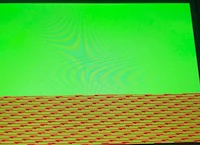
STM32N657 DK - LTDC layer framebuffer corruption when using AXI SRAM (background OK)
Hi,
I am writing my own RTOS and I do not use CubeMX nor the HAL. I directly program the STM32N657 LTDC registers.
The target is the STM32N6570-DK board with the original 800x480 RGB LCD.
Problem description
The LTDC background color is displayed perfectly.
However, as soon as I enable Layer 1 with a framebuffer located in the internal AXI SRAM, the displayed image becomes corrupted.
The corruption is unusual:
- the top of the image is correct,
- below approximately 320 lines, the image progressively becomes shifted,
- the bottom of the image looks like repeated square blocks shifted horizontally,
- no FIFO underrun is reported.
The framebuffer contents themselves are correct when read back by the CPU.
LTDC configuration
Framebuffer:
Address : 0x34200000
Format  : ARGB8888
Size    : 800 x 480
Pitch   : 3200 bytes
Layer registers:
L1CFBAR  = 0x34200000
L1CFBLR  = 0x0C800C83
L1CFBLNR = 480

L1PFCR   = 0x00000000 (ARGB8888)
L1CACR   = 0x000000FF
L1BFCR   = 0x00000607
L1CR      = 0x00000001
Global registers:
GCR  = 0x00012221
SSCR = 0x00030003
BPCR = 0x000B000B
AWCR = 0x032B01EB
TWCR = 0x033301F3
Interrupt status:
ISR  = 0
ISR2 = 0
No FIFO underrun is ever reported.
Memory
The framebuffer is located entirely inside AXI SRAM3-6.
The linker reserves:
0x34200000 - 0x343BFFFF
The framebuffer occupies:
0x34200000 - 0x34376FFFNo other object is allocated inside this area.
The MPU marks this region as
- Normal memory
- Non-cacheable
- Non-shareable
- Read/Write
- Execute Never
The CPU writes the framebuffer correctly.
The DCache is explicitly cleaned after every framebuffer update.
Interesting observation
If I reduce the framebuffer height:
100 lines -> OK
200 lines -> OK
300 lines -> OK
320 lines -> still OK
330 lines -> corruption starts
480 lines -> strong corruption
The corruption therefore depends on the framebuffer height.
However, moving the framebuffer to
0x34300000
and displaying only 100 lines also works correctly.
Therefore the problem does not appear to be tied to a specific SRAM bank.
Things already tested
I have already tested all of the following without any improvement:
- RGB565 instead of ARGB8888
- Different framebuffer pitches
- Different burst length (L1BLCR)
- Different PLL configuration
- Different LTDC clock frequencies
- Different layer window sizes
- Different framebuffer addresses
- MPU cacheable / non-cacheable
- Shareable / non-shareable
- RISAF configuration
- RIF configuration
- Cache clean / barriers
- Different blending modes
- Background only (always perfect)
Question
Has anybody already experienced this behaviour on STM32N657?
Is there any additional LTDC register that must be configured on STM32N6 (compared to STM32H7)?
Could this be related to an undocumented limitation of the LTDC fetch engine or AXI SRAM access?
Any suggestion would be greatly appreciated.
Kind regards,
Edo