Arthur Franca
Associate
March 6, 2018
Solved

STM32L1 Discovery Kit 5MHz PWM Generation

  • March 6, 2018
  • 10 replies
  • 9101 views
Posted on March 06, 2018 at 17:49

Hello,

I have been using the STM32L1 Discovery Kit with the STM32L152RCT6 MCU. 

A project that I am working on requires me to output two PWM signals. One of these is a 100KHz square wave and the other is 5MHz square wave. 

I have gotten the 100KHz wave to work correctly, however I am unable to generate a 5MHz pwm from my board. I am using Timers 4 and 11 currently to generate these two signals and the code is as follows:

/* TIM3 init function */

static void MX_TIM3_Init(void)

{

TIM_ClockConfigTypeDef sClockSourceConfig;

TIM_MasterConfigTypeDef sMasterConfig;

TIM_OC_InitTypeDef sConfigOC;

htim3.Instance = TIM3;

htim3.Init.Prescaler = 2;

htim3.Init.CounterMode = TIM_COUNTERMODE_UP;

htim3.Init.Period = 2;

htim3.Init.ClockDivision = TIM_CLOCKDIVISION_DIV1;

if (HAL_TIM_Base_Init(&htim3) != HAL_OK)

{

_Error_Handler(__FILE__, __LINE__);

}

sClockSourceConfig.ClockSource = TIM_CLOCKSOURCE_INTERNAL;

if (HAL_TIM_ConfigClockSource(&htim3, &sClockSourceConfig) != HAL_OK)

{

_Error_Handler(__FILE__, __LINE__);

}

if (HAL_TIM_PWM_Init(&htim3) != HAL_OK)

{

_Error_Handler(__FILE__, __LINE__);

}

sMasterConfig.MasterOutputTrigger = TIM_TRGO_RESET;

sMasterConfig.MasterSlaveMode = TIM_MASTERSLAVEMODE_DISABLE;

if (HAL_TIMEx_MasterConfigSynchronization(&htim3, &sMasterConfig) != HAL_OK)

{

_Error_Handler(__FILE__, __LINE__);

}

sConfigOC.OCMode = TIM_OCMODE_PWM1;

sConfigOC.Pulse = 1;

sConfigOC.OCPolarity = TIM_OCPOLARITY_HIGH;

sConfigOC.OCFastMode = TIM_OCFAST_DISABLE;

if (HAL_TIM_PWM_ConfigChannel(&htim3, &sConfigOC, TIM_CHANNEL_1) != HAL_OK)

{

_Error_Handler(__FILE__, __LINE__);

}

HAL_TIM_MspPostInit(&htim3);

}

/* TIM4 init function */

static void MX_TIM4_Init(void)

{

TIM_ClockConfigTypeDef sClockSourceConfig;

TIM_MasterConfigTypeDef sMasterConfig;

TIM_OC_InitTypeDef sConfigOC;

htim4.Instance = TIM4;

htim4.Init.Prescaler = 106;

htim4.Init.CounterMode = TIM_COUNTERMODE_UP;

htim4.Init.Period = 2;

htim4.Init.ClockDivision = TIM_CLOCKDIVISION_DIV1;

if (HAL_TIM_Base_Init(&htim4) != HAL_OK)

{

_Error_Handler(__FILE__, __LINE__);

}

sClockSourceConfig.ClockSource = TIM_CLOCKSOURCE_INTERNAL;

if (HAL_TIM_ConfigClockSource(&htim4, &sClockSourceConfig) != HAL_OK)

{

_Error_Handler(__FILE__, __LINE__);

}

if (HAL_TIM_PWM_Init(&htim4) != HAL_OK)

{

_Error_Handler(__FILE__, __LINE__);

}

sMasterConfig.MasterOutputTrigger = TIM_TRGO_RESET;

sMasterConfig.MasterSlaveMode = TIM_MASTERSLAVEMODE_DISABLE;

if (HAL_TIMEx_MasterConfigSynchronization(&htim4, &sMasterConfig) != HAL_OK)

{

_Error_Handler(__FILE__, __LINE__);

}

sConfigOC.OCMode = TIM_OCMODE_PWM1;

sConfigOC.Pulse = 1;

sConfigOC.OCPolarity = TIM_OCPOLARITY_HIGH;

sConfigOC.OCFastMode = TIM_OCFAST_DISABLE;

if (HAL_TIM_PWM_ConfigChannel(&htim4, &sConfigOC, TIM_CHANNEL_1) != HAL_OK)

{

_Error_Handler(__FILE__, __LINE__);

}

HAL_TIM_MspPostInit(&htim4);

}

/* TIM11 init function */

static void MX_TIM11_Init(void)

{

TIM_ClockConfigTypeDef sClockSourceConfig;

TIM_OC_InitTypeDef sConfigOC;

htim11.Instance = TIM11;

htim11.Init.Prescaler = 2;

htim11.Init.CounterMode = TIM_COUNTERMODE_UP;

htim11.Init.Period = 2;

htim11.Init.ClockDivision = TIM_CLOCKDIVISION_DIV1;

if (HAL_TIM_Base_Init(&htim11) != HAL_OK)

{

_Error_Handler(__FILE__, __LINE__);

}

sClockSourceConfig.ClockSource = TIM_CLOCKSOURCE_INTERNAL;

if (HAL_TIM_ConfigClockSource(&htim11, &sClockSourceConfig) != HAL_OK)

{

_Error_Handler(__FILE__, __LINE__);

}

if (HAL_TIM_PWM_Init(&htim11) != HAL_OK)

{

_Error_Handler(__FILE__, __LINE__);

}

sConfigOC.OCMode = TIM_OCMODE_PWM1;

sConfigOC.Pulse = 1;

sConfigOC.OCPolarity = TIM_OCPOLARITY_HIGH;

sConfigOC.OCFastMode = TIM_OCFAST_DISABLE;

if (HAL_TIM_PWM_ConfigChannel(&htim11, &sConfigOC, TIM_CHANNEL_1) != HAL_OK)

{

_Error_Handler(__FILE__, __LINE__);

}

HAL_TIM_MspPostInit(&htim11);

}

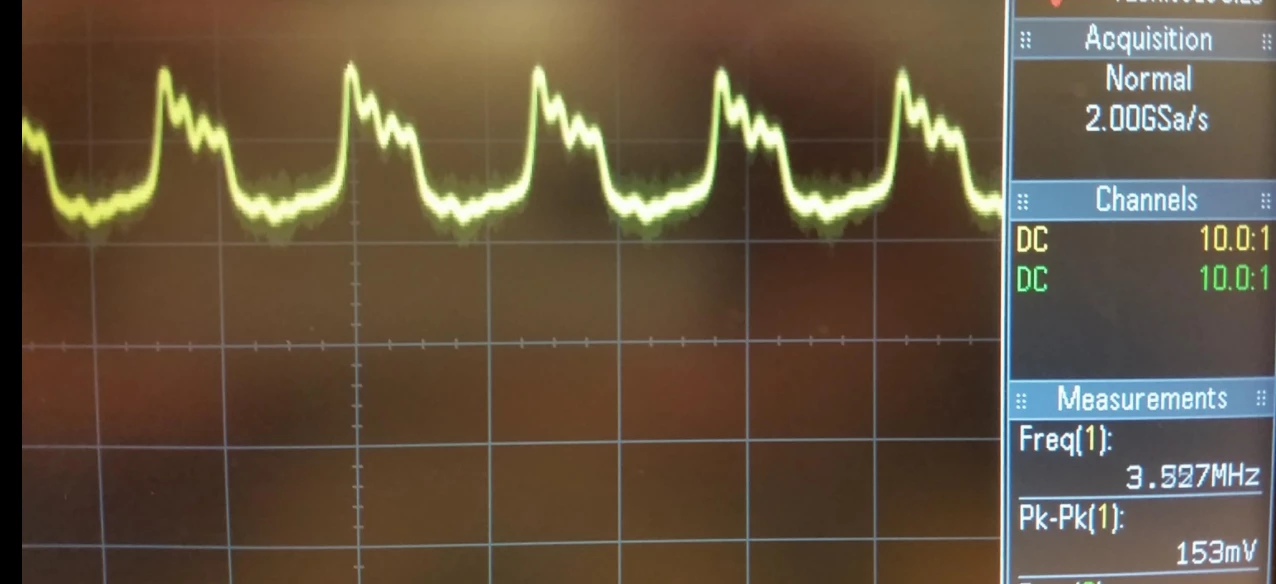
When I run my board with this code I find that the TIM4 correctly ouputs a 100KHz square wave with a peak to peak voltage of 3V. The TIM11 channel outputs an unclean square wave with a very low peak to peak voltage and only approx. a 3.5MHz signal. If I try to reduce the prescaler value to 1 in order to increase the frequency further, I lose the waveform completely. The results from the oscilliscope are show below:

TIM4 -
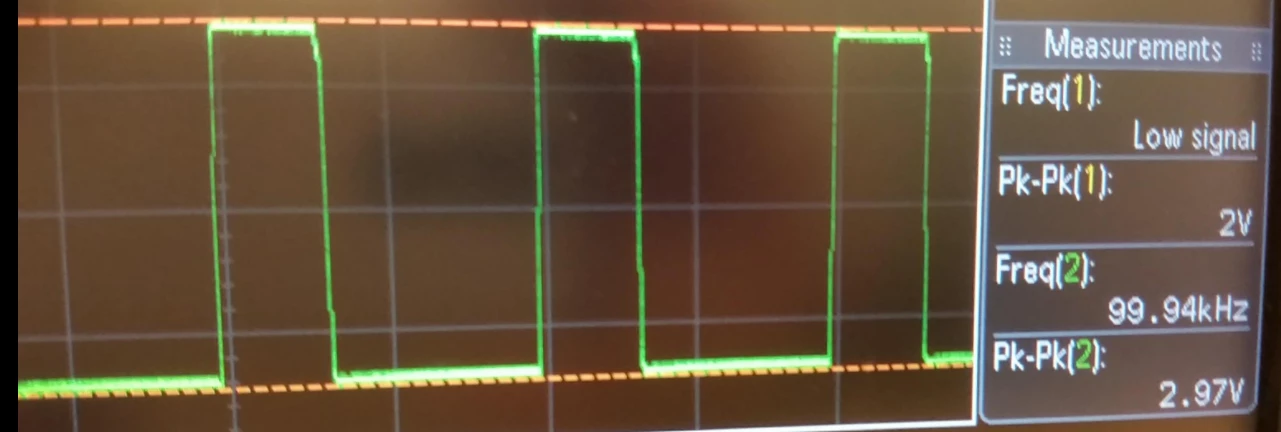
0690X00000609xaQAA.png

TIM11 -

0690X00000609xQQAQ.png

Any help on getting the TIM11 pwm to be a clean square at 5MHz with 3V peak to peak would be greatly appreciated.

Thanks,

Arthur

#tim-pwm #stm32l152

This topic has been closed for replies.
Best answer by waclawek.jan
Posted on March 06, 2018 at 23:36

Set higher speed setting on given pin in GPIO.

How do you load that pin?

Also, check your oscilloscope probe rating.

If you need pwm if that kind of frequency, there is something serious wrong with your approach, usually.

Probably yes, but the waveform should be clean nonetheless.

JW

10 replies

henry.dick
Associate II
March 6, 2018
Posted on March 06, 2018 at 18:50

'

the other is 5MHz square wave. '

Let me give you a big secrete that I rarely share with anybody else.

If you need pwm if that kind of frequency, there is something serious wrong with your approach, usually.

If you really need something that fast, think about something other than a MCU.

waclawek.jan
waclawek.janBest answer
Super User
March 6, 2018
Posted on March 06, 2018 at 23:36

Set higher speed setting on given pin in GPIO.

How do you load that pin?

Also, check your oscilloscope probe rating.

If you need pwm if that kind of frequency, there is something serious wrong with your approach, usually.

Probably yes, but the waveform should be clean nonetheless.

JW

Arthur Franca
Associate
March 7, 2018
Posted on March 07, 2018 at 00:04

JW,

I used the CubeMX software to generate this script file. It allowed me to just select the timer that I wanted to use and I then specified the channel I desired and that allocated the pin on for me on the GUI. I then output the script file from this software. 

I went back into the CubeMX software and saw that my pin for the timer output was set to a low speed so this may very well be the problem. I have now set it to a high speed and will test soon.

Thank you for your reply!

ted korczak
Associate III
March 7, 2018
Posted on March 07, 2018 at 09:18

I am using also CubeMX , for my stm32f103 I don't see anything about pin speed set up, there is a limitation , @ 5.1MHz has 10% less amplitude. If you need exactly 5MHz on your board you need to change crystal to 30MHz.

T J
Senior III
March 7, 2018
Posted on March 07, 2018 at 01:03

5MHz PWM should be easy enough. but maybe not exactly 5.0MHz

Its child's play for the STM32 processors.

there will be no CPU overhead

Waclawek.Jan

‌ is correct,

check the PIN IO Speed.

check the ground probe on your scope.

check the pin loading.

Upto about 16MHz should be possible, however, since the process is ' divide the fixed frequency primary clock', only some frequency choices are available. 32Mhz/2, 32/3. 32/4 etc.

ted korczak
Associate III
March 7, 2018

Posted on March 07, 2018 at 03:38

The pin problem - Use my program, you can generate any frequency, you wish. For second channel use another timer.

https://community.st.com/0D70X000006SwIPSA0

Tesla DeLorean
Guru
March 7, 2018
Posted on March 07, 2018 at 04:56

You aren't going to get 5 MHz by dividing down 32 MHz

Usually I'd suggest setting Prescaler = 0, and Period = N-1 where N is a integer.

For 5 MHz consider a 30 MHz CPU clock

30,000,000 / 100,000 = 300

Prescaler = 0, Period = 300-1

Pulse = 150

30,000,000 / 5,000,000 = 6

Prescaler = 0, Period = 6-1

Pulse = 3

Tips, Buy me a coffee, or three.. PayPal Venmo (See Profile) Up vote any posts that you find helpful, it shows what's working..
ted korczak
Associate III
March 7, 2018
Posted on March 07, 2018 at 06:13

5.1mhz  stm32f103 

HardwareTimer pwmtimer3(3);

void setup() {

pinMode(PA6, PWM); //5.1mhz

pwmtimer3.pause();

pwmtimer3.setPrescaleFactor(1);

pwmtimer3.setOverflow(14);

pwmtimer3.setCompare(TIMER_CH1, 7);

pwmtimer3.refresh();

pwmtimer3.resume();

}
Arthur Franca
Associate
March 7, 2018
Posted on March 07, 2018 at 17:54

I have now corrected the speed setting on the pin by putting it to a high setting. 

I then kept my period value at 2 with a pulse of 1 for a 50% duty cycle. My prescaler value I tried placing at 1. This would in theory give me my approx. desired frequency according to this equation I found online:

   Desired Freq = MCU Freq. / ([Prescaler +1][Period+1])

   5.3333MHz = 32MHz / ([1+1][2+1])

Upon testing this I found that I still had a similar issue:

- With prescaler set to 1 there is no output at all

- As I increase the prescaler value I get an output at a low amplitude with the expected frequency until approx. a prescaler value of 9 where I get a full 3V peak to peak clean square wave

I have checked my oscilloscope rating and it samples up 100MHz so there should be no problem there.

ted korczak
Associate III
March 7, 2018
Posted on March 07, 2018 at 18:16

5.3333MHz = 32MHz / ([2+1])

I don't know how this formula is working, it is look strange '([2+1])'

, replace it by x, for 6 and you have your 5.3333. if x is not an integer you have no signal at the output.

Arthur Franca
Associate
March 7, 2018
Posted on March 07, 2018 at 18:25

Hi Ted,

Sorry the high setting did work! It was a weird coding issue I've now fixed.

The denominator in the formula is [1+1][2+1] = 2*3 = 6

I now am getting the 5.3MHz wave. however I am also getting a significant amount of noise on both timer channels now:

https://scontent-sea1-1.xx.fbcdn.net/v/t0-12/28722352_10216521141648890_1114448581_n.jpg?oh=f8ad7d451adf8ae0b98773e573e427a9&oe=5AA1F719

Zooming in closer:

https://scontent-sea1-1.xx.fbcdn.net/v/t0-12/28741184_10216521141688891_1889000873_n.jpg?oh=95db2874d583d607edd04974cadcf1a1&oe=5AA2F13E

ted korczak
Associate III
March 7, 2018
Posted on March 07, 2018 at 19:46

If you have - Alternate Function Push Pull - nothing more can be done - my opinion

ted korczak
Associate III
March 8, 2018
Posted on March 08, 2018 at 01:45

if the waves not must be synchronised use 2 of this.

http://www.linear.com/product/LTC1799

Carlo Agrusti
Associate II
March 8, 2018
Posted on March 08, 2018 at 11:49

or even 

http://www.linear.com/product/LTC6904

  if you need something programmable
ted korczak
Associate III
March 11, 2018
Posted on March 11, 2018 at 18:58

For better shape you can try.

Use two new digital pins , make one as input second as output, make a wire jumper from your 5 MHz to new input and look what you have on new output.